
Close-up demonstrators
You film small components and want to see where the focus falls as you work. Look for magnification and focus assistance, and check the image with a test recording too.


For filming jewellery at home, first choose a monitor whose input supports your camera’s HDMI signal and video format. Magnification and focus assistance, exposure tools, brightness, pass-through and any camera controls you need will depend on your studio lighting and camera setup. Manufacturer specifications describe features, not how the monitor will perform in your studio.
You film small components and want to see where the focus falls as you work. Look for magnification and focus assistance, and check the image with a test recording too.
You want to assess bright areas and changing light. Look for exposure tools and check that the screen is easy to read under your studio lighting.
You want to see the camera image on both a camera monitor and a second screen. Check that the model you choose has the video output you need.
| What to consider | What should you check? | Who is this important for? |
|---|---|---|
| Sharpness of small details | Check the exact model for magnification and peaking. Make a test recording and review it at the intended viewing size. | When I film small components, I want to see where the focus falls as I move them. Around 36% of consumers prioritise checking small details. |
| Reflections and exposure | Check whether the model has tools such as waveform, histogram or false colour, and see how easy the screen is to read under your own studio lighting. These tools do not change the light falling on the jewellery. | When filming shiny jewellery, I want to assess bright areas and reflections as I record. Around 29% of consumers prioritise exposure control. |
| Signal and connections | Compare your camera’s output and transmitted video format with the monitor’s input. If you want to use a second screen, check that the monitor has a suitable output too. For example, Portkeys lists the PT5 II as supporting up to 4K UHD at 30p. | If I want to pass the camera image through or connect my camera, the entire signal path needs to be compatible. Around 21% of consumers prioritise connections and signal compatibility. |
| Power and positioning | Check the power options for each model and whether the required battery, power supply, cables and mount are included in the package. Also decide where you can position the screen without getting in the way of your hands or the jewellery. | At my workbench, I want a screen that I can position and power appropriately. Around 14% of consumers prioritise power and positioning. |
For the Portkeys PT5 II, 4K UHD up to 30p refers to the supported video signal; Portkeys states that the screen resolution is 1920 × 1080 pixels.
Compare the screen resolution, accepted input signal and your camera’s HDMI output separately.
Screen brightness helps you see the monitor. The lighting and reflections on the jewellery depend on your filming setup.
Choose monitoring tools to assess the video signal, and make a test recording under your own studio lighting too.
A monitor will only work with a suitable connection and a supported video signal. The contents of the package can also vary between models.
Before you buy, check your camera’s output, the video format you need, the power source, the required mount and what is included in the package you have chosen.
You may need to buy a compatible battery, power supply, cable or mount separately, depending on the model. Check what is included.
The PT5 II is a compact HDMI monitor for checking your image. The LH5P II has a higher stated maximum brightness and camera control features.
The F6 PLUS combines HDMI pass-through with image-assistance tools, making it suitable for setups where you want to view the camera image elsewhere too.
The Shinobi II is a compact HDMI monitor for anyone looking for a screen with specified brightness or compatible camera control.
The Indie 5 is worth considering for a setup that uses SDI as well as HDMI.
This pick is for smartphone filming when you want to view the rear-camera image as you record; it is not an HDMI monitor for a standalone camera.
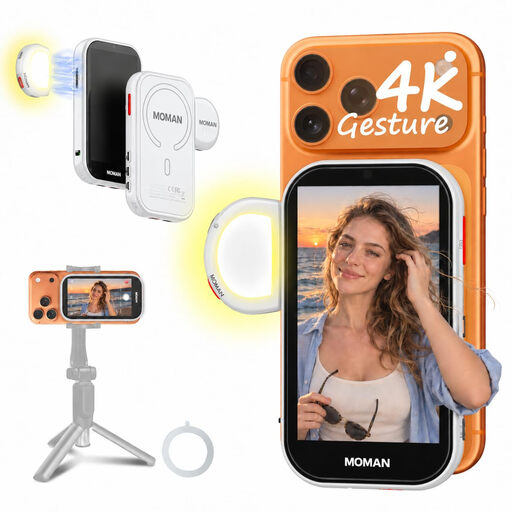 No image available
Lets you view the live image from your rear camera while filming with a compatible smartphone; the screen measures 4,02 inches.
The phone is not included. The product information lists compatibility with iPhone 7–17 and supported Android phones; a wired Android connection requires HCCast.
No. First compare your camera’s connection and video format with the monitor’s input specifications. Camera control or touch-to-focus also requires compatibility with your specific camera model.
Don’t assume it will. The specifications listed here describe display features and monitoring tools. If you need a recording function, check separately whether the product you are considering has one.
Check your camera’s connection, the supported video signal, the power source and what is included in the package you have chosen. Position the screen so you can see it without it getting in the way of your hands or the jewellery, then test it with a short recording.
No. According to the European Commission, the CE mark is the manufacturer’s declaration that the product complies with the applicable EU rules requiring the mark; it does not mean that a central EU body has certified the product in general. The rules that apply to a specific model and its included power supply depend on the product.