
Close-up creator
You film the edges of flowers and tiny details, and want to judge focus and framing more accurately than you can on your camera’s screen. De Videomakers discusses what to consider when choosing a camera monitor.


Start by checking whether the monitor can receive your camera’s video signal. Then choose a screen size and focus and exposure tools to suit your needs. A viewing monitor is enough if you only want to monitor your footage, while a monitor-recorder is worthwhile only if you want to record externally using a compatible setup. Also check the power supply, connections and included accessories.
You film the edges of flowers and tiny details, and want to judge focus and framing more accurately than you can on your camera’s screen. De Videomakers discusses what to consider when choosing a camera monitor.
You change your lighting setup or background and want to check exposure while filming. Atomos and FEELWORLD describe monitor tools that can help with this.
As well as monitoring your footage, you may want camera control, collaboration features or compatible external recording. Atomos and SmallHD describe features that can vary by camera model and workflow.
First check your camera’s connection and output signal. Then compare the screen and its tools with what you need to assess while filming your flower arrangement.
| What to consider | What should you check? | Who is it for? |
|---|---|---|
| Focus and composition | Screen size, screen resolution and tools such as peaking or magnification. | If I want to assess the edges of flowers and small details accurately, I prioritise focus and framing; around 36% of consumers put this need first. |
| Exposure | Check which tools are available, whether they suit your picture mode and whether any calibration option fits your workflow. | When the studio lighting changes, I want to be able to assess exposure while filming; around 29% of consumers make exposure monitoring their main priority. |
| Connection, positioning and power | Compare the camera output and signal with the HDMI or SDI input, power source, cable and mounting option. | If the camera is in a fixed position or the monitor will be further away, I want to know in advance whether the connection and power supply will work there; around 21% of consumers put a practical setup ahead of extra picture features. |
| External recording | Check whether the model actually records, which recording formats work with your camera and what storage and accessories you need. | If I want to record externally as well as monitor my footage, the entire recording chain needs to work with my camera; around 14% of consumers give this workflow top priority. |
The resolution a monitor can receive is not the same as the resolution of its screen. The FEELWORLD F6 PLUS is one example: according to FEELWORLD, this model has a UHD 4K input and a 1080p screen.
Compare both specifications separately with your camera’s signal and the details you want to assess.
A monitor is not automatically a recorder. Atomos describes the Shinobi II as a monitor and the Ninja as a monitor-recorder for external recording.
Decide in advance whether you only want to monitor your footage or record externally too, and check that your camera and recording format are compatible.
External recording may require compatible storage. Also check which accessories are included with the version you choose.
Control options can vary by camera model. SmallHD states that certain control licences for the Indie 5 are sold separately.
Before buying, check the exact camera model, required connection, firmware and any licence you may need.
The power supply and mounting you need depend on your equipment and how you position the monitor.
Compare what’s in the box with the cables, power supply, battery and mount you already have.
You may need to buy a suitable cable, power supply, battery or mount separately. External recording may also require a compatible SSD.
The Shinobi II is a viewing monitor; the Ninja is designed for anyone who also wants a compatible external recording workflow. Atomos describes these two product options separately.
The F6 PLUS is a compact HDMI monitor; the F5 PROX is another option if the exposure tools it offers suit your workflow.
The LH5P II is designed for HDMI monitoring combined with camera control for supported cameras.
The Indie 5 may suit a setup where both HDMI and 3G-SDI are relevant.
The G7 Pro is a larger 7-inch alternative if a bigger screen suits your studio setup.
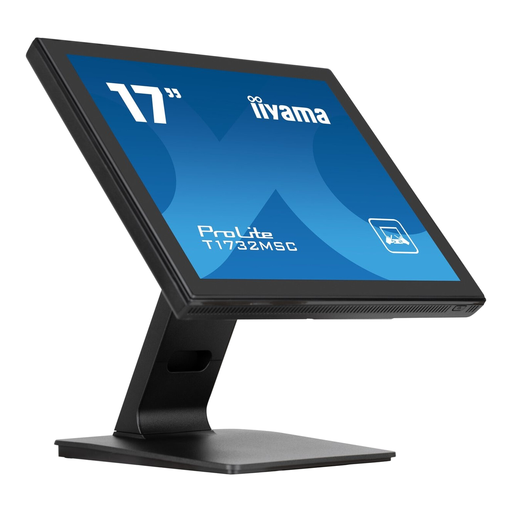
A computer monitor for a home studio setup; check that the chosen connection and screen support your camera’s signal.
 No image available
This computer monitor can only be used as a camera monitor if your camera’s signal is supported through a suitable connection; check this before buying.
The product name lists a 17-inch LED touchscreen with a resolution of 1280 × 1024. The product information lists HDMI and DisplayPort; check which connection and signal are compatible with your camera.
Not necessarily. Check separately which resolution the monitor can receive and which resolution the screen displays. FEELWORLD lists a UHD 4K input and a 1080p screen for the F6 PLUS.
Compare your camera’s video output and signal with the input on the exact monitor model, then choose a suitable cable, mount and power source. Atomos lists NP-F/L-series battery or USB-C PD power for the Shinobi II; check which accessories are included with the version you’re buying.
If a product is faulty, the retailer is your point of contact for the statutory guarantee; according to the Dutch government, there is no fixed statutory guarantee period in the Netherlands. For online purchases from a business, a 14-day cooling-off period applies in many cases, with some exceptions. A manufacturer’s warranty does not replace your statutory rights.
That depends on the rules that apply to the specific product. According to the European Commission, CE marking is mandatory for products covered by specific harmonised EU rules. Check the documentation for the model on offer; a CE mark does not prove that its features or connections are compatible with your camera.