
Flower-arranging creator who wants to check focus
If you film flowers or your hands close up, a larger live view can help you check focus and framing. Kamera Express describes an external monitor as a screen for viewing footage while filming.


Choose a camera monitor that can handle your camera’s video signal and can be mounted and powered where you need it. For a fixed indoor setup, a compact HDMI monitor with focus-assist tools may be enough. A brighter screen or extra connections are mainly useful if your room gets daylight from a window or your existing equipment calls for them.
If you film flowers or your hands close up, a larger live view can help you check focus and framing. Kamera Express describes an external monitor as a screen for viewing footage while filming.
When the daylight in your room changes, it helps to assess the camera signal and the monitor’s readability separately. Atomos and Feelworld describe tools for checking the image and exposure on their respective models.
If you film from a fixed position, make sure the signal connection, mounting and power supply suit your setup. Portkeys, Atomos and SmallHD describe different connections and power options for their models.
Start with your camera’s video output and where you want to view the monitor. Then consider whether focus-assist tools, exposure aids or extra connections would improve your filming.
| What to consider | What to look for | Who is this important for? |
|---|---|---|
| Sharpness of flower details | Check the screen size, resolution and focus-assist tools of the exact model, and whether your camera outputs a usable video signal while filming. | If I want to check the focus on petals or hand movements, I’m looking for a clear live view with suitable focus-assist tools. Around 36% of consumers put sharpness first. |
| Exposure in changing light | Check which exposure aids are included, and whether the screen’s brightness and positioning suit the light in your room. | When daylight from a window changes, I want to be able to assess both the screen’s readability and the camera signal. Around 29% of consumers put exposure first. |
| Framing and viewing position | Work out where you, the camera and the flower arrangement will be; check the screen size and whether you need a suitable mount for that position. | If I want to keep an eye on the arrangement and my hands from my workstation, a useful viewing angle is important. Around 21% of consumers prioritise framing and viewing position. |
| Connection and power | Compare your camera’s output and frame rate with the monitor’s input. Also check the cable, power supply and what’s included with the exact package. | For a fixed filming setup, I want to know in advance how the monitor connects to my camera and how it’s powered. Around 14% of consumers put connection and power first. |
A monitor can accept a 4K video signal even if its own screen has a resolution of 1920 × 1080 pixels. The input signal and screen resolution are different specifications.
Check the supported input signals, frame rates and screen resolution separately.
Atomos states that camera control and touch-to-focus only work with compatible cameras.
Before buying, check the exact camera model, firmware and connection required.
You may need a compatible cable for camera control. The feature may not be available if your camera isn’t compatible.
The model names are similar, but the quoted brightness figures for the F6 PlusX differ: Feelworld lists 1600 nit, while a Dutch product listing gives 500 cd/m².
Check the full model name and specifications for the version on offer. If you’re choosing a monitor for daylight from a window, don’t rely on a brightness figure without checking the model details.
A fixed filming setup also needs a working signal connection, a mount and a power supply. Atomos says the Shinobi II has no built-in battery.
Check what’s included with the exact package and what else you’ll need for your setup.
You may need to buy a power supply or battery, HDMI cable and mount separately.
The PT5 II is a compact HDMI option for anyone looking for a larger image and focus-assist tools.
The F6 Plus is an HDMI touchscreen option for creators who want to preview LUTs.
The Shinobi II is designed for monitoring, with a stated bright screen and camera control for compatible cameras.
The Indie 5 is worth considering for an existing setup that uses 3G-SDI as well as HDMI.
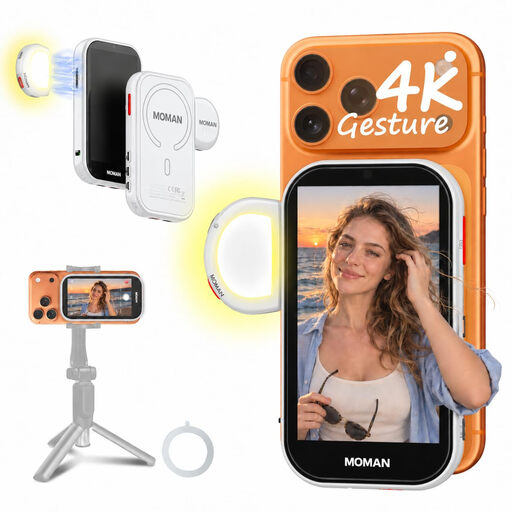
This pick is for filming with a compatible smartphone as your camera, when you want to view the rear camera’s live image.
 No image available
For filming with a compatible iPhone when you want to view the rear camera’s live image.
The product information lists a 4.02-inch screen, wired 4K mirroring and wireless P2P mirroring. The magnetic mount and included rings are designed for compatible phone cases.
The phone is not included. HCCast is required for wired Android mirroring.
For a monitor that only uses HDMI, such as the Portkeys PT5 II, your camera needs to output a video signal over HDMI that the monitor supports. Also check the camera output, cable connectors and settings while filming. If you use an SDI workflow, the SmallHD Indie 5 also has a 3G-SDI input.
That depends on the model and the power supply you choose. Atomos lists an NP-F/L-Series battery or USB-C PD as a power option for the Shinobi II. Check what power supply you’ll need and what’s included with the version you’re buying.
Not necessarily: the supported video input and the resolution of the built-in screen are separate specifications. Check both figures for the exact model.
No. According to the Dutch government, there is no fixed time limit for statutory guarantees in the Netherlands. Whether a product is fit for purpose depends, among other things, on what you could reasonably expect and what caused the problem.
For purchases made by consumers, the Dutch government describes free take-back of a similar electrical appliance by the retailer when you buy a new one, including for online purchases. Take used camera and video camera batteries to a suitable battery collection point, not to general waste.