
Filming stamp details
You want to check during close-ups that the details are in frame and sharply rendered. Focus-assist tools and image magnification may matter more than simply having a larger screen.


Start by checking your camera’s video output, then choose a monitor that lets you assess focus, framing and exposure from where you work. A compact HDMI monitor may be enough for viewing; an extra output, a larger screen, a wireless connection or a recording function is useful only if it suits your setup. Also check the power supply, mounting options and room for cables on the shared workbench.
You want to check during close-ups that the details are in frame and sharply rendered. Focus-assist tools and image magnification may matter more than simply having a larger screen.
You want to see the image without taking up too much bench space or cluttering the work area with the screen, power supply and cables.
You want to share the camera image with someone else and decide whether a second wired screen or a suitable wireless setup will work in your space.
First decide what you need to check while filming. Then choose the connections, viewing position and any extra features required.
For this type of filming, it helps to choose one main priority. The table matches each priority with a practical check for your camera and workbench.
| What to consider | What should you check? | Who should pay particular attention? |
|---|---|---|
| Focus and framing | Check the panel resolution, focus-assist or image-magnification features, and whether you can see the screen from your usual working position. | If I’m filming tiny stamp details, I want to check focus and framing while setting up. Around 25% of consumers put checking detail at the top of their list of buying concerns. |
| Camera connection | Compare the camera connector and its video output during recording with the input on the exact monitor model. | I first want to know whether my camera’s signal will appear on the screen in the recording mode I’m using. For around 25% of consumers, camera connectivity is their main buying concern. |
| Exposure | Look for exposure-assist tools on the exact model and assess a test recording under your workshop lighting. | When I want to assess the exposure of stamps while filming, I look for tools that help me evaluate the camera image, not just the screen’s brightness. Around 20% of consumers prioritise exposure control. |
| Positioning and power | Check the mounting points, available space, power source, accessories and cable routing for the version you’re considering. | If I’m filming at a shared workbench, I want to position the screen without getting in the way of my workspace or anyone else’s. Around 20% of consumers make positioning, power and cables their main buying concern. |
| Viewing together or recording | Decide whether you need a second screen, wireless viewing or external video files. Then check the connections, compatibility and storage media. | If someone else needs to watch or I need external files, I first check which feature suits the way I work. Around 10% of consumers prioritise sharing the image or recording externally. |
The resolution of a signal a monitor accepts and the screen’s physical resolution are different specifications. So, accepting a 4K signal doesn’t automatically mean the panel has 4K resolution.
For the exact model, compare both the panel resolution and supported input with the signal your camera outputs while recording.
Features vary by model. Atomos, for example, states that the Shinobi II has one HDMI input. This specification gives no reason to assume it has an HDMI output or recording function.
Decide in advance whether you only want to monitor the image, connect a second screen or record separate video files.
External recording may require suitable storage media, such as media supported by your chosen model and recording format.
Power requirements and included accessories vary by model and version. For example, the FEELWORLD LUT7 package information states that no battery is included.
Check what’s included with the exact offer and decide where the screen, power source and cables will go on the workbench.
Depending on the version, your setup may need a separate battery or power supply, cable or mount.
The Shinobi II is a compact monitor without a recording function; the Ninja TX combines monitoring with external recording.
The Video Assist 5-inch 12G HDR is worth considering if you’re looking for one device that offers both monitoring and external recording.
The LUT7 is a 7-inch HDMI monitor for anyone considering a larger viewing area.
The Indie 7 is designed to offer a larger viewing area, monitoring tools and HDMI and SDI connections.
The LH5P II is a 5.5-inch HDMI monitor for anyone considering a loop-through output or camera control.
The Mars M1 Enhanced is worth considering if someone else needs to watch wirelessly in a suitable setup.
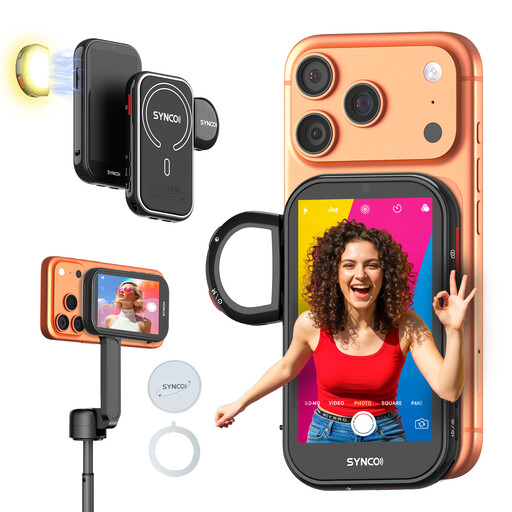
This product selection is aimed at filming with a compatible iPhone, rather than using a general HDMI monitor with a separate camera. Check that it’s compatible with your phone and suits your setup.
 No image available
Designed for viewing the image from the rear camera of a compatible iPhone while filming; according to the product information, it is not compatible with Google Pixel.
The description lists a wired mirroring mode and wireless viewing at distances of up to 50 m. It also says the device has a built-in fill light and a battery that lasts for more than 3 hours.
Not always: the supported HDMI input and the panel’s physical resolution are different specifications. For example, Atomos lists a panel resolution of 1920 × 1080 pixels for the Shinobi II, with support for certain 4K signals at up to 30 frames per second. Compare the exact model’s panel resolution and input with your camera’s output mode.
Check the mounting points, viewing and working space, cable routing and power requirements for your chosen model. Don’t assume it has a built-in battery: Atomos states that the Shinobi II doesn’t.
Yes, if you want to use the recording function. Blackmagic lists recording to an SD card or USB-C storage for the Video Assist 5-inch 12G HDR; Atomos lists compatible CFexpress Type B or USB-C media for the Ninja TX. Check that the media suits your chosen model and recording format.
That depends on the recording and how you publish it. The Dutch Data Protection Authority considers identifiable people’s information to be personal data. So check which GDPR rules apply to your planned recording and publication. The Dutch Data Protection Authority’s guidance on permanent camera surveillance of employees does not automatically apply in the same way to an instructional video.
According to the Dutch Government, the seller—not the manufacturer—is responsible for providing a solution when a product is faulty. The Netherlands has no fixed statutory guarantee period that applies to all products; a manufacturer’s guarantee is in addition to your statutory rights.