First, choose a monitor that can receive your camera’s video signal and position it so you can see the folding area. A compact screen takes up less space, while a 7-inch screen gives you more room to view your work. Also check the power supply, mounting options and cables you’ll need for your camera and setup.
Who is this choice for?
Filming folds with the camera above the table
You want to check that the whole work surface is in shot, so you need a usable camera output and a good viewing position. Canon’s camera specifications show that HDMI output can vary depending on the camera model and mode.
Filming fine details
You want to check small folds and lighting while filming. Image aids such as peaking may be useful; Portkeys lists this feature for the PT5 II.
Filming in a shared space with limited room
You want to be able to put the screen and setup away after use. A smaller screen may fit more easily into the space available; FEELWORLD offers the models mentioned in both 6-inch and 7-inch sizes.
What should you look for when buying?
Compact HDMI monitor, around 5–6 inches
A good fit if: your camera outputs an HDMI signal, you can view the work surface from nearby and space is limited.
The trade-off: you get less screen space than with a 7-inch model; connections, power options and features vary between versions.
7-inch HDMI monitor
A good fit if: you have a permanent spot for it and want to view the work surface from a little further away.
The trade-off: the larger screen needs more space; check that the mounting options and power supply suit your setup.
Use your camera’s existing screen
A good fit if: you can already see the camera screen clearly from your working position.
The trade-off: whether your camera offers the view you need depends on the camera model and the mode you’ve selected.
| What to consider |
What should you check? |
Who should consider this? |
| Connection and camera signal |
Compare your camera’s video output, connection and supported signals with the input on the exact monitor model. Check the cable and display mode too. |
If I want to see a live view while folding, the monitor needs to receive my camera’s signal. Around 36% of consumers prioritise a working camera connection. |
| Fine folds and sharpness |
Check the screen size, resolution and available image aids. Also consider how far away you’ll be viewing it from. |
If I want to check small folds before filming more, I look for a screen and image aids that suit my viewing distance. Around 29% of consumers give checking details top priority. |
| Space, mounting and power |
Measure the space and check the mounting options, permitted power supply and what’s included in the package. |
If I share a bedroom, I want to be able to put the screen away after use and keep the folding area clear. Around 21% of consumers prioritise a space-saving setup. |
| Lighting and aspect ratio |
Check whether the exact model offers the image aids or framing markers you need, and whether they suit horizontal or vertical filming. |
If I want to check the lighting or a vertical crop, I look for features I’ll actually use while filming. Around 14% of consumers give this kind of image checking top priority. |
What to watch out for
-
Confusing a 4K HDMI signal with a 4K screen
A monitor may receive certain 4K signals even if its own screen has a lower resolution. Portkeys lists the PT5 II as having a 1920 × 1080 screen; FEELWORLD specifies Full HD for the F7 PLUS, despite HDMI support up to 4K60.
Compare the screen resolution separately with the supported HDMI input and your camera’s output.
-
Assuming a battery, cable or camera control is included
Power options and package contents vary by model. Atomos states that the Shinobi II doesn’t have a built-in battery. Camera control from the monitor also depends on whether your camera model is supported.
Check what’s included with the exact set and the compatibility information for your camera, rather than relying only on the product range or a product image.
-
Assuming a larger or brighter screen is automatically better
The monitors mentioned range from 5 to 7 inches. A larger size or a high stated brightness doesn’t, on its own, mean the screen will work better in your bedroom setup.
Choose based on your viewing distance, available space and the light in the room. Only prioritise extra size or brightness if it solves a specific problem.
Relevant camera monitor brands
Portkeys
The PT5 II is a 5-inch HDMI monitor for a compact setup.
- Portkeys says the PT5 II has a 1920 × 1080 screen, peaking and waveform.
- The manufacturer lists a maximum HDMI input of 4K UHD at 30p; this doesn’t make the screen itself a 4K display.
FEELWORLD
According to the manufacturer, the FW568 PRO and F7 PLUS have screen sizes of 6 and 7 inches respectively.
- FEELWORLD lists a 9:16 marker for the FW568 PRO and HDMI support up to 4K60 for the F7 PLUS.
- The manufacturer says both models have Full HD screens; the larger F7 PLUS needs more room in your setup.
Atomos
The Shinobi II is a compact monitor option if you may also want to control your camera from the screen.
- Atomos lists a 5.2-inch screen with a resolution of 1920 × 1080, powered by an NP-F battery or USB-C PD.
- Camera control and touch-to-focus depend on a supported camera and compatible software. Check compatibility with your camera model.
Viltrox
The DC-550 Pro II is a 5.5-inch option with several power choices.
- According to Viltrox, HDMI 2.0 in/out supports signals up to 4K60, and NP-F, USB-C and DC are listed as power options.
- Check camera control for your specific camera model; the manufacturer’s claim isn’t an independent performance test.
Monitor on Joybuy for a permanent table setup
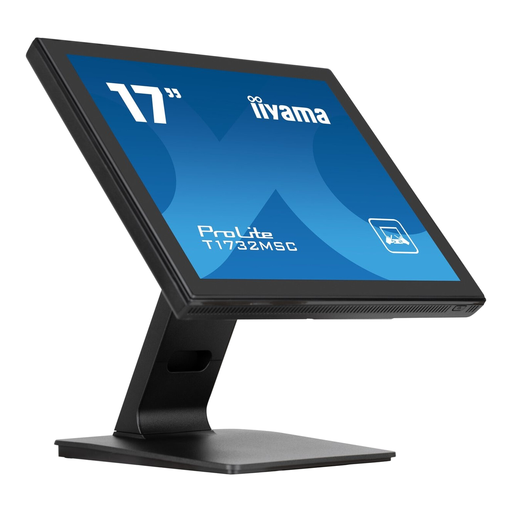
This Joybuy pick is an HDMI monitor for a permanent setup. At 17 inches, it needs more space than compact camera monitors; check that your camera output and the monitor signal are compatible.
 No image available
iiyama ProLite 17-inch touchscreen monitor, 1280 × 1024
Could suit a permanent table setup if your camera output is compatible with the HDMI input; check signal support for your camera.
17 inches (43,2 cm), LED touchscreen and 1280 × 1024 resolution.
The 17-inch size takes up more space than a compact camera monitor.
View on Joybuy
Frequently asked questions
Will any HDMI camera monitor work with my camera?
No. An HDMI connection alone doesn’t guarantee compatibility. Compare your camera’s video output and recording mode with the monitor’s supported signals; Canon’s specifications show that HDMI output can vary depending on the camera model and mode.
How should I position and power a monitor while filming folds?
Position the screen so you can see the work surface without it or its cables getting in the way of folding. Check the mounting options, permitted power supply and what’s included in the set; for example, Atomos says the Shinobi II doesn’t have a built-in battery.
What if a monitor I buy online doesn’t suit my setup?
For online purchases from a business, you’ll generally have a 14-day cooling-off period in the Netherlands, according to the Government of the Netherlands. The seller must also provide a solution if a product is faulty; check the terms that apply to your purchase.
Can someone I live with appear recognisably in a folding video I post online?
Agree with the person you live with before filming and sharing, and keep them out of shot if necessary. According to the Dutch Data Protection Authority, the exception for personal or household use doesn’t apply when images are shared publicly with a wider audience.


