Choose a compact wired monitor if you crochet next to the camera and mainly want to check focus and framing. A larger screen or wireless viewing only makes sense if you want to watch from elsewhere. Beforehand, check your camera’s video signal, the cable, power supply and mounting options: monitor specifications alone won’t tell you whether it will work with your camera. Keep housemates out of shot, or consider privacy before sharing footage.
Who is a camera monitor suitable for?
Crochet creator who wants to check stitches
You film close-ups and want to check focus and framing on a screen while recording. Some models offer image-assist tools such as focus peaking, including the FEELWORLD F5 PROX, according to the manufacturer.
Creator with limited space to set up
You share a bedroom and need a screen, mount and cable route that fit your available workspace. A compact screen may make better use of the space than a larger model.
Creator who wants to view footage remotely
You’re not always sitting next to the camera and want to decide whether a larger screen or a wireless connection suits the place where you want to view the footage.
What should you look for when choosing?
First check that your camera can output a compatible video signal. Then decide whether a compact setup will do or whether you want to view the footage from somewhere else.
| Concern |
What to look for |
Who is this most important to? |
| Focus and camera connection |
Check your camera’s video output and output format, the monitor’s input, and whether focus peaking is available. |
When I film stitches close up, I want to check focus and framing and make sure the camera and monitor can handle the same signal. Around 36% of consumers put focus and connectivity first. |
| Space and mounting |
Compare screen size and weight; check the mounting points and how the cable can be routed around your workspace. |
In a shared bedroom, I want to position my screen and camera without the setup getting in the way of my workspace. Around 29% of consumers prioritise a compact setup. |
| Power and what’s included |
Check whether a battery, adapter, cable and mount are included with the exact version. |
For longer recording sessions, I want to know in advance which power source and components I’ll need so I can complete my setup. Around 21% of consumers put power and included items first. |
| Viewing from somewhere else |
Decide where you want to view the footage and check all the devices and connections in your intended setup. |
If I’m not sitting next to the camera, I want to follow the footage from somewhere else and know that the necessary connection will work there. Around 14% of consumers prioritise remote viewing. |
Common mistakes
-
Assuming a 4K HDMI signal means you’re getting a 4K screen
According to Atomos, a monitor can accept UHD 4K signals via HDMI, while the Shinobi GO has a screen resolution of 1920 × 1080 pixels. Input signal and screen resolution are different specifications.
Check the supported input signals and the screen resolution separately.
-
Comparing monitors without checking what’s included
FEELWORLD describes several versions of the F5 PROX. The components you need for your setup may vary between bundles.
Compare the exact version and check which power supply, battery and cables are included.
Depending on the bundle, you may still need a compatible battery, power supply or cable. Check this before putting your setup together.
-
Treating a claimed wireless range as a guarantee for your bedroom
The range quoted by Hollyland is a manufacturer claim under LOS conditions and doesn’t determine how the connection will work in your room.
First decide whether you need wireless viewing, then check which devices and connections need to work together.
-
Focusing only on the crochet stitches and forgetting the background
Footage showing identifiable people may contain personal data. The Dutch Data Protection Authority distinguishes between footage that stays private and footage that is shared more widely.
Check the full frame before filming and consider privacy again before sharing footage.
Relevant camera monitor brands
FEELWORLD
The F5 PROX is a compact monitor option, while the T7 PLUS has a larger screen. Both are worth considering if your camera outputs a compatible HDMI signal.
- According to FEELWORLD, the F5 PROX has a 5.5-inch screen and image-assist tools, including focus peaking.
- FEELWORLD specifies a 7-inch screen for the T7 PLUS.
- Check the exact F5 PROX bundle: accessories may vary between versions. Manufacturer specifications are not an independent performance test.
Atomos
The Shinobi GO is a compact HDMI monitor with image-assist tools. Camera control is available on specific other models and should be checked for each camera.
- Atomos specifies a 5.2-inch screen, HDMI input and battery or USB-C PD options for the Shinobi GO.
- Don’t assume the Shinobi II’s control features are available on the Shinobi GO; check camera control for the specific model.
Portkeys
According to Portkeys, the LH5P II is designed for HDMI monitoring, with image-assist tools and control for selected cameras.
- Portkeys lists a 5.5-inch screen and focus peaking.
- Control features vary by camera. Check whether your camera model is supported.
Hollyland
The Mars M1 Enhanced is worth considering if you also want to view the footage somewhere else.
- Hollyland describes this model as combining monitor, transmitter and receiver functions.
- Check which counterpart device and connection your setup requires; manufacturer claims about range and latency aren’t measurements for your room.
Joybuy product option
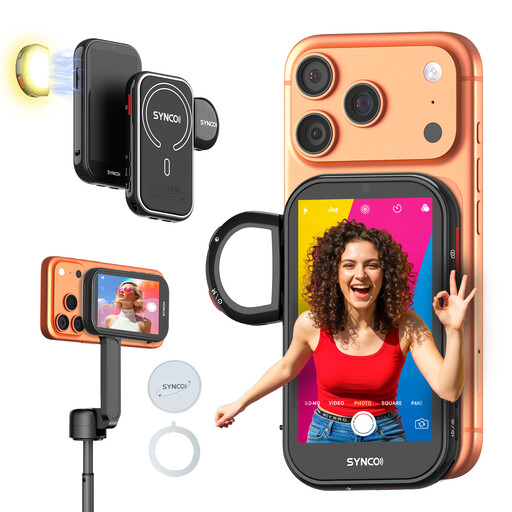
This option is a wireless selfie monitor screen. Check whether it’s compatible with the camera and setup you use to film crochet stitches.
 No image available
SYNCO Wireless AI Selfie Monitor Screen
The product name suggests a wireless screen for selfie setups; check whether it’s compatible with your camera and filming style.
Wireless AI selfie monitor screen, according to the product name.
View at Joybuy
Frequently asked questions
Can I record crochet videos using a camera monitor?
Don’t assume you can: a camera monitor such as the Atomos Shinobi GO is specified as a monitor with an HDMI input. Check separately which device you’ll use to record the video.
What should I check before mounting and connecting it?
Compare your camera’s video output and output format with the input on the exact monitor model. Then check the cable, mounting options, power source and what’s included; FEELWORLD describes several accessory versions of the F5 PROX.
What if the monitor doesn’t work properly during normal use?
For a consumer purchase in the Netherlands, the seller is responsible for the statutory guarantee if a product is faulty; the Netherlands Authority for Consumers and Markets (ACM) doesn’t specify one fixed guarantee period. For online purchases, ACM ConsuWijzer says you generally have up to 14 days from delivery to change your mind, with some exceptions. This is separate from your rights if a product is faulty, damaged or not as described.
Can I publish a crochet video that clearly shows someone I live with?
First consider the privacy rules that apply to your specific use. According to the Dutch Data Protection Authority, images of identifiable people are personal data; the exception for personal or household use applies if you keep footage private or share it with only a very limited group. For public publication, the regulator says a legal basis is almost always required, and consent is often the most appropriate option.


