Who can benefit from a camera monitor?

Solo creator at the collage table

You want to check that your hands, paper and tools stay in frame while you explain what you’re doing, without having to keep walking over to the camera screen. That’s why the monitor’s position and the available workspace matter.

Creator filming close-up details

You film small shapes, edges or sticking and want to check focus and lighter or darker areas as you record. Look for tools such as peaking, magnification and waveform, if they’re available on the model you choose.

Creator with an existing camera setup

You want to add a screen without buying a combination of camera signal, input, cable and power supply that won’t work. Whether the camera picture appears on an external screen while recording also depends on the camera model and its settings.

What should you look for when buying?

What to consider What to look for Who is this important for?
Checking the framing Screen size, mounting position and your line of sight from your working position. If I want to check that my hands and collage stay in frame while I work, a well-positioned monitor makes a difference. Around 24% of consumers rank framing as their top priority.
Checking small details Screen resolution, peaking and magnification; also check the footage with a test recording. When I want to check fine edges and small movements, I look at both the focus tools and the recorded result. For around 19% of consumers, checking detail comes first.
Checking exposure Check whether waveform, histogram or false colour is available, and bear in mind the lighting and reflections in your workspace. If I want to assess light and dark materials while filming, exposure tools are useful. Around 19% of consumers rank this as their top priority.
Connecting your camera Check the camera output, cable, picture display during recording, and supported resolution and frame rate. If you want the picture to appear on the monitor in your chosen recording mode, check the entire camera and monitor setup. For around 24% of consumers, connecting the camera is the top priority.
Workspace and power Check the mounting options, cable routing, power options and what’s included with the exact version. If I want to film without the screen and cables getting in the way of cutting and sticking, the position and power supply need to be practical too. Around 14% of consumers put workspace and power at the top of their list.

Common buying mistakes

  • Confusing 4K signal support with screen resolution

    A monitor may accept a particular 4K signal but display it on a panel with a lower native resolution.

    Compare the native panel resolution and supported HDMI signals separately.

  • Assuming a battery and adapter are included

    F5 PROX package contents vary; the Atomos Shinobi II does not have a built-in battery.

    Compare the contents of the exact version with your desired recording time and power method.

    Depending on the version, you may need a separate battery or a suitable power supply.

  • Mistaking a viewing monitor for an external recorder

    Monitoring and recording separately are different functions. Don’t assume that a monitor setup will also record your class.

    First decide whether the camera itself will record or whether you need a separate recorder; only then compare models.

    For external recording, you may need a monitor-recorder and the associated recording equipment.

  • Checking only the monitor, not the camera output

    Depending on the model and recording mode, a camera may display the external picture differently. So, a compatible monitoring input doesn’t prove that the combination will work.

    Check your camera’s manual and test the complete signal chain with a test recording.

Brands to compare

Portkeys

Worth comparing if you’re looking for a compact HDMI monitor for framing, focusing and exposure checks in a limited workspace.

  • Portkeys says the PT5 II has a 5-inch screen with a resolution of 1920 × 1080, peaking and exposure tools.
  • The stated maximum brightness is 500 nit. Support for a 4K input signal doesn’t mean the panel itself is 4K; also check which PT5 II version you’re looking at.

FEELWORLD

The F5 PROX is worth considering if good visibility in a brightly lit workspace is a key requirement.

  • FEELWORLD lists the F5 PROX as having a 5.5-inch screen with a stated brightness of 1600 nit and tools such as peaking, waveform, histogram and false colour.
  • The stated brightness alone doesn’t tell you how easy the screen will be to see in your lighting conditions. The included battery varies by package, so check the exact contents.

Atomos

The Shinobi II is a viewing monitor worth comparing if you’re looking for focus and exposure tools.

  • Atomos lists the Shinobi II as having a 5.2-inch screen, HDMI input, and focus and exposure tools.
  • The Shinobi II does not have a built-in battery. Atomos lists power via an NP-F/L-series battery or USB-C PD; check which option suits your setup.

Blackmagic Design

The Video Assist range is worth considering if you want to compare separate recording workflows as well as monitoring.

  • Blackmagic Design describes Video Assist as combining monitoring and recording features.
  • Recording support varies by version: according to Blackmagic Design, 3G models record up to 1080p60 and 12G HDR models up to 2160p60. Check the exact model and camera signal.

SmallHD

The Indie 5 is worth comparing if your existing camera setup uses both HDMI and 3G-SDI.

  • SmallHD lists HDMI and 3G-SDI connections for the Indie 5.
  • If your setup uses HDMI only, having SDI doesn’t offer any benefit in itself. Separate software licences are available for the camera control features listed.

Joybuy products

Joybuy product picks related to this topic. Check below what each model is designed for and whether it’s compatible with your recording device.
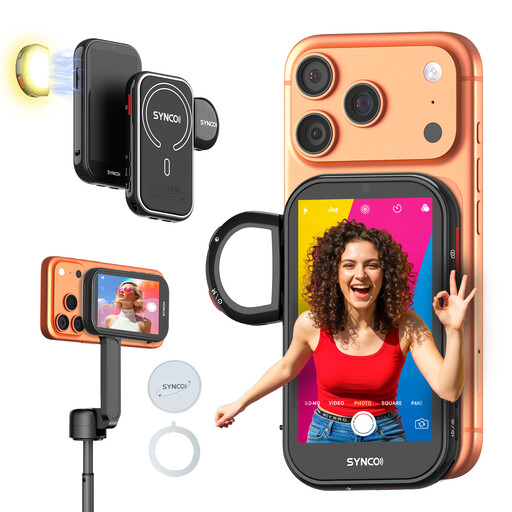
SYNCO Wireless AI Selfie Monitor Screen

SYNCO Wireless AI Selfie Monitor Screen

Could be suitable if you’re filming the class with a compatible iPhone or supported Android phone and want to frame the picture from the rear camera.

According to the product description, Google Pixel is not supported; wired Android display requires HCCast. Check compatibility with your phone.

View at Joybuy
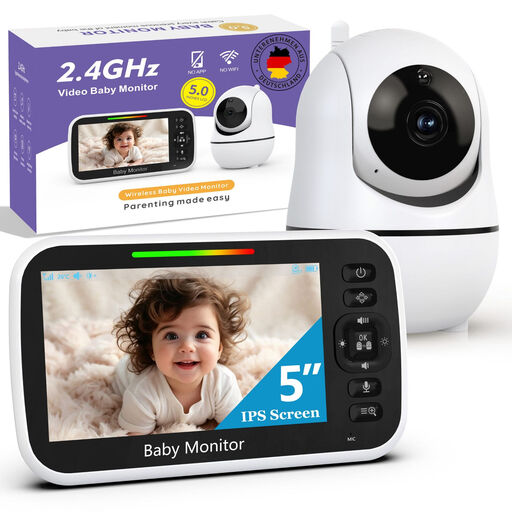
Baby monitor with camera and mount, 5-inch monitor

Baby monitor with camera and mount, 5-inch monitor

The product title describes this model as a baby monitor with a camera and 5-inch monitor, not as a general-purpose camera monitor for filming.

If you’re considering it for filming a class, first check that the connections and display are suitable for your recording device.

View at Joybuy

Frequently asked questions

Can I connect any camera to an HDMI camera monitor?

No, check the camera and monitor combination first. Compare the camera output and what it sends in your chosen recording mode with the monitor’s input, resolution and frame rate. With some Sony cameras, settings can change how the picture is displayed on the camera screen and external screen.

Does a monitor with 4K HDMI input automatically have a 4K screen?

No. Portkeys lists the PT5 II as supporting certain 4K input signals, but its native screen resolution is 1920 × 1080. Compare the supported input signals and screen resolution separately.

What should I check before a longer collage class?

Make a test recording in your intended camera mode and check that the picture remains visible while recording. Then set up the screen, mount and cables in their actual positions, and check the power supply and package contents: the Atomos Shinobi II has no built-in battery, and F5 PROX packages vary.

What are my rights if a monitor bought in the Netherlands is faulty?

For a faulty product, the Dutch government says you’re entitled to an appropriate solution, such as a free repair, replacement or refund; according to that source, the Netherlands has no fixed statutory guarantee period. For online purchases from a business, you’re also often entitled to a 14-day cooling-off period, although there are exceptions.

Can I show identifiable participants in my online portfolio film?

Before publishing, consider which privacy rules and GDPR legal basis apply in your situation. The Dutch Data Protection Authority regards identifiable people in footage as personal data; the exception for purely personal or household use does not automatically apply when you share a film more widely, for example in a public portfolio. You could also choose to keep other people out of shot.
