
Close-up creator
You film small folding, cutting or stamping techniques and want to check while filming that the key detail is in sharp focus.


First, choose a monitor that accepts your camera’s video signal and that you can power and position where you’re filming. For small card-making details, magnification and focus peaking are useful aids; if window light makes the screen hard to read, brightness and exposure tools matter more. A monitor-recorder is mainly worth considering if you want to record externally as well as in-camera.
You film small folding, cutting or stamping techniques and want to check while filming that the key detail is in sharp focus.
The light on your worktable changes, and you want to be able to read the monitor screen and assess the exposure.
You want to check in advance that your camera output, HDMI cable, mounting and power supply will all work together in your regular filming space.
First check the video signal, connection and power supply. Then choose the screen aids and size to suit how you film and review your lesson.
For this choice, the main buying concern will usually be one of the following: seeing small details, reading the screen in window light, setting up a working system or keeping the monitor powered during the lesson.
| What to consider | What should you check? | Who is this important for? |
|---|---|---|
| Sharpness of small details | Check whether the exact model has focus peaking and image magnification, and whether the screen size suits your viewing distance. | If I want to check fine edges and small details, clear focus aids are useful. Around 31% of consumers prioritise checking details. |
| Screen readability and exposure in window light | Check the stated brightness and whether the model has exposure tools; if possible, assess the screen from your usual workspace. | When the window light changes, I want to keep assessing the image and checking the exposure. Around 25% of consumers prioritise screen readability in window light. |
| Camera and monitor connection | Check your camera’s video output, the supported resolution and frame rate, the HDMI connection and the mounting options. | If I’m setting up a permanent filming space, I want to make sure the camera, cable and monitor will work together. Around 25% of consumers say a working connection and setup are their main concern. |
| Power supply and what’s in the box | Check which power options the exact model supports and whether your chosen bundle includes the power source and accessories you need. | If I want to film a lesson without having to sort out the power supply partway through, I want to know in advance what my setup needs. Around 19% of consumers prioritise power and a complete setup. |
Support for a 4K input signal doesn’t mean the monitor itself has a 4K screen or supports every frame rate. Atomos lists the Shinobi II’s screen resolution as 1920 × 1080 pixels and specifies which signals it supports.
Check the screen resolution separately from the supported resolution and frame rate of the camera signal.
What’s included can vary between bundles. FEELWORLD states that the F5 PROX’s standard accessories do not include a battery or power adapter.
Compare the contents of the exact variant with what you already own and what your setup needs.
You may need a compatible power source, cable or mount in addition to the monitor. Check which items are included with each offer.
A monitor-recorder adds an external recording workflow. Atomos describes the Ninja as a recorder; some RAW capabilities require a compatible camera.
Decide in advance whether external recording or playback during the lesson is part of the way you work.
External recording requires suitable storage and may add equipment and extra steps to your filming workflow.
The Shinobi II is a monitor; the Ninja combines monitoring with external recording.
The F5 PROX is a 5.5-inch monitor with focus and exposure aids.
The PT6 is a compact monitor for an indoor setup; the PT5 II is a different model with a 5-inch screen.
The DC-X2 is a 6-inch HDMI monitor; the DC-X3 is the version with additional SDI connections.
The Indie 5 is a compact model with HDMI and SDI for anyone who needs those connections.
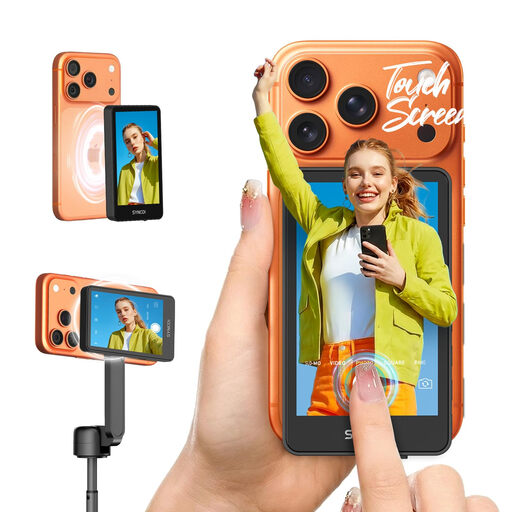
This Joybuy selection is a smartphone selfie monitor for smartphone filming; check that it suits the way you film your card-making lesson.
 No image available
The product name describes this model as a selfie monitor for smartphone filming; it could suit a card-making lesson if you’re filming with a compatible smartphone.
The product name mentions a touchscreen and support for iPhone 7–17 and Android. Check whether your exact phone is compatible.
No. Check the video output and settings on your exact camera, the cable type, and the monitor’s supported resolution and frame rate. The connections must work together to support the video signal your camera outputs.
Choose a power method supported by the exact monitor model and check what’s included in the bundle. Atomos lists NP-F/L-series batteries or USB-C PD as options for the Shinobi II; FEELWORLD states that a battery and power adapter aren’t included in the F5 PROX’s standard accessories.
According to the Dutch Data Protection Authority, the exception for personal or household use doesn’t automatically apply to wider publication or business use. Making and publishing images of identifiable people for professional or commercial purposes requires a lawful basis under the GDPR. Consent is one possible example, but it isn’t automatically the only lawful basis.
When you buy as a consumer in the Netherlands, you’re entitled to a product that works as it should; if there’s a fault, the seller must provide a solution. The Dutch Government states that the Netherlands has no fixed statutory guarantee period. For an eligible online purchase from a business, you’ll generally also have 14 days to change your mind.