Who is this guide for?

Teacher filming fine brushstrokes

You want to check in an overhead view whether the nib and letter shapes are sharp, and whether light-coloured paper remains clearly visible. Atomos lists features including focus peaking, magnification and exposure aids for the Shinobi II. Check that the features on your chosen model work with your camera’s signal.

Maker with limited desk space

You want to view the image without the monitor, mount, cables or power supply taking up your writing area. The dimensions, mounting point and power options all affect how you can arrange your setup.

Maker filming in changing light

You want to check the paper and framing as the ambient light changes. Compare the brightness specification for the exact model and think about where you can position the screen to reduce distracting reflections. Brightness alone doesn’t tell you how easy the screen will be to read on your desk.

What should you look for?

Compact HDMI monitor

Choose this option if: you’re short on space and mainly want to check framing, the nib and exposure alongside your camera. Portkeys lists a 5-inch, 1920 × 1080 panel with 500 nit brightness for the PT5 II. Atomos lists a 5.2-inch panel and 1500 nit brightness for the Shinobi II.

Bear in mind: the smaller screen area and power supply. These individual manufacturer specifications aren’t the result of a comparative hands-on test. Check your camera’s signal and consider reflections where you’ll be filming, too.

Monitor with a built-in battery

Choose this option if: you’d rather not use a separate monitor battery and the stated battery life suits your lesson. FEELWORLD lists a built-in battery and a 6-inch screen for the P6XL.

Bear in mind: FEELWORLD states that it lasts around two hours at 100% brightness. You’ll also need to find a spot for the 6-inch screen where it won’t block your writing area.

Larger or more feature-rich screen

Choose this option if: you’ll be viewing the screen from a distance or need a specific connection. SmallHD lists HDMI and 3G-SDI for the Indie 5, while NEEWER lists a 7-inch screen for the F700.

Bear in mind: a larger screen takes up more space. Extra connections are only useful if they work with your equipment, and camera control for the Indie 5 is optional.

What to consider What to look for when buying Who is this most relevant to?
Sharpness and exposure Check the panel resolution and available aids, such as focus peaking, magnification, a histogram or waveform. A 4K input doesn’t mean the panel itself has 4K resolution. If you want to check fine brushstrokes and light-coloured paper while filming, your main priority is being able to assess detail and exposure. Around 33% of consumers put this first.
Camera signal and cable Compare your camera’s active video output with the monitor’s input and supported formats. Also check which cable you’ll need. If your main concern is making sure the camera connection works, first check that the monitor and camera support the same signal. Around 27% of consumers give this compatibility the highest priority.
Workspace and power Check the dimensions, mounting point, cable routing, power input and what’s included with the version you’ve chosen. A built-in battery can reduce the number of separate components, but it has a stated battery life. If you need to keep your writing area clear, you’ll want to position the screen, mount and power supply so you still have room to work. Around 20% of consumers prioritise a tidy desk setup.
Visibility in changing light Compare the brightness specification for the exact model and consider whether you can position the screen away from distracting reflections. If the light changes while you’re filming, you’ll want to be able to assess the display clearly from your workspace. Around 20% of consumers make visibility in changing light their main priority.

Common buying mistakes

  • Assuming ‘4K HDMI’ means a 4K panel

    A monitor can support a 4K signal and still have a lower-resolution panel. Portkeys lists 4K30p support and a 1920 × 1080 panel for the PT5 II.

    Check the supported HDMI signals and panel resolution separately against what you want to monitor.

  • Assuming the battery is built in or included

    Atomos states that the Shinobi II doesn’t have a built-in battery. FEELWORLD lists one for the P6XL, along with a stated battery life at a specified brightness setting.

    Check the power input, what’s included with the version you’ve chosen, and whether the power supply will last for your lesson.

    Depending on the version, you may need to buy a compatible battery, power source or cable separately.

  • Choosing based only on the highest nit figure

    Brightness figures from different manufacturers don’t, by themselves, tell you how easy a screen will be to read in your space or how much reflection you’ll see.

    Compare the specifications, but also plan a screen position that keeps your writing area clear and reduces distracting reflections.

Relevant camera monitor brands

Atomos

The Shinobi II and Shinobi GO are compact HDMI monitors designed to be used alongside a camera.

  • Atomos lists a 5.2-inch panel, 1500 nit brightness, focus and exposure aids, and NP-F or USB-C PD power for the Shinobi II.
  • According to Atomos, the Shinobi II doesn’t have a built-in battery. Features and power accessories vary by model.

FEELWORLD

The P6XL is an option with a built-in battery, while the F5 PROX is a separate monitor range with focus and exposure aids.

  • FEELWORLD lists a 6-inch screen and around two hours of use at 100% brightness for the P6XL. For the F5 PROX, the manufacturer lists features including focus peaking, waveform and histogram.
  • These features don’t necessarily apply to both models. Check the accessories included with the version you’ve chosen, too.

Portkeys

The PT5 II is a compact HDMI option for anyone weighing up screen size and basic monitoring against the stated brightness.

  • Portkeys lists a 5-inch, 1920 × 1080 panel, HDMI in/out, focus peaking and 500 nit brightness.
  • The brightness specification alone doesn’t tell you how easy the screen will be to read in your lighting conditions.

SmallHD

The Indie 5 is worth considering if you need a compact monitor with HDMI and 3G-SDI.

  • SmallHD lists a 5-inch panel, 1000 nit brightness, HDMI and 3G-SDI.
  • Camera control is optional and licences are sold separately. Extra features aren’t necessarily useful for a straightforward HDMI setup.

NEEWER

The F700 is a larger 7-inch option if you want to view the screen from a distance and have enough space.

  • NEEWER lists a 1920 × 1080 resolution, HDMI in/out and 2000 nit ±10% brightness for the F700.
  • The larger body needs extra space. The manufacturer lists versions with or without an NP-F750 battery, so check which version you’re choosing.

Joybuy products

The products below include an iPhone preview screen and portable monitors in various sizes. Before buying, check that your camera’s video output and connection will work with the screen you’ve chosen. The product titles alone don’t confirm compatibility.
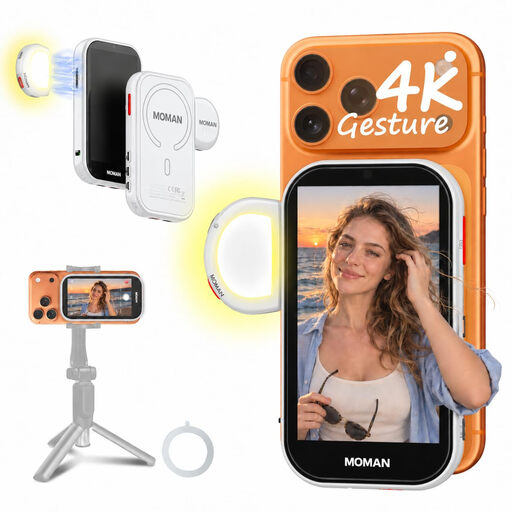
Moman M4 AI Selfie Monitor Screen for iPhone, Gesture Control & Light, White

Moman M4 AI Selfie Monitor for iPhone, White

Designed as a preview screen for a compatible iPhone. Check that this phone setup suits the way you film.

The product name mentions gesture control and a light.

The phone isn’t included.

Joybuy

UPERFECT 16-inch 2K 144Hz portable monitor with 2560 × 1600 QLED screen

UPERFECT 16-inch 2K 144Hz portable monitor

Could suit a setup where you want to position a larger screen away from your writing area, provided your camera outputs a compatible video signal.

The product name lists a 16-inch QLED screen with a 2560 × 1600 resolution, 450 nits and a Mini HDMI connection.

Bear in mind that it will need space on or beside a small desk.

Joybuy

ASUS ZenScreen MB166CR portable monitor, 15.6 inch, Full HD

ASUS ZenScreen MB166CR, 15.6-inch Full HD

Consider this portable screen only if it works with the video connection on your source device and you can make room for the monitor.

The product name lists a 39.6 cm (15.6 inch) screen with a 1920 × 1080 resolution.

Check the connection and mounting options for your specific setup.

Joybuy

ASUS MB16ACV portable monitor, 15.6 inch, Full HD

ASUS MB16ACV, 15.6-inch Full HD

Could be an option if you want to use a portable screen alongside your filming setup and your source device outputs a compatible video signal.

The product name lists a 39.6 cm (15.6 inch) screen with a 1920 × 1080 resolution.

Check which connection you’ll need for your camera or other source.

Joybuy

iiyama 24-inch IPS monitor with built-in Windows Hello camera and microphone

iiyama 24-inch IPS monitor with built-in Windows Hello camera and microphone

A large screen could be useful if you’ll be viewing it from a distance and can position it away from your writing area. Check that you have room for both the screen and stand first.

The product name lists a 24-inch IPS monitor with a built-in camera and microphone.

The screen and stand take up space, so check whether an alternative mounting option will work with your desk.

Joybuy

Frequently asked questions

Does a 4K camera need a monitor with a 4K screen?

Not necessarily: supported HDMI input and panel resolution are different specifications. Compare your camera’s active output setting with the monitor’s supported input. Portkeys lists 4K30p support and a 1920 × 1080 pixel panel for the PT5 II.

How can I keep a camera monitor out of the way while writing?

First, decide where you can see the screen without blocking your writing area. Then check the mount, cable routing and power supply in that spot. Atomos lists a mounting point on the underside of the Shinobi II and says it doesn’t have a built-in battery. FEELWORLD lists a built-in battery for the P6XL, with a stated battery life under specific conditions.

What costs and rights should I check when buying online?

Check which cables, power components and mounting materials are included with the version you’ve chosen, and who the seller is. The Dutch government states that there is no fixed statutory period for the legal guarantee in the Netherlands, and that the seller must put faulty products right. When you buy online from a business, you’ll often have a 14-day cooling-off period, subject to conditions and exceptions.

Can I publish a calligraphy lesson if other people are recognisable in the footage?

That depends on how the footage is used and shared. The Dutch Data Protection Authority considers recognisable people in footage to be personal data. The exception for strictly personal or household use doesn’t apply to wider publication or business use. If this is the case, assess which GDPR legal basis applies before filming and publishing.

What should I check about the product safety of an imported monitor?

For the specific version, check which EU product safety requirements apply and whether the required CE marking is present. The Dutch government states that electronic products placed on the EU market need CE marking. A brand name or product specification alone doesn’t confirm that a specific version meets the requirements.
