
Detail checker
You film small text, cards and game pieces, and want to check focus and framing as you record.


Start by thinking about what you want to check while filming: magnification and focus aids can help with small details, while a larger screen gives you more viewing space. Then check that the camera output, supported HDMI mode, mounting and power supply suit your setup. Only choose a monitor with a recording function if you also want to record separately on the monitor.
You film small text, cards and game pieces, and want to check focus and framing as you record.
You film longer explanations at the table and want a well-positioned viewing screen with a power solution that suits the session.
You want to record separately on the monitor as well as view the footage, and are happy to manage storage and compatibility.
A good fit if: you mainly want to check focus and framing, and have limited space around the camera.
Bear in mind: a smaller screen gives you less viewing space for the whole game board.
A good fit if: someone beside the camera needs to follow the game, or you move your setup around.
Bear in mind: a larger screen needs space for mounting. If you choose a battery-powered model, check the stated battery life and power options.
A good fit if: you need to record on the monitor as well as view the footage.
Bear in mind: you’ll need to factor storage, file management and camera compatibility into your workflow.
| What to consider | What should you check? | Who is this important for? |
|---|---|---|
| Details and framing | Compare screen size and panel resolution. Also check whether magnification, peaking or frame guides are available. | I want to check small text and game pieces without losing sight of the whole board. Around 36% of consumers filming in this situation prioritise checking details. |
| Camera connection | Check your camera’s output type and compare your preferred HDMI resolution and frame rate with the support offered by the exact monitor model. | I want to know that the monitor can display the signal from my existing camera, not just that both devices have HDMI. Around 29% of consumers give camera connectivity top priority. |
| Power and positioning | Check mounting points, screen position and power options. Compare battery life only under the stated conditions of use. | I want to film a longer explanation without cables or the screen getting in the way of the playing area. Around 21% of consumers focus mainly on session length and positioning. |
| Recording on the monitor | Check whether the model actually records video, what media it records to, and which cameras and formats it supports. | I want to use a recording workflow on the monitor as well as recording in the camera. Around 14% of consumers say this extra recording function is their main requirement. |
Supported input and the number of pixels on the built-in screen are different specifications. This distinction matters if you want to check small text and game pieces.
Compare the panel resolution and any magnification features separately with your camera’s HDMI output mode.
An SD card slot alone doesn’t prove that a monitor records video. Atomos states that the Shinobi II’s SD card is for firmware and LUTs; Blackmagic, by contrast, specifies that the Video Assist 5" 12G HDR can record to an SD card or USB-C storage.
A separate recording workflow also means choosing and managing storage media.
Only buy a monitor with a recording function if you need that extra recording option. Check the storage medium, file format and camera compatibility.
The screen needs to remain visible and accessible without getting in the way of the playing area, and the power supply must suit the expected recording time.
Depending on your setup, you may need additional parts for a suitable power or mounting solution.
Plan the positions of the camera, monitor and cables in advance. Also check which power supply and mounting parts are included with the version you choose.
The PT5 II is a compact HDMI monitor for checking the image and focus.
The Shinobi II is a compact viewing monitor with focus and exposure tools. Camera control is only relevant for supported cameras.
The P6XL is a 6-inch option for anyone who values a built-in battery when filming at different table setups.
The Indie 7 is an option if you need a 7-inch viewing screen and, potentially, SDI as well as HDMI.
The Video Assist range is worth considering if a separate recording function is part of your workflow.
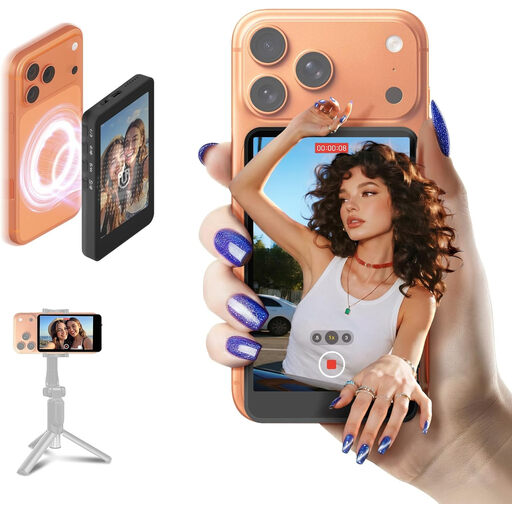
This pick is for filming a board game tutorial on a smartphone when you want to view the footage as you record.
 No image available
An option for smartphone filming when you want to view the footage as you record. Check that your phone is compatible with the model.
The product name lists iPhone 7–17 and Android. Check compatibility with your exact phone model and preferred setup.
Not necessarily: input support and screen resolution are separate specifications. Portkeys lists input up to 4K30p and a 1920 × 1080 screen for the PT5 II. Compare both figures with your camera’s output.
Choose a power option that suits the expected session length, and route cables away from the playing area. FEELWORLD quotes around two hours of use for the P6XL at 100% brightness; Atomos lists NP-F/L-Series batteries or USB-C PD as power options for the Shinobi II. Check which parts are included with the version you choose.
For a consumer purchase, the Dutch government says you are entitled to a product that is fit for purpose. There is no fixed statutory warranty period in the Netherlands, and the retailer is your point of contact if there’s a problem. If you’re buying on behalf of a business, don’t assume the same consumer rules apply; check the terms of purchase.
A valid legal basis under the GDPR is required to record and publish identifiable people for business purposes. The Dutch Data Protection Authority considers identifiable people’s information to be personal data; consent may be a legal basis. If no identifiable people appear in the footage, those specific rules on processing images of people do not apply in the same way.
According to the Dutch government, you need the creator’s permission to use copyright-protected music and other people’s photographs. A private home copy cannot be shared as a public online shop video. Check the rights that apply to each item of content you want to show.