
Creator filming small game pieces
You film cards, text or counters from above and want to check focus and framing as you explain the game.


Choose a camera monitor that lets you clearly check the board, hands and small game pieces from where you’re working. Then make sure its camera connection, power supply and mounting options suit your setup. A brighter screen or exposure aid won’t eliminate flicker in your footage, so test your camera and lights together.
You film cards, text or counters from above and want to check focus and framing as you explain the game.
You want to assess the exposure and tell the difference between what you see on screen and flicker in your footage.
You want to connect and power the monitor in a convenient position, without cables or mounting getting in the way of filming.
Start by thinking about what you need to see from your working position, then check the camera output, power supply and mounting options. Treat flicker as an issue with the footage, not screen brightness.
| What to consider | What to look for | Who is this important for? |
|---|---|---|
| Focus and framing | Compare screen size, resolution, magnification and available focus or framing aids. Check the screen from your actual viewing position. | I want to be able to see from where I’m sitting whether cards, text, hands and counters are in focus and fully in frame. Around 29% of consumers give checking detail top priority. |
| Exposure and flicker | Check whether it has tools such as waveform, histogram or false colour. Record a test with your own lights and check the footage for flicker. | I want to assess light-coloured cards and dark areas without mistaking screen brightness for a solution to flicker. Around 29% of consumers prioritise checking exposure and artificial light. |
| Signal and compatibility | Compare your camera’s output, connection, resolution and frame rate with the input specifications of the exact monitor model. Check camera control separately. | I want my camera’s signal to be accepted and, if needed, to be able to control my camera from the monitor. Around 21% of consumers give signal compatibility top priority. |
| Positioning and power | Check the mounting point, cable routing and power options, as well as which battery, adapter or mount is included with the version you’re considering. | I want to mount and power the screen in a convenient position while filming, without getting in the way of the board or camera setup. Around 21% of consumers prioritise practical positioning and power. |
An HDMI connection or the term 4K doesn’t, by itself, tell you which resolution and frame rate a monitor accepts. Atomos specifies monitoring up to 4K UHD 30p for the Shinobi II.
Compare your camera’s exact HDMI output with both the resolution and frame rate supported by the monitor input.
The stated brightness describes the screen, not whether the recorded video will be free from flicker.
Record a test with the lights you actually use and check the footage. For suitable situations with a 50 Hz power frequency, Sony suggests shutter speeds of 1/50 or 1/100 of a second as possible starting points; the right choice depends on the camera and filming conditions.
Power and mounting requirements vary between monitors. Camera control also depends on support for your camera model and the right configuration. Atomos says the Shinobi II doesn’t have a built-in battery.
Before buying, check what’s included, the power options and mounting, as well as compatibility with your camera model and firmware.
You may need to buy a suitable power supply, cable or mount separately.
The FW568 PRO is a compact HDMI monitor for tabletop setups where checking the image and sending it through to a second HDMI device may be useful.
The Shinobi II combines a compact monitor screen with control of certain supported cameras.
The Indie 7 has a larger screen, suitable for viewing from a separate working position or as part of a more advanced production setup.
The LH5P II combines a compact HDMI screen with monitoring aids and control for certain cameras.
The R6II Lite is a compact HDMI option with focus and exposure aids.
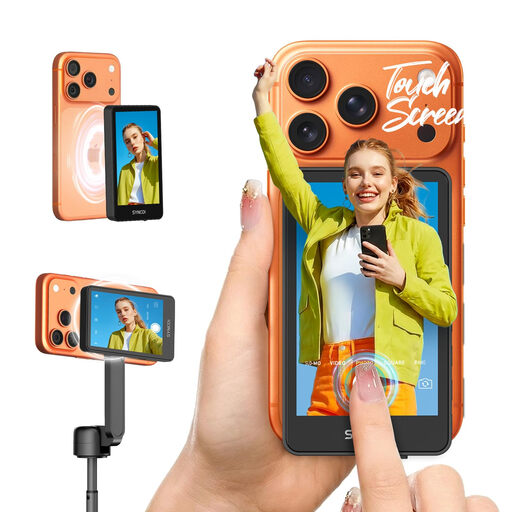
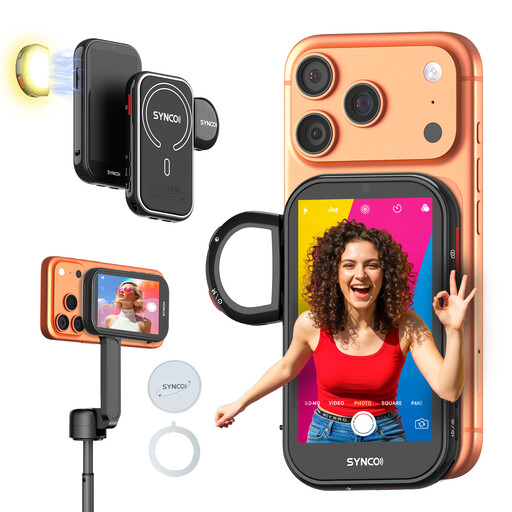
These products are phone selfie monitors for filming a board game tutorial with a compatible smartphone. They’re designed for viewing or controlling a phone recording; check phone compatibility before choosing one.
 No image available
Designed for viewing your phone’s recording and remotely controlling functions such as recording and zoom, when filming with a supported iPhone or Android phone.
The product description states that it offers wireless control up to 50 metres and has a built-in battery.
 No image available
This may suit a phone setup where you want to keep an eye on the image while your phone is out of reach.
The product description mentions wired and wireless image display, gesture control, a built-in battery and fill light with three colour temperatures and three brightness levels. It states that the product is compatible with iPhone but not Google Pixel; check whether it’s suitable for your phone.
No. The monitor helps you assess the image, but flicker depends on the combination of light source and camera settings. Test with your own lights. For suitable situations with a 50 Hz power frequency, Sony suggests shutter speeds of 1/50 or 1/100 of a second as possible options, depending on the camera’s features and filming conditions.
Not automatically. Atomos says that, with the Shinobi II, camera control requires a separate connection and settings on a supported camera, as well as HDMI. Check your exact camera model, firmware and the control function you want to use.
Check how your chosen monitor is powered and make sure the cable won’t get in the way of the board or filming. Atomos says the Shinobi II has no built-in battery and lists an NP-F battery or USB-C PD as power options.
For eligible distance sales from a business, a 14-day cooling-off period generally applies. The Netherlands Government lists exceptions and distinguishes these purchases from buying from a private individual, so check who the seller is and which terms apply to your specific purchase.
That depends on the circumstances and the privacy rules that apply. According to the Dutch Data Protection Authority, recognisable people are personal data. The exception for purely personal or household use doesn’t apply to wider publication, which may require a legal basis under the GDPR.