
Filming construction details
If you want to film rails, wiring or small components up close, focus on the lens, focusing distance and depth of field. Canon Netherlands explains that depth of field decreases as you get closer to your subject.


If you usually film from one spot, choose a setup that can capture both your model railway and small components from your actual camera position. A mirrorless camera gives you the flexibility to choose from interchangeable lenses. If you want to film while moving along the layout, a compact gimbal camera could be a good fit, but check first that its fixed field of view and focusing distance will work for your close-up shots.
If you want to film rails, wiring or small components up close, focus on the lens, focusing distance and depth of field. Canon Netherlands explains that depth of field decreases as you get closer to your subject.
If you film from a tripod, check whether you can fit both the layout and your hands in the frame from the available position. The Consumers’ Association says a tripod is useful for filming at home, where weight is less of a concern.
If you want to film scenery and moving trains as you go, stabilisation and the limitations of the field of view are important. DJI lists three-axis mechanical gimbal stabilisation for the Osmo Pocket 3.
A good fit if: you switch between wide shots and small construction details from one spot.
Keep in mind: you may need a different lens, a tripod or extra lighting; filming close up reduces the depth of field.
A good fit if: you regularly move the camera along the layout and want a compact setup.
Keep in mind: the fixed lens and focusing distance determine whether small components will appear large enough in the frame.
| What to consider | What should you check? | Who is this important for? |
|---|---|---|
| Small construction details | Check the focusing distance of the exact lens and take a test shot of your smallest component from the intended distance. Nikon Netherlands lists a minimum focusing distance of 0.2 m for the Nikon Z DX 16-50mm kit lens. | If I want to show rails, wiring or small components close up, the lens needs to focus at my working distance. Around 28% of consumers say details are their top priority. |
| Full layout and hands | Measure the distance between the camera and the layout, then assess the field of view of the exact lens or camera from that position. | I want to keep the layout and my hands in frame without the camera getting in the way of my workspace. Around 22% of consumers prioritise a useful overview. |
| Room lighting | Record a test video under your own lights and check for any visible flicker or banding. | If I mostly film using the existing room lighting, I want to know how it looks in the footage. Around 17% of consumers give lighting and flicker top priority. |
| Long recordings and audio | Check recording time with your settings, power supply, memory card and microphone connection. Nikon lists a maximum continuous recording time of 125 minutes for the Z 30; actual recording time depends on usage conditions. | For a long building session, I don’t want to keep stopping the recording, and spoken explanations need to be clear. Around 17% of consumers put long recordings and commentary at the top of their list. |
| Moving along the layout | Check that you have enough room to move along the layout and that the fixed lens can capture the details and wider shots you want. DJI lists a minimum focusing distance of 0.2 m for the Osmo Pocket 3. | If I want to move the camera along the layout, freedom of movement and stable footage matter more than filming from one fixed position. Around 16% of consumers give moving shots top priority. |
A high resolution won’t help if the lens can’t focus close enough. Close-up shots also reduce the depth of field.
Check the focusing distance of the exact lens and take a test shot of your smallest component from the intended distance.
Stabilisation can help when you’re moving, but a fixed lens and minimum focusing distance limit your options for detail shots.
Choose based on the shot that matters most to you: a tour along the layout or very small construction details.
A kit and a standalone body can include different components. Check exactly which lens and accessories come with the version you’re considering. DJI says the Osmo Pocket 3 has no built-in storage.
Compare the items included and check whether you’ll need extra storage, a tripod or a microphone for your recordings.
Artificial light can cause flicker or banding in video, even if the camera is otherwise suitable for your filming position.
Record a test video using the lights you actually plan to use. Where possible, try suitable video shutter speeds and check the results.
The EOS R50 V with RF-S 14-30mm kit lens is a mirrorless option for a fixed setup, with interchangeable lenses.
The ZV-E10 II is a mirrorless camera body with an interchangeable E-mount lens; your choice of lens also affects how you frame wide shots and details.
The Z 30 with Z DX 16-50mm kit lens is a mirrorless option for fixed shots and longer building sessions.
The Osmo Pocket 3 is a compact gimbal camera for anyone who regularly films along their model railway.
The selection below includes compact video and vlog cameras. Check each model to make sure its lens, movement options and focusing distance for details suit your setup.
 No image available
This vlog camera is worth considering if you’re looking for a compact camera; check that the framing and focusing distance for details work for your own workspace.
 No image available
Built-in storage may be useful if you want to save recordings without using a separate card straight away; check that the fixed lens suits your focusing distance for details.
The product title lists a 1-inch CMOS sensor, 4K/240fps, 2× lossless zoom, 107GB of built-in storage and a 2-inch rotatable screen.
 No image available
The included handle with a 1/4-inch thread may be useful if you want to attach the camera to a support; check that it suits your setup.
The product title lists a 1-inch CMOS sensor, 4K/240fps, 3-axis stabilisation, 2× lossless zoom, 14-stop dynamic range and 107GB of built-in storage.
 No image available
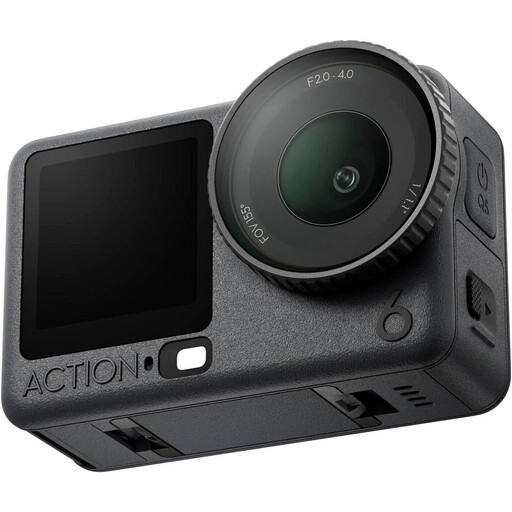
An action camera could be a good fit if you want to move the camera along the layout; test the framing and the recording time you need where you plan to film.
The product description lists a 1/1.1-inch sensor and a variable f/2.0–f/4.0 aperture. The product title names the Adventure Combo.
 No image available
The included microphone may be useful if you want to record explanations while you build. DJI lists three-axis mechanical stabilisation and focusing from 0.2 m for the Osmo Pocket 3; the fixed lens limits your choice of field of view and magnification.
The product title lists 4K/120fps and an included microphone.
No. First check whether the lens can focus from your filming distance and make the component large enough in the frame. Filming close up reduces the depth of field. So, take a test shot of your smallest component rather than comparing maximum resolution alone.
First, decide where you can put a tripod, then check from that position whether the layout and your hands fit in the frame. Next, record a test shot under your own room lights and check the focus, any flicker and the sound.
Before choosing a model, check the power supply, a suitable memory card and any microphone you need. Record a test that lasts as long as your planned session. For goods bought in the EU, Your Europe states that you have a minimum two-year legal guarantee from the date of receipt; if there’s a fault, you can contact the seller. Any additional manufacturer’s warranty does not replace this legal right.
According to the Dutch Data Protection Authority, a recording you keep private falls under the exception for personal or household use. That exception does not necessarily apply if you share the video publicly. Recognisable people are identifiable individuals, so consider which legal basis applies to publishing the video; consent may be relevant.