
Miniature painter showcasing fine details
You want to capture small painted features clearly, so you’re looking at magnification, lens mounts and room for lighting.


A standard zoom lens may be enough for full miniatures and changing your framing; for tiny painted details, the magnification and working distance of the specific lens are what matter. If your miniature has raised details at different depths, taking a series of shots at different focus points can help. A consistent setup, lighting and white balance also help create a cohesive portfolio. Always check exactly which lens comes with the camera kit.
You want to capture small painted features clearly, so you’re looking at magnification, lens mounts and room for lighting.
You want to keep raised details in focus from front to back, so you’re considering a stable setup and shots taken at different focus points.
You photograph several pieces in a similar style and pay attention to the background, lighting and colour settings.
Best for: full figures, groups and compositions where you want to vary the framing.
Trade-off: a standard zoom lens isn’t automatically a macro lens; check the magnification of the lens included in the kit.
Best for: anyone who wants to fill the frame with tiny painted details and can choose a lens with the right mount.
Trade-off: a macro lens isn’t usually included in a zoom kit; a short working distance can also limit the space available for lighting.
Best for: anyone who wants to get started without a separate lens and values a compact setup.
Trade-off: a short minimum focusing distance isn’t the same as a stated 1:1 macro lens; check that you can position your lighting, too.
| What to consider | What should you check? | Who should pay particular attention? |
|---|---|---|
| Magnifying small details | Compare the maximum magnification and working distance of the specific lens, and check that the mount is compatible. | If I want to show eyes, brushstrokes or textures clearly, the lens needs to achieve the framing I’m after. Around 33% of consumers prioritise magnifying details. |
| Keeping depth in focus | Check whether the camera model offers focus bracketing, combines images automatically or simply takes a series of shots. | For protruding parts and raised details, I want to capture both the foreground and background in focus. Around 27% of consumers prioritise depth of field. |
| Reproducing colour and lighting | Check the white balance settings and plan fixed positions for the camera, background and lighting. | When I photograph several pieces for one portfolio, I want to keep colour and exposure as consistent as possible. Around 20% of consumers prioritise colour consistency. |
| Choosing a complete kit | Check the variant and what’s in the box; consider whether the included lens suits both wide shots and detail shots. | If I want to get started without buying a separate lens, I want to know what’s included in the kit beforehand. Around 20% of consumers prioritise an easy-to-use starter kit. |
Maximum magnification varies from lens to lens. Canon specifies magnification of up to 1:2 for the RF 35mm F1.8 Macro IS STM, while Nikon specifies 1:1 for the NIKKOR Z MC 50mm f/2.8.
Compare the maximum magnification of the specific lens with the framing you want.
You may need a different lens to achieve the detail framing you want.
The distance from the sensor isn’t the same as the working distance between the front of the lens and your subject. Sony lists a working distance of around 2 cm for the E 30mm F3.5 Macro.
Check the working distance at the magnification you want to use, and see whether there’s still room for your lighting.
You may need a different lighting setup if the lens has to be close to your subject.
The documented Canon EOS R50 and Nikon Z50II zoom kits don’t include the separately described macro lenses.
Check the exact variant and what’s in the box before buying. Only choose extra equipment you need for the photos you want to take.
You may need a separate macro lens or equipment for your setup.
The EOS R50 with an RF-S standard zoom lens is an option for wide shots; the RF 35mm F1.8 Macro IS STM is a separate lens for close-ups.
The Z50II zoom kit is designed for standard framing; the NIKKOR Z MC 50mm f/2.8 is a separate option for macro details.
The E-mount α6400 can be paired with an E standard zoom lens or the separate E 30mm F3.5 Macro.
The Tough TG-7 is a compact alternative with a fixed lens and a microscope mode.
Joybuy camera picks and compact camera setups.
 No image available
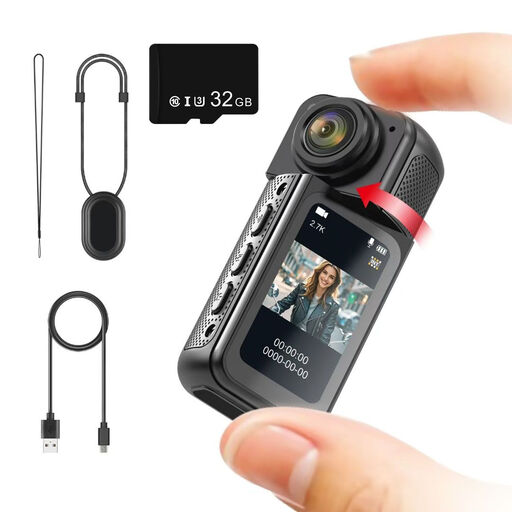
For miniature details, the lens needs to focus at the close distance you want to use. Check this before choosing the camera.
The product name lists 2.7K, a 180° rotating lens, magnetic mounting, a 1.47-inch IPS screen and an included 32 GB memory card.
 No image available
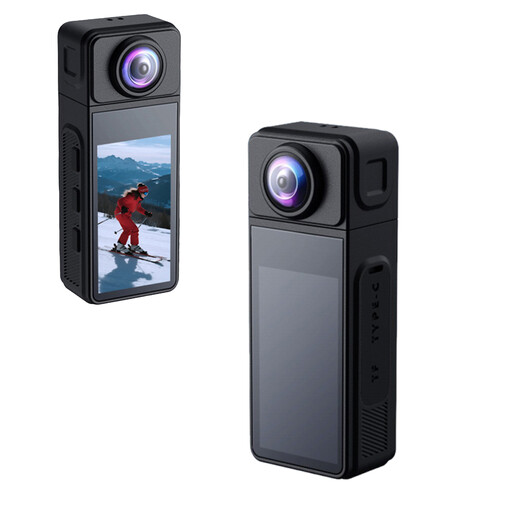
If you want to photograph a miniature close up, check that the lens focuses at the distance you need and that the framing works with your setup.
The product name lists a 270° rotating wide-angle lens, a magnetic housing and electronic image stabilisation.
 No image available
If you want to use lighting with your miniature, check that the position and direction of the light suit the photos you want to take.
The product name lists 4K, a clip, a 1.54-inch screen, a 140° field of view, app control, an LED light and a 1200 mAh battery.
 No image available
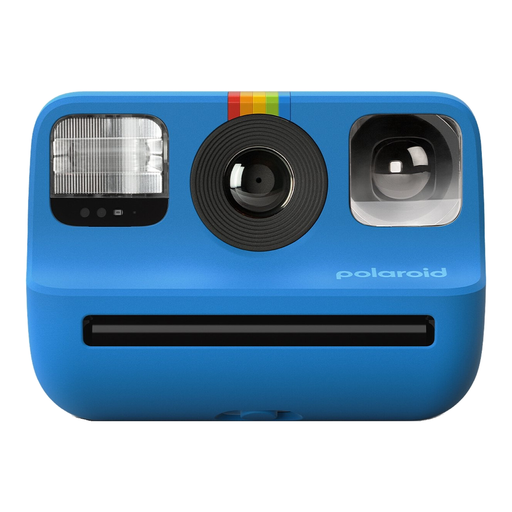
If you’re creating a portfolio with consistent framing and colours, it’s worth checking first that the way this instant camera captures images suits your workflow.
The product name identifies this model as the Polaroid Go Gen 2 in blue.
No, it depends on the framing you want. A zoom lens may be enough for a full figure; for tiny details, compare the magnification of the specific lens. Canon specifies a maximum magnification of 0.16× at 45 mm with autofocus, or 0.26× with manual focus, for the RF-S 18-45mm. Nikon, meanwhile, specifies 1:1 for the separate Z MC 50mm f/2.8.
Set up the camera and subject securely, and consider taking shots at different focus points. Check whether your camera model simply takes a series of shots or combines the images itself: Nikon describes combining images using software, while the TG-7 manual describes a combined image.
First, check which lens and other equipment are included in the exact kit. The documented Canon EOS R50 kit includes an RF-S 18-45mm lens, while the Nikon Z50II zoom kit includes a Z DX 16-50mm; the macro lenses mentioned are sold separately. For a consumer purchase in the Netherlands, the statutory guarantee covers what you could reasonably expect from the product. If a product develops a fault too soon during normal use, contact the seller, as advised by ACM ConsuWijzer.
For online consumer purchases, you generally have a statutory cooling-off period of up to 14 days after delivery. ACM ConsuWijzer also explains the exceptions and conditions. Check the rules for your specific purchase, especially if you’re buying for business use.
As a rule, you need permission from the creator to use other people’s copyright-protected photos or works publicly, according to the Dutch government. A copy for personal use must not be shared. This doesn’t automatically determine which rights apply to a particular miniature or a photo you’ve taken yourself.