What should you look for?
Adjustable overhead camera
Suitable for: live lessons at a fixed table where you want to reframe the work area quickly.
Consider: Logitech lists Reach at 1080p/60 fps; check that the model appears large enough in the frame at your mounting height.
Webcam with adjustable focus
Suitable for: recording via a computer when you need to work at close range.
Consider: Elgato specifies autofocus from 10 cm for Facecam Pro; the webcam needs a suitable mount and requires USB 3.0 or higher.
Mirrorless camera with a close-up lens
Suitable for: choosing your own framing and matching the camera body, lens and mount to work together.
Consider: Canon lists an RF mount for the EOS R50; according to Canon, the separate RF 35mm F1.8 Macro IS STM offers up to 1:2 magnification.
Video-focused mirrorless camera
Suitable for: recording longer lessons with dedicated video and audio features.
Consider: Panasonic lists unlimited 4:2:2 10-bit C4K/4K recording at 50p/60p for the GH7; the body mentioned is supplied without a lens.
Compact gimbal camera
Suitable for: filming away from your usual workbench or while holding the camera.
Consider: DJI lists a fixed lens on the Osmo Pocket 3 that focuses from 0.2 m; check that distance against the close-up you want.
For a miniature painting lesson under artificial light, your choice mainly comes down to fine detail, a stable image, a clear workbench, long recordings or filming in different locations.
| What to consider |
What should you check? |
Who is this important for? |
| Sharp close-ups |
Measure the distance from the lens to the model and check the focusing distance of the exact camera and lens combination. |
If I want to show brushstrokes and tiny details, the model needs to stay sharp without my hands blocking the shot. Around 26% of consumers prioritise sharp close-ups. |
| Image under artificial light |
Make a test recording with your own lights and check for lines and changes in exposure. |
If I want to show paint colours and layers clearly, I want to see how my lights look on video first. Around 26% of consumers prioritise a stable image under artificial light. |
| Hands-free overhead view |
Check the mount, available height, connection and field of view with both your hands and the model in shot. |
If I’m giving a live demonstration, I want to film the work area without the camera getting in the way of my brushwork. Around 21% of consumers prioritise a hands-free live setup. |
| Long lesson recording |
Check the power supply, storage and audio input for the recording format you want to use. |
If I want to record a full lesson, I need to know in advance how storage and audio will be handled. Around 16% of consumers prioritise uninterrupted recording and clear audio. |
| Filming in multiple locations |
Compare the focusing distance and angle of view with your preferred framing and workspace. |
If I also want to film away from my usual table, I’m looking for a camera I can move around and will check its close-up performance separately. Around 11% of consumers prioritise portability. |
For flicker under lighting with a mains frequency of 50 Hz, Sony suggests 1/50 or 1/100 second as possible shutter speeds. Test the setting with the lights you actually use; results can vary between light sources.
Cameras at Joybuy
This Joybuy selection includes cameras for computer use and recording video lessons. Check how each model focuses at your working distance and make a test recording with your own lighting.
 No image available
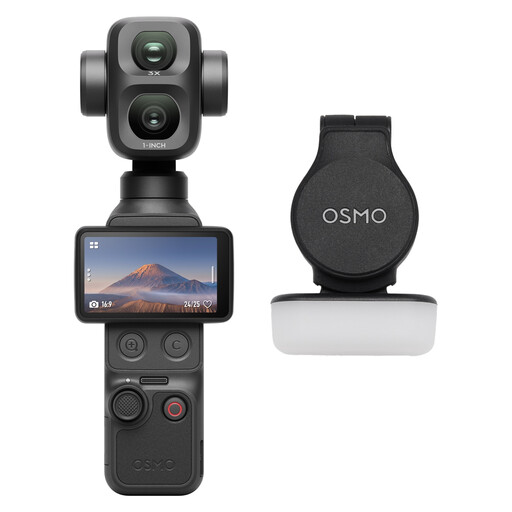
Osmo Pocket 4P Standard Combo, black
The video features listed may be useful if you want to record a lesson; check the focus and framing at your own working distance.
The product description lists 4K video, a 20mm f/2.0 lens and 4K/240 fps in slow motion only.
Joybuy
 No image available
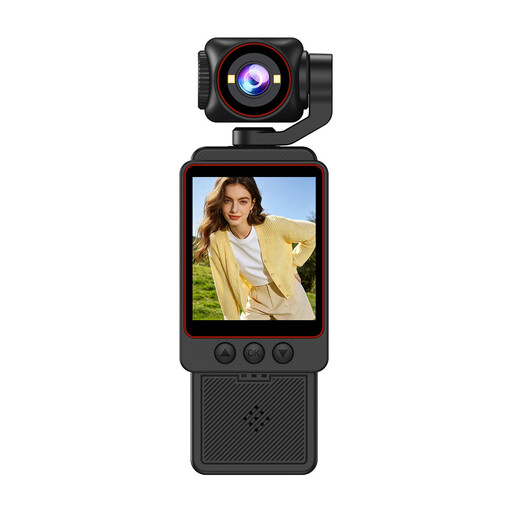
2K pocket vlogging camera with rotating lens, black
This camera is described as being for video recording; check whether the rotating lens and image framing suit your workbench.
The product description lists 2K video, a 360-degree rotating lens and built-in audio recording.
Joybuy
 No image available
Philips 4000 Series 4K UHD Webcam SPL6408BT/00, EU version
This desktop webcam may suit you if you want to record your lesson via a computer; test the focus and image with your model on the table.
The product title lists 8 MP, autofocus, two built-in microphones and a privacy cover.
Joybuy
 No image available
Philips 2K QHD PC Webcam SPL6308S/00, EU version
This webcam is described for computer use; check whether the clip mount suits the place where you want to film.
The product title lists 2K QHD video and a noise-cancelling microphone.
Joybuy
 No image available
Sony ZV-E10 with 16–50mm zoom lens, black
A camera supplied with a zoom lens may suit you if you want to put together your own recording setup; check the close-up at your painting distance.
The product description lists 4K video, a tilting screen and a Product Showcase setting for shifting focus to objects.
Joybuy
Frequently asked questions
Will 4K help if the model isn’t in focus?
No. First check the distance from the lens to the model and the framing. Elgato lists a focusing range from 10 cm for Facecam Pro; DJI lists a focusing distance from 0.2 m for the Osmo Pocket 3. The size of the image also depends on your setup.
How can I test my lights before recording a full lesson?
Make a short test recording under the lights you’ll actually use and check for lines. For a mains frequency of 50 Hz, Sony suggests 1/50 or 1/100 second as possible shutter speeds to reduce flicker; test with your specific lights too.
What should I check for a live USB setup?
Check that your computer and software recognise the camera, that the connection is compatible and that the mount stays clear of your work area. Elgato specifies USB 3.0 or higher for Facecam Pro; Logitech describes Reach as a USB-C camera.
What extra components should I check for recording a lesson?
Check the bundle and what you’ll need for the lens, storage and audio. The Canon EOS R50 achieves the stated macro magnification with a separate RF 35mm F1.8 Macro IS STM; DJI says the Osmo Pocket 3 has no built-in storage.
Can I publish footage that clearly shows pupils or other participants?
Recognisable people in footage are personal data, so data protection law may apply. The Dutch Data Protection Authority states that an organisation needs a lawful basis to film and publish recognisable footage of pupils; the appropriate basis depends on the circumstances.


