
A painter explaining miniatures in close-up
You want to make brush tips, layers of paint and small components easy to see. When choosing, consider both the distance to the model and the room your hands and brush need.


If you want to show fine brushstrokes in close-up, start by checking the lens’s working distance and magnification. A mirrorless camera with a suitable macro lens gives you more flexibility when setting up close-ups. A compact camera with a fixed lens may be more convenient if a quick set-up is your priority, but check that the model and your brush fit in the frame at your chosen distance. With either option, check the white balance in changing window light, the length of your class and how clearly your explanations can be heard.
You want to make brush tips, layers of paint and small components easy to see. When choosing, consider both the distance to the model and the room your hands and brush need.
You want viewers to be able to follow your colour choices as the daylight changes. Adjustable white balance and a test recording in your workspace lighting can help you assess the image.
You want to spend as little time as possible setting up and record the whole lesson with clear explanations. At the same time, check that fine details remain clearly visible.
Good for: showing fine paint details when you can position the camera, lens and support at a set working distance. Canon lists a maximum magnification of 0.5× for the RF 35mm F1.8 MACRO IS STM; Nikon lists a maximum reproduction ratio of 0.67× for the NIKKOR Z DX MC 35mm f/1.7.
Keep in mind: the lens mount and lens need to be compatible with the camera body. Higher magnification alone does not guarantee that the model, brush and hands will all be in focus at the same time.
Good for: getting set up quickly, provided a test frame shows enough detail. DJI lists a minimum object distance of 20 cm and a Product Showcase focus mode for the Osmo Pocket 3.
Keep in mind: a fixed lens gives you less flexibility to adjust the optics for a small close-up. The stated focusing distance does not prove that your model will appear large enough in the frame.
| What to consider | What should you check? | Who is this important for? |
|---|---|---|
| Visibility of miniature details | Check the lens mount, magnification, focusing distance and clear space in front of the lens. Frame a test shot using the model you’ll actually be painting. | If I want to show brushstrokes and layers of paint clearly, I check that the close-up works without blocking my workspace. Around 31% of consumers prioritise miniature detail. |
| Paint colours in changing window light | Check the white balance and review a short test clip in the lighting you’ll be filming in. | If the daylight changes during my class, I want to check that the paint colours remain recognisable. Around 25% of consumers prioritise colour reproduction. |
| Recording a full lesson | Compare your planned lesson length with the recording conditions for the exact model, and test the memory card and power supply using similar settings. | If I want to record the demonstration in one take, I check in advance that my set-up can handle the whole lesson. Around 19% of consumers prioritise uninterrupted recording. |
| Clear explanations | Listen back to a test recording from the planned camera position and check the microphone options available on the model you’ve chosen. | If I give instructions while painting, I want to check that my voice can be heard clearly from the worktable. Around 13% of consumers prioritise clear explanations. |
| Set-up time and workspace | Try a test set-up and check the framing, focus and space for your hands and brush at the same time. | If I want to film with minimal equipment without getting in the way of my painting space, I look for a practical set-up. Around 12% of consumers prioritise ease of set-up. |
The magnification figures quoted apply to specific lenses, not automatically to every camera body or bundle. A suitable macro lens may need to be bought separately.
Before buying, check the exact camera body, lens mount, lens and working distance for the complete set-up.
The Sony E 30mm F3.5 Macro has a minimum working distance of 2.4 cm from the front of the lens. This short distance can limit the space available for your brush, hands and lighting.
Measure how much clear space you need in a test set-up and try the lens at the distance you actually want to film from.
Changing light can affect how paint colours look on screen, even when the model is in focus. Canon Europe explains that the colour temperature of light affects the colours captured by the camera.
Record a short test clip before the class and check it again if the light changes noticeably.
The Sony ZV-E10 and ZV-E10 II are different models. Bundles can also vary.
Compare the full model name, bundle contents and specifications before weighing up different versions.
The EOS R50 V is a video camera with interchangeable RF lenses. For close-ups, you can consider a suitable lens as a separate purchase.
The ZV-E10 II is a video camera with interchangeable lenses. The Sony E 30mm F3.5 Macro is a separate lens for close-ups.
The Z 30 is aimed at video creators. The NIKKOR Z DX MC 35mm f/1.7 is a separate lens for detailed close-ups.
The Osmo Pocket 3 is a compact gimbal camera with a fixed lens, designed for creators who want to put together a video set-up quickly.
The LUMIX G100D is a compact Micro Four Thirds mirrorless camera for video; choosing a lens for close-ups is a separate consideration.
These product picks are aimed at video recording. For a painting class with small details, it’s still important to make a test recording with your model, camera position and workspace lighting.
 No image available
If you want a quick set-up and to film small paint details, assess this version with a test frame.
 No image available
Check with your actual model whether this camera set-up clearly shows the small details in your painting class.
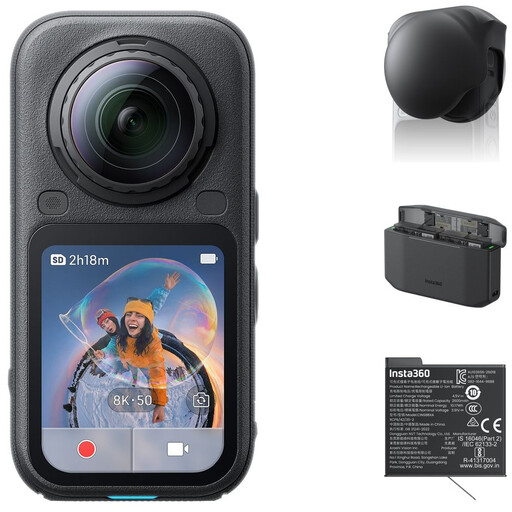
The bundle name lists a Standard Bundle, Lens Cap, Xtreme Battery and Fast Charge Case.
 No image available
Consider this version if you’re looking for a compact camera set-up. Make a test recording to check whether the miniature appears large enough in the frame from your filming distance.
The product name lists a 1″ CMOS sensor, 4K/240fps, 3-axis stabilisation, 2× lossless zoom, 107GB of built-in storage and a 2″ rotating screen.
 No image available
Compare this bundle with your intended filming set-up and test whether your model, hands and brush all fit comfortably in the frame.
The product name lists 4K/240fps, 3-axis stabilisation, 14 stops of dynamic range, 107GB of built-in storage and a handle with a 1/4″ thread.
No image available
This bundle may suit you if you also want to record spoken explanations while filming; test the sound from the planned camera position.
The product name lists 4K/120fps, 3-axis mechanical stabilisation and a microphone in the Creator Combo.
Make a test recording in the window light you’ll be filming in and check the white balance. Canon Europe explains that the colour temperature of light affects how the camera records colours. Check the result again if the daylight changes.
It depends on how large your model appears in the frame. DJI lists a minimum object distance of 20 cm for the Osmo Pocket 3, but that distance alone doesn’t tell you how much detail you’ll see. Test with the actual model, your hands and your brush in the frame.
Record a test segment using the settings, memory card and power supply you plan to use for the lesson, then listen back to the audio. Nikon lists up to 125 minutes of uninterrupted filming for the Z 30 under the manufacturer’s conditions; don’t treat this as a guaranteed recording time for every set-up.
If you film and publish identifiable people on behalf of a business or organisation for professional or commercial purposes, the Dutch Data Protection Authority says the GDPR applies and you need a valid legal basis, such as consent. A recording made solely for your own use and not published is not automatically the same situation.
According to ACM ConsuWijzer, online purchases generally come with a statutory 14-day cooling-off period after delivery. The seller is also responsible for offering an appropriate solution if the product develops a fault sooner than you could reasonably expect during normal use. The precise rules depend on the purchase and the circumstances.