Start by measuring the distance between the camera and your work, then choose a lens or focus range that shows both the work surface and the small steps involved in building. A mirrorless camera gives you a choice of lenses, a webcam is well suited to teaching via computer, a camcorder has a built-in zoom lens, and a compact gimbal camera may be a good fit for moving close-up shots. Take test footage using your own lights to assess sharpness, colour and any flicker.
Who are these camera set-ups suited to?
Detail-focused builder
You want to show small joints and components clearly, so check the focus and framing at your actual working distance. Canon Netherlands and DJI list model-specific focusing distances, so always assess the lens or camera you’ve chosen as part of your set-up.
Teacher using a computer
You want to show work on your table during an online lesson and adjust the settings under artificial light. Logitech describes a Show Mode for the MX Brio, along with controls for settings including white balance and shutter speed. Check the camera angle and computer compatibility too.
Creator of longer lessons
You record continuous building steps with spoken instructions. Check that the microphone connection, storage media and power supply suit the length of your lessons. Canon lists a microphone input and two SD card slots for the LEGRIA HF G70.
Which buying concerns should you consider?
Mirrorless camera with lens
A good fit if: you want to tailor a fixed tabletop set-up to your working distance and choose your own lens.
Consider: the supplied lens won’t necessarily provide enough magnification, so test the complete combination.
Webcam connected to a computer
A good fit if: you teach directly from a computer and want to show your desk.
Consider: check that the camera angle and focus show even the smallest components.
Camcorder with zoom lens
A good fit if: you want to switch between wide shots and close-ups without changing lenses.
Consider: Canon lists a minimum focusing distance of 1 cm at wide angle for the LEGRIA HF G70, but 60 cm across the full zoom range.
Compact gimbal camera
A good fit if: you want to capture moving shots around your build as well as a fixed lesson recording.
Consider: DJI lists a focus range starting at 0.2 m for the Osmo Pocket 3. Test whether this provides enough magnification and whether you can mount the camera securely.
| What to consider |
What should you check before buying? |
Who is this important for? |
| Capturing small details sharply |
Measure the distance to your work and check both the minimum focusing distance and magnification of the exact camera and lens combination. Take a test shot of the smallest component. |
When I demonstrate small joints, I want them to look sharp and clear from my fixed camera position. Around 36% of consumers put clearly visible miniature details first. |
| A steady image under artificial light |
Film using the lights you actually use. For a 50Hz power supply, Sony Netherlands suggests starting with 1/50 or 1/100 of a second if you experience flicker. Test whether this works with your light source. |
I don’t want stripes or changing colours in the picture under my own lights. For around 29% of consumers, a steady image under artificial light is the top buying priority. |
| Showing your table on a computer |
Check computer compatibility and take a test shot that includes the whole work surface, both hands and a small component. |
When I teach via a computer, I want to show my building table easily and switch between explanations and demonstrations. This is the top priority for around 21% of consumers. |
| Instructions and long recordings |
Test the microphone at your usual speaking distance and check the connections, storage media and power supply for the planned lesson length. |
I want to record longer building steps with clear spoken instructions, so the recording set-up needs to suit the session. Around 14% of consumers put continuous explanations and audio first. |
Which buying mistakes can you avoid?
-
Focusing only on resolution or the shortest focusing distance
A camera may be able to focus without giving a small component enough space in the frame. The focusing distance can also change with the zoom setting.
Compare how the smallest component looks at the actual camera distance and zoom setting you plan to use during the lesson.
If you can’t frame the shot properly, you may need a different lens or camera mount.
-
Assuming a camera body is a complete kit
The Sony ZV-E10 II listing in the Netherlands is for the body only, whereas the Canon EOS R50 kit is listed with an RF-S 18-45mm lens. What’s included in the bundle therefore affects what else you’ll need.
Check the exact bundle contents and assess the camera and lens together.
If you buy a body only, you’ll need to choose a suitable lens yourself.
-
Assuming autofocus will fix flicker from LED lights
Focusing and stripes caused by a flickering light source are two different problems. A sharp image doesn’t rule out flicker.
Take test shots using your own lights and try a different shutter speed if necessary. For a 50Hz power supply, Sony Netherlands suggests starting with 1/50 or 1/100 of a second.
Which brands are worth considering?
Canon
Canon offers both the EOS R50 with an interchangeable lens and the LEGRIA HF G70 with a built-in zoom lens.
- The EOS R50 kit is listed with an RF-S 18-45mm lens; the HF G70 has a microphone input and two SD card slots, according to Canon Netherlands.
- The focusing distance of the RF-S lens varies depending on the zoom setting. For the HF G70, Canon lists 1 cm at wide angle and 60 cm across the full zoom range.
Sony
The Sony ZV-E10 II is a mirrorless camera with an interchangeable lens, for creators who want to choose their own lens and set-up.
- Sony lists an APS-C sensor and interchangeable lenses for this model.
- The Dutch listing is for the body only and doesn’t include a lens. Sony’s advice on flicker is a settings recommendation, so test the results with your own lights.
Logitech
The MX Brio is a webcam for computer-based lessons where you want to show your work on the table.
- For the MX Brio, Logitech lists Show Mode and controls for settings including white balance and shutter speed.
- A desk view won’t necessarily show whether tiny components are sharp and large enough in your set-up. Check the angle and test footage.
DJI
The Osmo Pocket 3 is a compact gimbal camera for anyone who also wants to capture moving close-up shots.
- DJI lists a focus range starting at 0.2 m.
- The minimum focusing distance doesn’t prove that you’ll get the macro shot you want. Check the magnification and mounting options in your own set-up.
Panasonic
The LUMIX G97 is a mirrorless camera for creators who want to assess features including recording options for longer lessons.
- Panasonic lists 4K recording with no set time limit.
- Panasonic warns that the camera may still stop recording if the ambient temperature is high. The lens and set-up separately determine how miniature details appear in the frame.
Joybuy products for filming your builds
This selection includes webcams for computer-based lessons and compact cameras for filming your build, including moving shots.
 Image not available
Logitech HD Pro Webcam C920e
A webcam option for anyone who wants to record lessons via a computer and show their work table.
The field of view is fixed, so take a test shot to check that both your work surface and hands fit in the frame.
Joybuy
 Image not available
Philips 4000 Series 4K UHD Webcam SPL6408BT/00
A desktop webcam to consider if you want to record lessons via a computer.
The product name lists 4K UHD, autofocus, two built-in microphones and a privacy cover. Take a test shot to see whether the framing captures both your hands and small components.
Joybuy
 Image not available
DJI Osmo Pocket 3
A compact camera to consider if you want to capture moving shots around your build as well as a fixed lesson recording.
The product name lists 4K/120fps video and 3-axis stabilisation. DJI gives a focus range starting at 0.2 m; check whether this distance provides enough magnification for your components.
Joybuy
 Image not available
Insta360 Link 2C Standard Bundle, Graphite Black
A webcam option for computer-based lessons where you also want to show your work on the table.
The product name lists 4K, a 1/2-inch sensor and HDR. Check that the DeskView angle and required software settings suit your lesson set-up.
Joybuy
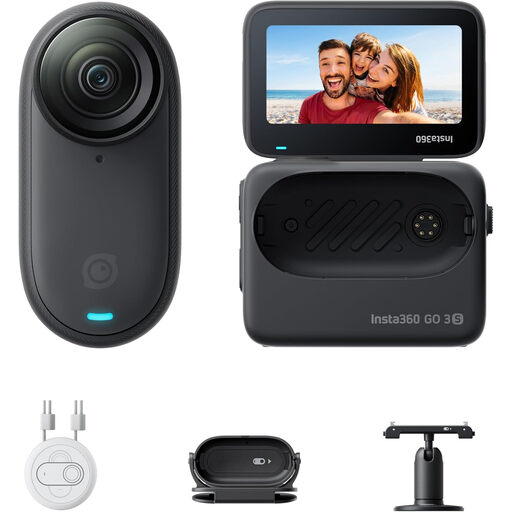 Image not available
Insta360 GO 3S 128GB
A compact camera to consider if you want to capture a building step hands-free.
The product name lists 4K and a stated battery life of 140 minutes. Don’t use the magnetic pendant if you have a pacemaker.
Joybuy
Frequently asked questions
Which setting should you try if you see stripes under artificial light?
First, take a test shot using the lights you’ll be working with. For a 50Hz power supply, Sony Netherlands suggests starting with a video shutter speed of 1/50 or 1/100 of a second. Test which setting works with your light source.
Can the Canon LEGRIA HF G70 focus from 1 cm at every zoom setting?
No. Canon lists a minimum focusing distance of 1 cm at wide angle and 60 cm across the full zoom range. So check how your close-up looks at the zoom setting you’ll use during the lesson.
Do you need an external microphone for spoken instructions?
Not necessarily. First, test the built-in recording at your usual speaking distance. If it doesn’t meet your needs, you could consider an external microphone with a model that has a suitable connection, such as the Canon LEGRIA HF G70.
What should you bear in mind if other people are recognisable in your footage?
According to the Dutch Data Protection Authority, recognisable images of people are personal data, so privacy rules apply. Bear this in mind when choosing your camera angle and editing your footage; a recording showing only the build won’t include any recognisable people.


