What should you look for when choosing?
First, check that the smallest parts appear sharp and large enough in the frame. Then consider the view of your work surface, your computer setup and how long you need to record.
| What to consider |
What to look for when buying |
Who is this important for? |
| Filming small parts in sharp focus |
Check the focusing range and how much of the frame the subject fills at the distance you’ll be filming from. Sony and Canon offer interchangeable-lens systems, but the kit lens won’t necessarily be suitable for close-ups. |
I want to show joints or paintwork clearly without bringing the camera closer than it can focus. Around 36% of consumers put detail first. |
| A useful overhead view |
Check that the mount holds the camera securely above or beside your work surface, and that your hands and tools fit in the frame. Logitech describes a stand for the MX Brio that lets you point the camera downwards. |
I want to show the sequence of steps and the whole work surface in one shot. Around 29% of consumers prioritise an overview of the work surface. |
| Recording through a computer |
Check the model’s connection and software compatibility. Make a short test recording, too, to see whether your voice is clear above the background noise in your workspace. |
I want to record or stream the lesson through my computer while explaining what I’m doing. Around 21% of consumers prioritise straightforward, computer-based instruction. |
| Recording a lesson segment without interruption |
First, work out how long a lesson segment will be. Then check the power supply and storage for the exact version you’re considering. DJI lists microSD storage for the Osmo Pocket 3. |
I don’t want to have to film a building step again because I’ve run out of power or storage. Around 14% of consumers give uninterrupted recording top priority. |
Products for filming in your home studio
The selection focuses mainly on webcams for computer-based lesson recordings, with a compact camera for demonstrations on the move.
 No image available
AOC 4K PRO webcam
Suitable for a computer setup where you want to use autofocus and built-in microphones for video and commentary.
The product name lists a Sony IMX363 sensor, PDAF autofocus, two microphones, a 75° field of view, and USB-A and USB-C connections.
View at Joybuy
 No image available
Philips 4000 Series 4K UHD Webcam, EU Version, Black, SPL6408BT/00
Suitable for a computer-based recording where you want a webcam with autofocus and built-in microphones.
The product name lists 4K UHD, 8MP, autofocus, dual microphones and a privacy cover.
View at Joybuy
 No image available
Philips 2K QHD PC Webcam, EU Version, Silver, SPL6308S/00
Suitable for a computer-based lesson recording where you want QHD video and a noise-cancelling microphone.
The product name lists a QHD webcam, a noise-cancelling microphone and a clip mount.
View at Joybuy
 No image available
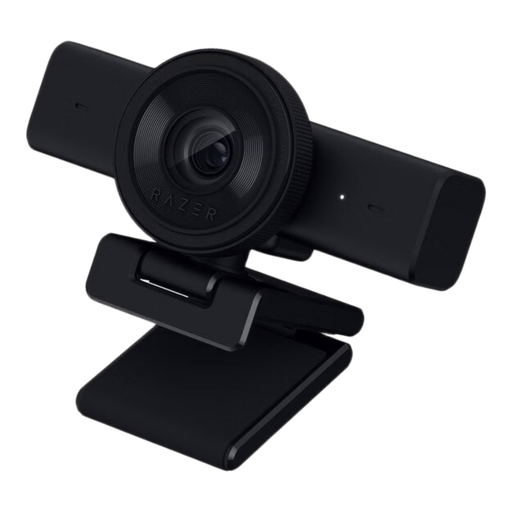
Razer Kiyo V2 X webcam, black
Suitable for a computer-based recording or stream where you want a webcam with autofocus and a tripod mount.
The product name lists 1440p or 1080p at 60 FPS and USB. The stated field of view is 80°; check whether small parts will appear large enough in the frame with this crop.
View at Joybuy
 No image available
DJI Osmo Pocket 3
Suitable for anyone who wants to film demonstrations on the move as well as fixed views of their work surface.
The product name lists a 1-inch CMOS sensor, 4K/120fps video, 3-axis stabilisation and a rotating touchscreen. DJI gives this model a focusing range from 0.2 m; check whether the fixed lens captures enough detail at your working distance.
View at Joybuy
Frequently asked questions
Is 4K alone enough to show tiny building details?
No. Also check whether the camera can focus at your working distance and whether the part fills enough of the frame. DJI and Elgato publish different focus ranges for the models reviewed; a resolution figure won’t tell you about focusing distance.
How do you test a webcam setup for an overhead view?
Measure the distance between the camera and your work surface, then use a sample part to check focus, framing and how much room you have to move your hands. Elgato lists a 1/4-inch mounting point and a focus range of 30–120 cm for the Facecam MK.2; Logitech describes a stand for the MX Brio that lets you point the camera towards your desk.
What should you check for longer recordings and maintenance?
Check that the power supply and storage will last for the length of your lesson segments. DJI lists microSD storage for the Osmo Pocket 3. Follow the instructions for your exact model when maintaining it; Elgato recommends using a microfibre cloth to clean the lens of its Facecam.
What are my rights if a camera I bought online doesn’t work properly or isn’t suitable?
If a camera breaks sooner than you could reasonably expect with normal use, the seller must offer an appropriate remedy at no cost, according to ACM ConsuWijzer. In the Netherlands, the legal guarantee does not have a standard fixed term of two years. For online consumer purchases, you generally have up to 14 days from delivery to change your mind, subject to legal exceptions.
Can I film identifiable people in my building lesson and share it publicly?
First, consider which privacy rules apply to recording and sharing the footage. The Dutch Data Protection Authority considers identifiable people in footage to be personal data; the exception for personal or household use does not apply when footage is shared publicly with a wider audience. Such publication requires a legal basis under the GDPR, and whether it is lawful depends on the people involved, the purpose and the basis you choose.


