For measuring tasks carried out mainly on a table, an adjustable document camera is the most suitable setup. If you want to switch between being on camera and showing your desk, a webcam with a presentation mode could be a good fit. If you want to show your face and what you're doing at the same time, consider a dual camera. In every case, check the focus at your working distance, the framing and how the image appears in your video-calling software. Stated resolutions don't guarantee that measurement markings will be legible in the shared video.
Who is this choice relevant to?
If you explain measuring tasks at a table
If you're mainly showing your hands, the object you're measuring and its readings, look for a useful overhead view and a capture area that suits your work. IPEVO describes these features for the V4K document camera.
If you switch between talking and demonstrating
If you start by speaking on camera and then show something on your desk, consider the presentation mode and how easily you can switch to it. Logitech describes Show Mode for the Brio 500 and MX Brio.
If you show your face and what you're doing at the same time
If viewers need to see both you and the measuring task, look for a two-camera setup and check how both images appear in your video-calling software. AVerMedia describes the PW313D as a camera with two adjustable cameras.
What should you look for when choosing?
Document camera above the work surface
A good fit when: the measuring task on the table is the main focus and you want to show your hands and readings from above.
Bear in mind: an overhead view doesn't automatically give you a separate view of your face. Also check that the capture area suits your materials.
Webcam with presentation mode
A good fit when: you usually speak on camera and want to show something on your desk from time to time.
Bear in mind: the angle from the monitor may make it difficult to see your hands or measurement markings. Logitech says Logi Tune is required for Show Mode on the Brio 500.
Dual camera
A good fit when: you want to show your face and what you're doing with the object you're measuring at the same time.
Bear in mind: the two cameras may have different stated resolutions. Assess each image separately in the app you use.
Webcam on a separate stand
A good fit when: you already have a webcam and can position it securely above your work.
Bear in mind: a high resolution alone doesn't tell you whether the camera will focus at your chosen distance or give you a useful overhead view.
First decide which views need to be visible at the same time. Then check the camera angle, the size of the work area you need and the focus using the object you'll be measuring.
| What to consider |
What should you check? |
Who is this important for? |
| Small measurements |
Test the focus at your intended working distance and view the scale in your video-calling app. A stated resolution alone doesn't confirm that the markings will be legible. |
If I want viewers to be able to follow small measurement markings, I focus on the image of the readings. Around 33% of consumers say legible measurement markings are their top priority. |
| Space on the table |
Check that your hands, the object you're measuring and the scale all fit within the frame. For a document camera, compare its capture area with your workspace. |
If I need my hands free to measure, I want to show the entire work area. Around 27% of consumers put the work area first. |
| Two views at once |
Check that your video-calling software displays both images clearly and that each one is in focus at your chosen distance. |
If I'm explaining as I measure, I want viewers to see both my face and what I'm doing. Around 20% of consumers prioritise having both views at the same time. |
| Switching between talking and showing your desk |
Check which software you need, how the camera connects and how easily you can set it to the position you want. |
If I want to switch quickly from talking to demonstrating during a short presentation, I focus on the controls and software. Around 20% of consumers prioritise being able to switch easily. |
Common buying mistakes
-
Comparing only the highest resolution
A poor angle, a frame that's too wide or an out-of-focus scale can make your demonstration less useful, regardless of the maximum resolution.
Start with the working distance, camera angle and framing you need. Then check the available resolution settings and the image in your video-calling app.
-
Assuming a tilting webcam gives you an overhead camera view
Show Mode can show your work using a tilting webcam, while a document camera is designed to capture materials beneath the camera. The position of your monitor can affect how clearly measurement details appear.
Try recreating the angle you intend to use before deciding. Check that your hands, the object you're measuring and the readings all remain in view.
If your monitor setup doesn't work, you may need a separate stand or a second camera.
-
Assuming the manufacturer's warranty covers all your legal rights
A commercial warranty period doesn't, by itself, determine how long you have statutory rights in the Netherlands. ACM ConsuWijzer explains that, when used normally, a product must meet what you can reasonably expect of it.
Keep your proof of purchase and report any problem with a faulty consumer product to the seller.
Brands to compare
IPEVO
The V4K document camera is designed for measuring exercises where the materials on the table are the main focus.
- IPEVO says the V4K has autofocus, an adjustable arm and a maximum capture area of 342 × 255 mm.
- A camera above the work surface doesn't automatically give you a separate view of your face. The stated specifications don't guarantee that every measurement marking will be legible in every video-calling app.
Logitech
The Brio 500 and MX Brio combine a webcam view with a presentation mode for showing work on your desk.
- Logitech specifies Full HD and Show Mode for the Brio 500. For the MX Brio, it lists 4K at 30 fps and 1080p at 60 fps.
- According to Logitech, Show Mode on the Brio 500 requires Logi Tune. The downward viewing angle depends on your monitor setup, and the resolution doesn't guarantee that every measurement marking will be legible.
AVerMedia
The PW313D is designed for anyone who wants to show their face and the materials they're measuring at the same time.
- According to AVerMedia, the PW313D has two adjustable cameras with different maximum resolutions.
- Check how both images appear in your video-calling software. The manufacturer's specifications aren't an independent real-world test.
Cameras and webcams at Joybuy
This selection of Joybuy products includes webcams and cameras for video calls. For a measuring exercise, check separately whether the setup gives you the angle, framing and focus you need.
 No image available
Dell Pro P P2726DEV 27" QHD IPS monitor with webcam
The integrated webcam may be useful if you want to make video calls from your desk. Check separately whether the monitor's position also gives you a useful view of your measuring task.
The product name specifies a 27-inch QHD IPS monitor with 100 Hz and a webcam.
View at Joybuy
 No image available
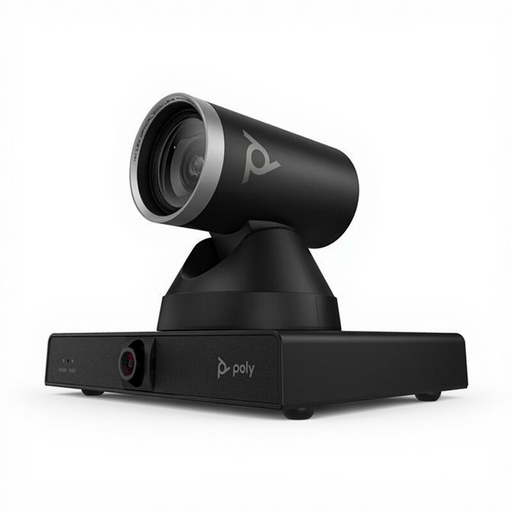
HP Poly Studio E60 Smart Camera 4K with 12× optical zoom
The product description mentions video conferencing and mounting on a display, tripod or ceiling. Check whether that installation suits your workspace and measuring setup.
The product name specifies 4K and 12× optical zoom.
View at Joybuy
 No image available
HP Poly Studio E70 Smart Camera
The product information mentions video conferencing and use in large meeting rooms. Check whether the mounting and framing are suitable for a desk-based demonstration.
View at Joybuy
 No image available
Philips 4000 Series 4K UHD webcam with autofocus, EU Version, Black, SPL6408BT/00
The autofocus may be useful if you want to check the focus on an object you're measuring. Test it at your intended distance and in your video-calling app.
The product name specifies 4K UHD, 8 MP, dual built-in microphones and a privacy shutter.
View at Joybuy
 No image available
Philips 2K QHD PC webcam with noise-cancelling microphone, EU Version, Silver, SPL6308S/00
The product information mentions attachment to monitors and laptop screens. Check that the clip and viewing angle suit the position where you want to show your measuring task.
The product name specifies 2K QHD and a noise-cancelling microphone.
View at Joybuy
Frequently asked questions
How can I check before buying that my object will stay in focus and in view?
Measure the area of your workspace that needs to be in frame and compare it with the stated capture area or adjustable camera angle. If possible, test a scale at your intended working distance and in the video-calling app you actually use. Camera specifications alone don't confirm how legible the image will be.
Do I need to install software to use a V4K or Brio 500 during a call?
IPEVO explains that, for the V4K, you select the connected camera as the input device in compatible camera software. Logitech says Logi Tune is required to enable Show Mode on the Brio 500. Check which features are available on your computer and in your video-calling app.
What warranty applies if I buy a webcam as a consumer in the Netherlands?
In addition to any manufacturer's or seller's warranty, you have a legal guarantee: the product must meet what you can reasonably expect from it when used normally. ACM ConsuWijzer says the seller is responsible for providing an appropriate free solution if the product is faulty. The Dutch legal guarantee doesn't have a fixed two-year limit.
Can I show documents or personal data on camera during a business measuring exercise?
Be mindful of what information is visible and which connection you're using. The Dutch Data Protection Authority says organisations must offer secure video-calling options and advises discussing as little sensitive information as possible. Stricter security rules apply in some sectors. Follow your organisation's security procedures and keep irrelevant information out of view.


