
Demonstrating precise measurements
If you want to show the position of a graduation mark or pointer, camera position and focus are important. The available information about the IPEVO V4K and HUE HD Pro includes details of autofocus or manual focus.


Start by choosing a camera angle that shows the item you’re working on, the scale and your hands together. A webcam mounted on your screen can save desk space if its fixed angle is suitable. An adjustable document camera gives you more freedom to position the lens above your work, but you’ll need space for its base or mount. Also check that it can focus at your working distance and that the desk view you need works with your computer and video-calling app.
If you want to show the position of a graduation mark or pointer, camera position and focus are important. The available information about the IPEVO V4K and HUE HD Pro includes details of autofocus or manual focus.
If there’s little space around your hands and tools, a webcam mounted on your screen may be worth considering. However, the view from its fixed position needs to show the entire measuring task.
If you want to show yourself and your measurements at different points during the same call, check how you switch between camera modes and whether you need software to do so.
Choose this option if: there’s no room for a camera base and the entire measuring area fits in view from the screen’s position.
Bear in mind: the screen’s position determines the viewing angle, so check that small markings are clearly visible from it.
Choose this option if: you want to position the lens above a ruler, dial or workpiece, and the base fits beside the area you’re measuring.
Bear in mind: the base and arm take up space, and the capture area alone doesn’t tell you whether fine markings will be legible.
Choose this option if: you regularly switch between showing your face and demonstrating measurements, and want one camera for both.
Bear in mind: the space the camera takes up when in use may differ from its listed folded dimensions.
| What to consider | What to look for | Who it matters to |
|---|---|---|
| Legibility of graduation marks | Test the focus and framing at your working distance, using the smallest detail you want to show. Also compare the capture area with the size of your work surface. | If I want to show a graduation mark or pointer clearly, I need to know whether it will stay in focus without my hands disappearing out of shot. Around 36% of consumers say legibility is their main consideration. |
| Desk space | Measure the free space beside your workpiece and try to recreate the viewing angle from the edge of your screen. Assess the camera when unfolded, not just when folded away. | When space is limited, I want to be able to use my hands and tools without the camera blocking the work surface. Around 29% of consumers prioritise desk space. |
| Switching between your face and your work | Check how to activate the camera mode you want and whether it works with your computer and video-calling app. | If I want to show both myself and my measurements during a call, I need to be able to switch camera modes easily. Around 21% of consumers say switching between showing their face and their work is their main consideration. |
| Lighting and focus | Check that the measurement point is well lit and that you can refocus if you move the workpiece. | With changing light or objects at different heights, I want to avoid shadows or a blurred image obscuring the scale. Around 14% of consumers focus mainly on this. |
A camera’s specifications alone won’t tell you whether the scale will appear in focus and large enough in the final video at your working distance.
Consider focus and framing alongside the capture area. If possible, test the camera with a similar object and the smallest measurement detail you want to show.
A foldable document camera needs to be unfolded and positioned before use. A screen-mounted webcam, meanwhile, depends on the angle and height of your screen.
Mark out the available space and the intended lens position before choosing a camera.
Insta360 describes DeskView as a way to show a temporary view of your desk, and distinguishes it from Overhead Mode, which requires a separate mount. According to the manual, Overhead Mode is only available on the original Link.
Choose DeskView only if the screen position shows your entire measuring area. Otherwise, consider an adjustable document camera.
IPEVO offers document cameras for showing your work; the V4K and DO-CAM have different setups.
The HUE HD Pro is a USB document camera with a flexible neck for demonstrations on a work surface.
The Brio 500 is a screen webcam with Show Mode for showing objects on your desk.
The Link series offers DeskView from a laptop or monitor; Insta360 lists this mode for models including the Link 2.
The MX-P3 is a portable document camera for anyone considering a direct connection to a screen as well.
This selection includes a screen webcam with desk-view mode and a document camera. If you’re considering the document camera, check that its live view and your preferred video-calling app suit the way you plan to use it.
 No image available
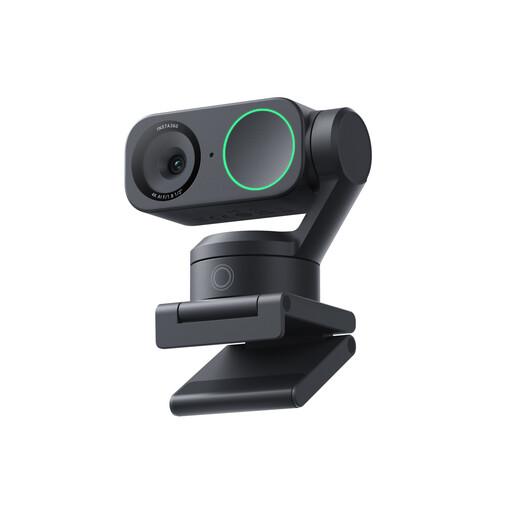
A good option if you’re looking for a screen-facing webcam with desk-view mode. Check that the view from your screen shows the entire measuring area.
The product name lists 4K, a 1/2-inch sensor, AI tracking, HDR and a microphone. Insta360 describes DeskView for the Link 2; you enable it through Link Controller.
 No image available
Worth considering if you want a document camera for measuring demonstrations. Check that the live view works with your computer and video-calling app.
The product name lists support for a flat A3 sheet, OCR, and compatibility with Windows and macOS.
Measure the width and depth of the workpiece, scale and hand movements you want to show. Compare them with a document camera’s capture area, or recreate the viewing angle from the screen position you intend to use. IPEVO lists a maximum of 342 × 255 mm for the V4K; this doesn’t guarantee that fine graduation marks will remain legible.
It depends on the model and feature. Insta360 says that DeskView is enabled through Link Controller, so check beforehand that the software works on your computer.
For a standard online consumer purchase, ACM ConsuWijzer says you’ll generally have up to 14 days from delivery to change your mind. Check the relevant exceptions and returns policy. Your statutory guarantee for a faulty product is separate from any manufacturer’s guarantee.
First, check the privacy rules and policies of your educational institution. The Dutch Data Protection Authority recommends setting rules for making and storing recordings and informing pupils or students. Whether a DPIA is required depends on the privacy risk of the specific data processing; there is no general ban on recordings, nor blanket permission to make them.