For handwritten maths, choose a camera you can position steadily above the paper, then check that both the full question and small symbols remain easy to read. If you also want to show your face, consider whether switching between views with one adjustable camera will be enough or whether you need two camera feeds. Check your video-calling app’s capabilities and how much space you have on your desk, too.
Who is a camera for maths homework suitable for?
Student showing their working
Wants a teacher or tutor to be able to follow the question, working and corrections in an exercise book; showing the paper matters more than having a studio-quality view of their face. Mathpaul explains how writing plays a central role in maths lessons.
Online maths tutor
Switches between their own worksheet and the person they’re speaking to while explaining, or wants to use both camera feeds. The capabilities of the video-calling app also influence how they set this up.
Content creator with a small home workspace
Wants a steady overhead view without having to rearrange the desk every time. An adjustable arm or folding design may therefore be worth considering.
What should you look for in a camera for handwritten sums?
Start by checking that the paper is easy to read. Then consider whether you want to switch camera angles, which app you use and how much light your workspace needs.
| What to consider |
What should you check? |
Who is this most important for? |
| How easy sums are to read |
Check that the camera’s field of view shows the whole question and that small symbols remain legible in the video mode you’ll use. |
If I want to show fractions, powers and working all at once, the view of the paper needs to stay clear. Around 40% of consumers put legible working at the top of their list. |
| Switching between your face and the paper |
Check whether the arm or camera head can reach both positions and whether your app can share a second camera feed. |
If I switch between my face and exercise book while explaining, I want to do so without having to set everything up again. Around 30% of consumers prioritise being able to switch between views. |
| Connection and live use |
Check the USB connection, supported operating system and how to share the camera in your video-calling app. |
If I mainly want the camera to work smoothly with my teaching app, I want to be able to test the steps for sharing it in advance. Around 20% of consumers prioritise the connection and setup. |
| Lighting for your workspace |
Check whether the camera has a light, and test its position with your writing hand in view. |
If my desk gets little light or my hand casts a shadow over my exercise book, I want to check that the paper is still clear on camera. Around 10% of consumers put lighting for their workspace first. |
Common mistakes when choosing a camera
-
Confusing photo resolution with live video performance
A high megapixel count doesn’t tell you what resolution or frame rate other participants will see during a video call. IPEVO and CZUR list different maximum settings for their models.
Compare the video mode you plan to use in lessons, and test whether small symbols remain legible at that setting.
-
Buying a standard webcam without a plan for an overhead view
Being able to focus at close range doesn’t, by itself, give you a steady position above an exercise book. A webcam designed for a screen won’t necessarily have the right mount or cover the paper adequately.
Check how you’ll position the camera above the paper and whether the whole page will fit in the frame.
You may need a separate mount or a second camera to get the setup you want.
-
Assuming one hybrid camera can show two views at once
A camera that can switch between your face and the paper won’t automatically show both perspectives at the same time.
Decide whether switching between views will be enough. If not, test whether your video-calling app can share a second camera feed.
Showing both views at the same time may require a second camera feed and a suitable setup.
Brands to consider for paper and video calls
IPEVO
The V4K is a document camera for anyone looking for an adjustable overhead view of an exercise book or workspace.
- IPEVO lists 8 MP, autofocus and a maximum capture area of 342 × 255 mm.
- The manufacturer lists up to 30 fps at Full HD. The maximum photo resolution of 3264 × 2448 is not the same setting as live video at 30 fps.
CZUR
The Fancy S Pro is designed to work as both a document camera and a webcam, for anyone who wants to show their face and paper using one adjustable device.
- CZUR specifies a 12 MP camera, adjustable arm and autofocus.
- The listed video modes go up to 1080p at 60 fps and 4K at 15 fps. Also check that the arm can reach the position you want on your desk.
Logitech
Reach is an overhead and content camera for anyone who wants to move the camera around their workspace regularly.
- Logitech lists a moveable arm, USB-C and HD 1080p at 60 fps.
- The manufacturer offers a table stand and a clamp base. Check which version will suit your workspace.
HUE
The HD Pro is a USB document camera for a desk setup that you may want to move around.
- HUE lists Full HD 1080p, built-in LED lights and a microphone.
- Check that the listed operating systems and camera apps are compatible with your computer and teaching setup.
Elgato
The Facecam Pro is a standard webcam to consider if you already have a suitable mount for an overhead view.
- Elgato lists autofocus from 10 cm and 4K at 60 fps for this model.
- The model isn’t positioned as a document camera with an overhead arm included. The mount and coverage of the paper remain separate considerations.
Joybuy products for paper and video calls
This selection includes webcams for video calls and a document camera for showing paper. If you choose a standard webcam, check whether you can create a suitable overhead setup.
 No image available
Philips 4000 Series 4K UHD Webcam SPL6408BT/00, black
A webcam for video calls. If you also want to show an exercise book with it, check the mount and how the paper looks on camera separately.
The product name lists 4K UHD, autofocus, two built-in microphones and a privacy shutter.
Joybuy
 No image available
Philips 2K QHD PC Webcam SPL6308S/00, silver
A PC webcam for video calls. If you want an overhead view of your exercise book, you’ll also need to check the mounting and framing.
The product name lists 2K QHD and a noise-cancelling microphone.
Joybuy
 No image available
Insta360 Link 2C Standard Bundle, Graphite Black
The product information mentions video calls, DeskView and Whiteboard Mode. Check whether these features suit the way you want to show paper.
The product name lists 4K, a 1/2-inch sensor, HDR and a microphone with AI noise reduction.
Joybuy
 No image available
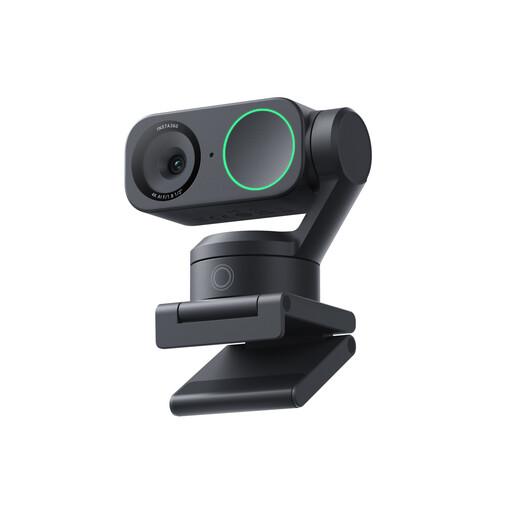
Insta360 Link 2 Standard Bundle
A webcam for video calls. To show an exercise book, check how you can position the camera above the paper and whether your app supports the view you want.
The product name lists 4K, a 1/2-inch sensor, AI tracking, HDR and a microphone with AI noise reduction.
Joybuy
 No image available
CZUR Shine 800 A3 Pro
The product information describes a document camera and scanner for paper documents. Check that A3 document size suits what you want to show during lessons.
The product information lists USB, a foldable design and OCR.
Joybuy
Frequently asked questions about cameras for maths homework
Can you show your face and exercise book during a video call?
It depends on the app and your setup. Zoom explains how to share content from a second camera, while Microsoft Teams explains how to share physical documents using a camera. Check in advance what sharing permissions are available and what the other participant will see.
How do you set up a camera for handwritten work?
Point the camera down at your exercise book, frame the whole question and check that small symbols are legible. Mathpaul explains that a maths teacher checks the camera view while writing and moves the camera if needed. Test your setup with your own lighting and writing hand, too.
What are your rights when buying online in the Netherlands?
For eligible distance purchases by consumers, you generally have a 14-day cooling-off period. You’re also covered by the statutory guarantee: if a product isn’t as it should be, the retailer is your point of contact. The Government of the Netherlands explains these rights; check who the retailer is and which terms apply to your purchase.
Can you record pupils or their homework without permission?
Buying a camera doesn’t give you the right to do so. The Dutch Data Protection Authority says educational institutions must minimise the impact on privacy during video calls and agree arrangements for matters including recording, informing people and storing recordings. Whether a particular private lesson or recording is lawful depends on the people involved, the purpose and how it is carried out.


