Start by considering the size of your print and what you want to use the photo for. If the print is flat and fits on the scanner bed, a flatbed scanner may be all you need. For larger prints, or if you want more control over the lighting and visible paper texture, a camera gives you greater flexibility. Try a camera you already own first, and check that you can capture the whole print from directly above, with everything in focus and straight. Smith College recommends positioning the camera perpendicular to the work. Also consider the lens, lighting and set-up: a new camera body alone won’t automatically fix tilted shots or uneven lighting.
Who is this guide for?
Printmakers who want accurate colours
You want the paper and ink to look true to life in portfolio or product photos. Look for consistent lighting, a colour reference and image files you can edit. National Museums Scotland explains the importance of suitable lighting and a neutral background.
Printmakers who want to show fine detail
You want to be able to assess cut lines, edges or the texture of the paper. Check that the print can fill the frame and stay sharp right into the corners. Both the lens and the sensor play a part, as Consumentenbond explains.
Printmakers with a simple home set-up
You want to photograph one or a few flat prints without buying more equipment than you need. First, compare what your existing camera can do with a scanner whose bed is large enough for your work.
What should you look for?
Your existing camera with a suitable lens
Choose this option: if you can capture the whole sheet in focus and straight from above, your current camera may be all you need.
Bear in mind: the lens, positioning and lighting all affect the shot. A new body won’t automatically fix tilted shots or uneven lighting.
Interchangeable-lens mirrorless camera
Choose this option: if you photograph prints in different sizes or need another lens to make a small print appear larger in the frame.
Bear in mind: check the exact lens and what’s included in the kit. A kit zoom isn’t automatically a macro lens.
Flatbed scanner
Choose this option: if the print is flat, fits on the scanner bed and you want to capture it without setting up a camera.
Bear in mind: the Epson Perfection V39II has an A4 scanning area. Measure your work, including the white margin you want, before choosing this scanner.
| What to consider |
What to check before buying |
Who is this important for? |
| Paper and ink colours |
Check whether you can adjust the white balance and, if you want to edit the image afterwards, shoot in RAW. Use a colour reference and avoid mixing light sources. |
I want the white of the paper and the ink in my portfolio photo to match the original work; around 33% of consumers put colour accuracy first. |
| Lines and edges |
Compare the print’s dimensions with the framing and magnification of the exact lens. Check a test shot in the centre and in the corners. |
If I want to assess fine cut lines and edges, sharpness across the whole image is important; around 27% of consumers give detail the highest priority. |
| White background |
Check a test shot for shadows and colour casts. Keep the lighting consistent, and adjust its direction if you want to show the paper texture. |
I want my print to look clear against white, without distracting shadows; around 20% of consumers prioritise an even presentation. |
| Overall set-up |
Test your existing equipment first and measure the print before choosing a scanner. If you’re buying a camera kit, check which lens is actually included. |
If I only need to photograph a few prints, I don’t want to buy more equipment than necessary; around 20% of consumers prioritise keeping their total spend down. |
Common pitfalls
-
Comparing only megapixels or camera bodies
The camera body’s resolution alone doesn’t guarantee that a lino print will be captured sharply and in full. The lens, framing and positioning matter too.
Check which lens is included and take a test shot so you can assess the lines and corners.
Depending on your set-up, you may still need a suitable lens or a stable mount.
-
Treating image stabilisation as a substitute for a stable set-up
Image stabilisation in a lens isn’t the same as positioning the camera straight and at a fixed distance above your flat work.
First work out how to position the camera securely and at a right angle above the print, then take a test shot.
A tripod or copy stand may be needed to keep the camera in a fixed position.
-
Choosing a scanner without measuring the paper
The Epson Perfection V39II has an A4 scanning area, so a larger print won’t fit in a single scan.
Measure the sheet, including the white margin you want, before choosing a scanner.
Brands to consider
Canon
The EOS R50 with RF-S 18-45mm is a specific starting point if you’re looking for a mirrorless camera with a standard zoom lens.
- Canon Netherlands lists 24.2 effective megapixels for the EOS R50, which supports RF and RF-S lenses.
- Check how much the included lens can magnify your print size. The camera body alone doesn’t tell you how large a small print will appear in the frame.
Nikon
Nikon Netherlands describes the Z50II kit as including the NIKKOR Z DX 16-50mm f/3.5-6.3 VR lens.
- Nikon states that the lens has VR image stabilisation.
- Image stabilisation doesn’t guarantee that the camera is straight above the work or that the lens offers enough magnification for a small print.
Sony
The α6400 is an APS-C mirrorless camera body with an E-mount; the exact kit depends on the lens you choose.
- Sony Netherlands specifies approximately 24.2 effective megapixels and RAW shooting for the ILCE-6400.
- For each kit on offer, check separately which lens is included and how much magnification it provides.
Fujifilm
The X-M5 is a mirrorless camera with an X-mount and interchangeable lenses.
- Fujifilm specifies an APS-C sensor, 26.1 million effective pixels and RAW shooting for the X-M5.
- These specifications don’t measure colour accuracy when photographing lino prints. Check the exact lens and what’s included in the kit.
Cameras at Joybuy
Consider these cameras as possible options for photographing a stationary print. For each model, check that the lens and set-up suit the size of your work and the framing you want.
 No image available
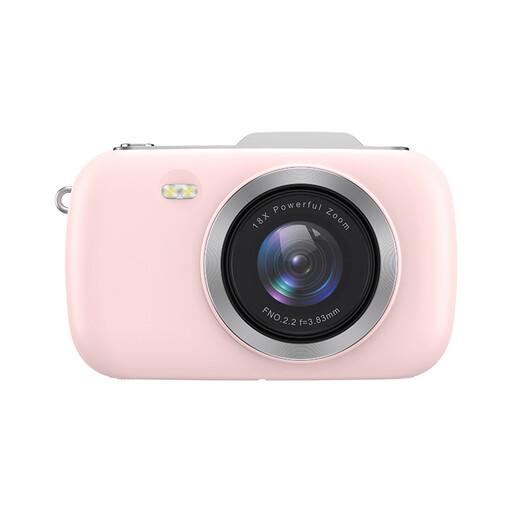
KOMERY G7-A 4K digital camera, 18X zoom, pink
The title describes this model as a point-and-shoot camera. Take a test shot to check whether your print appears sharp and in full.
The product title lists 18X zoom and the colour pink.
Joybuy
 No image available
KOMERY G7 5K digital camera, 18X zoom, white
The title describes this model as a point-and-shoot camera. Take a test shot to check whether the lens captures your print in full and in sharp focus.
The product title lists 5K, 18X zoom and the colour white.
Joybuy
 No image available
DJI Osmo Pocket 3 Creator Combo
The product description mentions capturing still images. Check whether you can position the device above your print for a straight, stable shot.
The description lists a 1-inch CMOS sensor and a 2-inch touchscreen. The title mentions an included microphone.
Joybuy
 No image available
Sony ZV-E10 + 16-50mm Zoom, black
This mirrorless camera is offered with a zoom lens. Check that its zoom range and framing suit the size of your lino print.
The product title lists a 16-50mm zoom lens.
Joybuy
 No image available
Sony Alpha A6100 + 16-50mm f/3.5-5.6 OSS II
This kit is described as a mirrorless camera with a zoom lens. Take a test shot to check whether the print appears large enough and in sharp focus.
The product description lists an APS-C sensor, 24.2 MP and an E-mount. The title names the 16-50mm f/3.5-5.6 OSS II lens.
Joybuy
Frequently asked questions
Do I always need a macro lens to photograph a lino print?
No, not necessarily. First check whether the lens you’ve chosen can capture the whole print at a large enough size and in sharp focus. For small prints, pay attention to the magnification offered by the exact lens.
How can I stop white paper looking yellow or grey?
Take a test shot in consistent lighting and, if needed, adjust the white balance using a grey card or colour reference. National Museums Scotland advises against mixing different light sources. Then check the resulting photo.
What should I maintain in my photography set-up?
Keep the background and any reflective white surface clean so dirt or discolouration doesn’t show up in your photos. If you’re taking photos regularly, also check the position of the work, camera and lighting each time.
What are my rights regarding warranties and cooling-off periods when buying a camera online in the Netherlands?
When you buy as a consumer, you’re entitled to a product that meets reasonable expectations. The Dutch government states that the Netherlands does not have a fixed statutory two-year warranty period for this. For online purchases from a business, a 14-day cooling-off period applies in many cases. Check the relevant terms and exceptions.
Can I publish a photo of any lino print online?
Not necessarily if it’s someone else’s protected work. Auteursrecht.nl states that lino prints may be protected by copyright, and that publishing or sharing photos of protected artworks usually requires permission from the rights holder. The copyright status of the specific work is what matters.


