
Knitting tutor filming stitches close up
You want to show small hand movements and stitches clearly. So check the focusing distance, lens and camera angle of the setup you choose.


Start with a setup that keeps your hands and stitches in focus and fully in frame from the available distance. Then compare sound quality and ease of use. A webcam is a good fit if you’re recording via a computer, a compact camera if you want to film independently, and an interchangeable-lens camera if you want to adjust the lens and framing. Whichever option you choose, check separately that the mount, lighting and microphone suit your workspace.
You want to show small hand movements and stitches clearly. So check the focusing distance, lens and camera angle of the setup you choose.
You may be filming via a computer or switching between explaining and showing your work. Logitech describes Show Mode on the MX Brio as a way to show work on a desk; check that the camera angle suits your desk.
You speak while you knit and want your voice to remain clear. Test the microphone where you plan to position the camera.
First, choose a recording setup that suits your workspace. Then check the image quality, sound and features you’ll need to record a complete lesson.
A good fit if: you film at your desk and already use a computer; Show Mode on the Logitech MX Brio can show work on your desk.
Consider: the computer, connection and software all remain part of your setup, and the camera won’t automatically point straight down.
A good fit if: you want to film without a computer and the working distance is suitable; DJI lists a minimum subject distance of 20 cm for the Osmo Pocket 3.
Consider: check that the fixed viewing angle and mount work for your knitting; image stabilisation won’t make an unsuitable angle right for the job.
A good fit if: you want to choose the lens and framing for shots of yourself and close-ups.
Consider: the lens supplied in a particular kit won’t necessarily suit every working distance; also check how you’ll mount the camera above your work surface.
| What to consider | What to check before buying | Who is this important for? |
|---|---|---|
| Sharp, clear stitches | Measure the distance between the camera and your knitting, then check the minimum focusing distance and the lens or fixed viewing angle. DJI lists a minimum subject distance of 20 cm for the Osmo Pocket 3. | If I want to show small stitches and hand movements clearly, I’ll first check whether my camera can focus from the planned distance. Around 36% of consumers put sharp detail first. |
| Camera angle at a small desk | Check that the camera captures the whole work surface and that a suitable mount is available. Logitech describes Show Mode on the MX Brio as a way to show work on a desk. | When space is limited at my desk, I want to keep my hands free while still seeing the needles and my work. Around 29% of consumers prioritise a practical camera angle at a small desk. |
| Clear spoken instructions | Test the sound from the intended distance and check whether an external microphone can be connected to the camera. According to Canon, the Canon EOS R50 has a 3.5mm microphone input. | If I’m explaining as I knit, I don’t want my voice to get lost because the camera is further away from my mouth. Around 21% of consumers make clear spoken instructions their top priority. |
| Lighting and recording time | Test the camera in the lighting you usually film in, and check the power supply, storage and kit contents for the exact model. DJI lists microSD storage for the Osmo Pocket 3. | When I want to record a complete lesson, I want to know in advance whether the image, power supply and storage will suit my planned recording. Around 14% of consumers prioritise lighting and a recording session they can sustain. |
High video resolution alone doesn’t tell you whether the camera can focus from your working distance or show all your knitting.
Check the focusing distance, lens or viewing angle, and try a test setup with your own work surface.
Logitech describes Show Mode on the MX Brio as a way to show work on a desk. The position of your screen and work surface also affects what the camera actually captures.
Before buying, test the position of the camera, screen, hands and needles. You may still need a different mount.
A suitable mount may take up extra space on or around your desk.
The lens affects how you frame your work surface, while the distance between the microphone and speaker can affect how clearly your voice comes across. RØDE explains that greater distance can make your voice quieter and room reflections more noticeable.
Check the exact kit contents and test the picture and sound from the camera’s intended position.
Depending on your setup, you may need a different lens, microphone or mount.
Logitech offers webcams for recording via a computer. The brand describes Show Mode on the MX Brio as a way to show work on a desk.
DJI presents the Osmo Pocket 3 as a compact, standalone camera. DJI lists microSD storage for this model.
Canon states that the EOS R50 supports RF and RF-S lenses and has a 3.5mm microphone input.
Sony describes the ZV-E10 II as an interchangeable-lens camera and lists recording formats up to 4K 60p.
These product options are selected for filming independently or recording via a computer during a knitting lesson.
 No image available
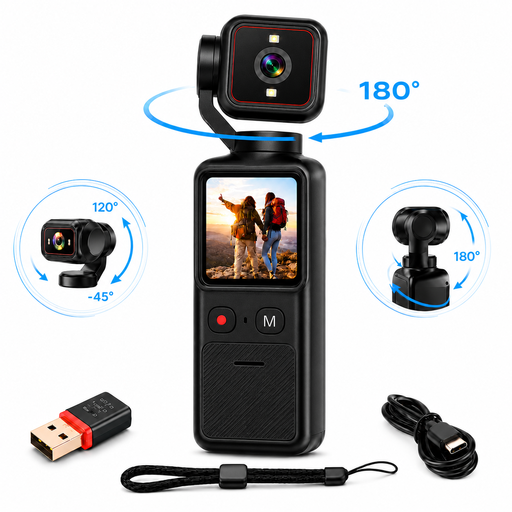
The rotating lens and tripod mount give you options for pointing the camera at your work surface. Take a test recording to check that your hands and stitches are clearly in frame.
The product description lists a 1.69-inch touchscreen, Wi-Fi, image stabilisation and a 1/4-inch tripod mount.
 No image available
This webcam is designed for recording via a desktop computer; check that the clip mount suits the position where you want to use it.
The product name lists 4K UHD and 8 MP. The product description mentions autofocus, dual built-in microphones with noise reduction, and a clip mount for laptops, desktops and monitors. This is the EU version.
 No image available
This compact camera may suit you if you want to film independently. For close-ups, bear in mind the minimum subject distance DJI specifies for this model.
The product description lists a 1-inch sensor, video up to 4K/120fps, 3-axis stabilisation, fast focusing and a rotating 2-inch touchscreen. DJI lists a minimum subject distance of 20 cm.
 No image available
The supplied zoom lens lets you adjust the framing. Take a test recording to see whether the lens suits the distance to your knitting.
The product description lists 4K video at 30 fps, a vari-angle screen and Product Showcase Setting for shifting focus from your face to an object. An adapter/charger and SD card are not included.
 No image available
This webcam may suit you if you want to record via a computer and show work on your desk. Check that its position frames your hands and knitting clearly.
The product description lists 4K video, a 1/2-inch sensor, autofocus, HDR and DeskView. The product name mentions a microphone with AI noise reduction.
No. 4K alone doesn’t determine whether the camera can focus from your distance and frame your knitting properly. For example, DJI lists a minimum subject distance of 20 cm for the Osmo Pocket 3; with an interchangeable-lens camera, the lens you choose also matters.
Test the sound from the spot where you’ll be speaking during the lesson. RØDE explains that a greater distance between the microphone and sound source can make your voice quieter and room reflections more noticeable; if you’re using an external microphone, also check that it connects to your camera.
Make a test recording in the room’s usual lighting and check the power supply, storage and contents of your chosen kit. DJI lists microSD storage for the Osmo Pocket 3, but that alone doesn’t tell you how long you can record for.
According to the Dutch government, for distance purchases you usually have a 14-day cooling-off period, with some exceptions. The seller must also provide information about the product and the cooling-off period; check which terms apply to your purchase.
Not automatically. The Dutch Data Protection Authority states that the exception for personal or household use doesn’t apply when images are shared with a wider audience; you’ll need a legal basis under the GDPR for that use. The appropriate basis depends on who is filming and how the images are used.