Who is this suitable for?

Knitters filming stitches from above

You want to keep your hands, needles and stitches clear in one steady shot. Working distance, lens choice and a secure camera mount matter more than a portable vlogging setup. The Dutch Consumers' Association notes that a tripod can be useful if you mainly film at home.

Makers of spoken knitting tutorials

You want to keep both the demonstration and your explanation clear during a longer recording. So check for a microphone input, recording time and power options. Canon and Nikon list microphone options for specific models.

Makers filming in changing window light

You want stitches and yarn colours to look as consistent as possible at different times of day. Check the exposure and white balance with your own yarn at the filming location. Canon explains why digital cameras don’t correct colour casts in the same way as the human eye.

What should you look for when buying?

What to consider What should you check? Which consumers does this matter to?
Sharp stitches in an overhead shot Measure the camera distance and desired field of view. Check the minimum focusing distance of both the camera and the lens you’ve chosen. If I film my hands, needles and stitches from above, I want all my work to stay within a steady, sharp frame. Around 29% of consumers put a sharp overhead shot first.
Window light and yarn colour Check whether you can adjust the white balance and exposure. Take a test shot with your own yarn in the spot where you plan to film. When the window light changes, I want to be able to tell whether the yarn and stitches are still clearly visible. Around 23% of consumers prioritise colour and changing window light.
Clear spoken instructions Check which microphone input the camera has and whether it’s compatible with your microphone. Record a short test from where you’ll actually be speaking. If I’m explaining as I knit, I want to hear my voice clearly alongside the image of my hands. Around 18% of consumers give clear spoken instructions top priority.
Recording a complete demonstration Compare recording times at your preferred video setting, and check the power options while filming and the memory card you’ll need. For an uninterrupted knitting demonstration, I don’t want the recording to stop unexpectedly. Around 18% of consumers prioritise uninterrupted recording.
A complete setup Check what’s included in the bundle. Allow for any additional items you may need, such as a mount, storage or a microphone. If I’m bringing together everything I need for a working recording setup, I want to know in advance what’s missing. Around 12% of consumers prioritise the total cost of their purchase.

Common buying mistakes

  • Assuming 4K automatically gives you sharp close-ups

    Resolution can’t make up for an unsuitable working distance, poor focus or a moving camera. Your stitches could still look small or end up outside the frame.

    Test the framing with your hands, needles and yarn in the spot where you plan to film. With a mirrorless camera, check the specific lens and choose a secure overhead mount.

  • Assuming the maximum recording time applies to every video setting

    Nikon lists both a maximum continuous recording time of 125 minutes for the Z30 and around 35 minutes of 4K UHD recording on a fully charged battery. These figures apply under different conditions.

    Check the recording time for the setting you plan to use, and make a test recording that’s as long as your lesson.

    A longer demonstration may require an extra power source or splitting the lesson into several recordings.

  • Comparing only the camera name or camera body

    Bundles can vary. For example, Sony lists the ZV-E10 II as a body only and with a 16–50 mm power zoom lens. DJI says the Osmo Pocket 3 uses a microSD card for storage and has no built-in storage.

    Compare what’s included in the exact bundle and check which items you’ll need for your filming location, sound and storage.

Camera brands to compare

Canon

The EOS R50 is a mirrorless camera for anyone who wants to choose a lens to suit their working distance and monitor the recording using a vari-angle screen.

  • Canon lists 4K 30p, Dual Pixel CMOS AF II and a 3.5 mm microphone input for the EOS R50.
  • Canon doesn’t list sensor-shift image stabilisation for the EOS R50. Check your chosen lens and make sure the mount is secure enough for your setup.

Sony

The ZV-E10 II with interchangeable lenses is an option for makers who want to expand their video setup. Sony offers separate body-only and lens bundles.

  • Sony lists an APS-C sensor and a bundle with a 16–50 mm power zoom lens.
  • Check whether your chosen lens gives you the framing and focus you want at your working distance. Sony’s description of the image quality is a manufacturer claim.

Nikon

The Z30 is a mirrorless camera for spoken video tutorials where lens choice and recording settings matter.

  • Nikon lists 4K UHD 30p and the choice of using the built-in stereo microphone or an external microphone.
  • Nikon gives an approximate 4K recording time of 35 minutes with a fully charged battery. Don’t treat the separately listed maximum continuous recording time of 125 minutes as the 4K battery life.

DJI

The Osmo Pocket 3 is a compact camera with a fixed lens, suited to anyone with limited space around their work table.

  • DJI lists focusing from 0.2 m, a rotatable screen and microSD storage.
  • Its fixed field of view means you’ll need to test the distance and framing in advance. Gimbal stabilisation is no substitute for a secure overhead mount.

Panasonic

The HC-VX3 is a camcorder for anyone who’d rather film with a built-in zoom lens than use interchangeable lenses.

  • Panasonic lists 4K, 24× optical zoom and USB-C power.
  • The zoom range doesn’t automatically mean the camera will focus at your short working distance. Also check that the version you want is available.

Joybuy products

This selection includes cameras for video recording. For each model, check whether its focus, field of view and controls suit the distance and overhead mount you’ll use for your knitting.

Osmo Pocket 4P Standard Combo, black

Osmo Pocket 4P, Standard Combo

Test the camera in the intended position above your knitting and check that all your work is in focus and fits in the frame.

View at Joybuy
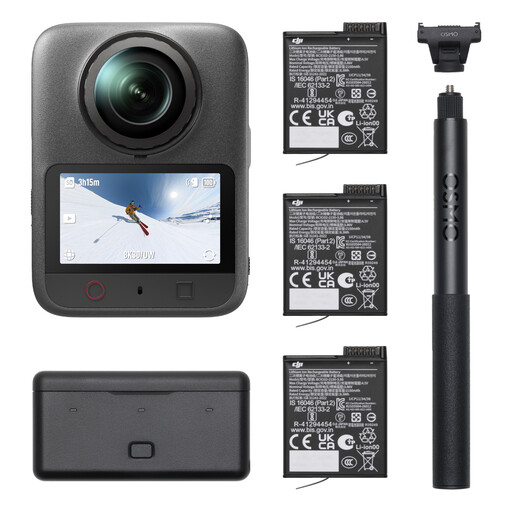
DJI Osmo 360 II Adventure Combo

DJI Osmo 360 II Adventure Combo

Take a test recording to check that the framing and controls work for the overhead view you want to create.

View at Joybuy

DJI Osmo Pocket 4 Standard Combo with 1-inch CMOS sensor, 4K/240fps and 107GB built-in storage

DJI Osmo Pocket 4 Standard Combo, 1″ CMOS, 4K/240fps

Test the framing from your intended working distance before permanently mounting the camera.

The product name lists a 1″ CMOS sensor, 4K/240fps, 107GB built-in storage and a 2″ rotatable screen.

View at Joybuy

Osmo Pocket 4 Creator Combo with 1-inch CMOS sensor, 4K/240fps and handle with 1/4-inch thread

Osmo Pocket 4 Creator Combo, 1″ CMOS, 4K/240fps

Check that the included handle and the camera mount you plan to use are suitable for your overhead setup.

The product name lists 107GB built-in storage and a handle with a 1/4″ thread.

View at Joybuy
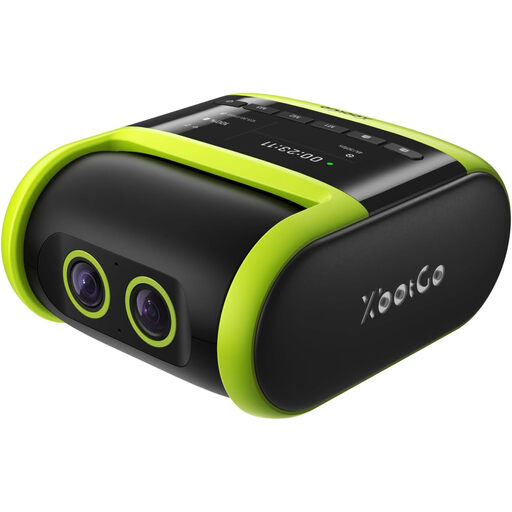
XbotGo Falcon All-in-One AI Action Camera, 4K Auto Tracking for sports recording

XbotGo Falcon All-in-One AI Action Camera

The product name is aimed at sports recording. Before choosing it, check whether the tracking feature and framing suit a stationary work surface with hands and knitting.

The product name lists 4K Auto Tracking for football, basketball and American football.

View at Joybuy

Frequently asked questions

How can I tell whether the camera will focus clearly on my knitting from above?

First, measure the available height above your work table and the width you need to fit in the frame. Compare this setup with the minimum focusing distance and field of view of the camera or lens you’ve chosen. DJI lists the Osmo Pocket 3 as focusing from 0.2 m; test the framing before deciding on a permanent mount.

How can I stop the yarn colour changing between recordings?

Check the white balance and exposure with your own yarn at the filming location, and review the image again when the window light changes. Canon explains that a camera processes colour casts differently from the human eye; a setting alone can’t guarantee exact colour reproduction.

What should I check besides the camera for a long lesson?

Check the recording time at your preferred video setting, power while filming, the memory card and how clear the sound is at the actual filming location. Nikon gives an approximate 4K UHD recording time of 35 minutes for the Z30 with a fully charged battery. DJI says the Osmo Pocket 3 uses a microSD card for storage.

What can I do if my camera breaks in the Netherlands?

If your camera breaks, contact the seller. According to the Dutch government, there’s no fixed statutory warranty period in the Netherlands; what you can expect from a product depends, among other things, on the product itself and the information provided by the seller.

Can I publish a knitting demonstration online if people are recognisable in it?

That depends on who is recognisable in the footage and how you share it. The Dutch Data Protection Authority says the exception for personal or household use doesn’t apply when footage is shared more widely. So check the relevant privacy rules before publishing the video.
