
Puzzler with a permanent table setup
Wants to film the whole puzzle and both hands from a stable angle, and check in advance that the focus and framing are right.


Start with your planned mounting height: check that the whole puzzle and your hands fit in the frame, and that the camera can focus on the pieces. A webcam suits a computer-based setup, a mirrorless camera lets you choose from interchangeable lenses, and a compact gimbal camera is an option if you also want to film moving close-ups. None of these options guarantees that your puzzle will fit in the frame from your working distance. Whichever camera you choose, consider the lighting, white balance and a secure mount.
Wants to film the whole puzzle and both hands from a stable angle, and check in advance that the focus and framing are right.
Switches between a wide shot and close-ups of small pieces or actions. Working distance, lens choice and focusing range are therefore important considerations.
Wants to show the work surface during a computer recording or call, and be able to adjust the image settings.
Choose this option: if you record or present live using a computer you already own, and the table fits within the field of view of a securely mounted webcam.
Keep in mind: an overhead presentation mode doesn’t prove that every puzzle will fit fully in the frame from your mounting height. Check your recording app and mount too.
Choose this option: if you want to adjust the framing with a suitable lens or make other types of video too.
Keep in mind: assess the camera body together with the supplied lens. You may need additional equipment to achieve the right working distance and mounting position, or to add audio equipment.
Choose this option: if you want to film moving close-ups as well as a fixed demonstration.
Keep in mind: a gimbal is no substitute for a fixed overhead mount for a still wide shot. Check that the field of view covers the puzzle and your hands from your chosen distance.
| What to consider | What should you check? | Who should consider this? |
|---|---|---|
| Framing and focus | Test the field of view and focus at your planned mounting height, with both the puzzle and your moving hands in the frame. | I want to capture the whole work surface and sharp, clear actions without anything being cut off at the edges. Around 33% of consumers put framing and focus first. |
| White background and light details | Record a test clip featuring the lightest puzzle pieces, and check the exposure and white balance under the lighting you plan to use. | I want the light-coloured pieces to remain visible against a white surface. Around 27% of consumers prioritise white reproduction and detail. |
| Recording via a computer | Check the connection, where the webcam will sit, the field of view and the settings in your recording app. | I want to show or record the work surface directly using a computer I already own. Around 20% of consumers prioritise a computer-based workflow. |
| Spoken commentary and recording time | Check microphone placement, storage, power and recording time using the settings you plan to use. | I want to record a longer demonstration with spoken commentary, so clear audio and practical recording time matter to me. Around 20% of consumers prioritise these points. |
The minimum focusing distance of the DJI Osmo Pocket 3 doesn’t tell you how much of the puzzle will fit in the frame from that distance.
Test the focus and framing together at your planned mounting height.
A mirrorless camera needs a lens that suits the framing you want. The Nikon Z 30 body we looked at also doesn’t include a charger.
Compare the exact, fully specified version and check what equipment your setup requires.
In a predominantly white scene, how the background appears and how much detail you can see in light-coloured pieces depend on exposure, white balance and lighting.
Review a test clip featuring the lightest puzzle pieces before finalising your recording settings.
A webcam option for a computer-based setup where you want to show the work surface.
The EOS R50 V is a video-focused mirrorless camera with interchangeable RF lenses.
The ZV-E10 II is a mirrorless camera option with interchangeable E-mount lenses.
The Z 30 is a mirrorless camera option for anyone planning to record longer video clips too.
The Osmo Pocket 3 offers a compact gimbal camera option if you also want to film moving close-ups.
This selection features compact gimbal cameras for puzzle demonstrations where you also want to film from different angles.
 No image available
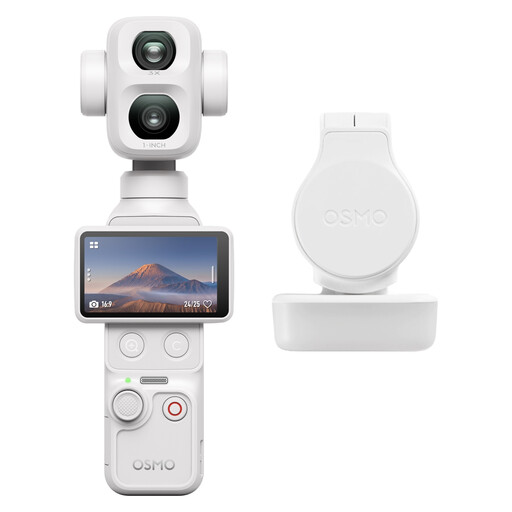
A compact gimbal camera option to consider if you also want to film from different angles during a puzzle demonstration.
Version: Standard Combo (White).
 No image available
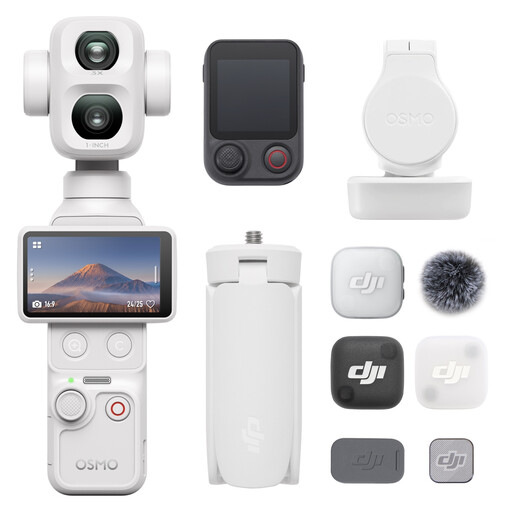
A compact gimbal camera option to consider if you want to try different filming angles for your demonstration.
Version: Vlog Combo (White).
 No image available
This bundle is worth considering if you want to include a video light in your setup when filming your puzzle.
Bundle: Osmo Pocket 3 and Ulanzi VL49 RGB LED Video Light.
 No image available
A compact gimbal camera option to consider if you also want to capture moving shots during your demonstration.
The product title lists a 1″ CMOS sensor, 4K/240fps, 3-axis stabilisation, 2× lossless zoom, 107GB of built-in storage and a 2″ rotating screen.
 No image available
A compact gimbal camera option to consider if you want a version with a handle for your demonstration.
The product title lists a 1″ CMOS sensor, 4K/240fps, 3-axis stabilisation, 2× lossless zoom, 14-stop dynamic range, 107GB of built-in storage and a handle with a 1/4″ thread.
Take a test shot using your intended mount and working distance, with the edges of the puzzle and both hands visible. An overhead presentation mode or a short focusing distance on its own doesn’t prove that the whole puzzle will fit in the frame.
Check a test clip under the lighting you’ll actually use, and adjust the exposure and white balance if necessary. Canon explains exposure compensation for unusually bright or dark scenes and the role of white balance in colour reproduction. Also check that the light-coloured pieces retain their detail.
Check how clear the audio is, along with storage, power and recording time, using your chosen settings. The Consumentenbond notes that an external microphone is an option with suitable cameras. Nikon lists up to 125 minutes of continuous recording for the Z 30 under certain conditions; this isn’t a guarantee for every recording setup.
ACM ConsuWijzer explains that the legal guarantee is based on what you could reasonably expect from the product under normal use. According to ACM ConsuWijzer, the statutory 14-day cancellation period for an online consumer purchase starts after delivery. Check which exceptions and return terms apply to your purchase.
According to the Dutch Data Protection Authority, the GDPR applies if you film and publish images of people professionally or commercially on behalf of a business or organisation. The circumstances of the recording and publication determine which rules apply to your situation.