Who is this camera guide for?

Filming fine jewellery details

You want to show work on clasps, wires or settings clearly; the focus and framing of the camera-and-lens combination determine how large those details appear. Canon specifies up to 1:2 magnification for its separate RF 35mm F1.8 MACRO IS STM lens; OM SYSTEM lists a minimum focusing distance of 1 cm for the Tough TG-7.

Creating overhead tutorials

You want both hands free and to record your work from a fixed angle, possibly straight to a computer. IPEVO lists an adjustable arm and UVC compatibility for the V4K.

Creating a variety of product videos

You film at your desk and elsewhere, and are weighing up a compact, standalone camera against the ability to capture small components in close-up. DJI lists a focusing distance from 0.2 m for the Osmo Pocket 3.

What should you consider when buying?

USB document camera above your work surface

Ideal for: a fixed overhead setup that captures your hands, with a computer at your desk. IPEVO lists an adjustable arm, UVC compatibility and use with programmes including OBS for the V4K.

Keep in mind: IPEVO lists a maximum of 15 frames per second at 3264 × 2448 pixels, compared with up to 30 frames per second in Full HD. Check how well it captures movement at the setting you plan to use.

Standalone compact camera

Ideal for: recording without a computer and capturing small components in close-up. OM SYSTEM lists a minimum focusing distance of 1 cm and 4K/30p video for the Tough TG-7.

Keep in mind: These specifications are listed separately, so they don’t prove that a 1 cm focusing distance is available in every video mode. At such close range, the camera and your hands may also get in the way of the light.

Mirrorless camera with a suitable lens

Ideal for: anyone who wants to choose their own lens, whether for wider shots or greater magnification. Canon lists 4K/30p for the EOS R50 and up to 1:2 magnification for the separate RF 35mm F1.8 MACRO IS STM lens.

Keep in mind: The stated 1:2 magnification doesn’t apply to the R50 kit zoom. Canon lists a maximum magnification of 0.25× at 15 cm in MF mode for the RF-S 18-45mm.

Compact gimbal camera

Ideal for: anyone who also regularly films handheld as well as at their desk. DJI lists mechanical stabilisation for the Osmo Pocket 3.

Keep in mind: DJI lists a focusing distance from 0.2 m for the Osmo Pocket 3. Check whether a small piece of jewellery will appear large enough in the frame from that distance; stabilisation doesn’t mean the camera is suitable for macro filming.

What to consider What to check before buying Most important for
Focus and framing Compare the focusing distance and magnification of the exact camera-and-lens combination; check whether the close-up function also works in your chosen video mode. If I want to show small clasps or settings clearly, I check whether they appear large enough in the frame from my working distance. Around 36% of consumers prioritise capturing fine details.
Hands-free filming and overhead views Check the reach of the arm or tripod, mounting position and framing at a camera height that works for your desk. When I’m working on jewellery, I want the camera to stay out of the way of my hands and show the process from above. This is the main consideration for around 29% of consumers who want to keep their hands free.
Reflections and task lighting Check the framing with your own shiny materials and leave room to diffuse the light. When I’m filming shiny metal, I want the shapes to remain visible without reflections overpowering them. Lighting control is the top priority for around 21% of consumers.
Recording and connections Choose between recording to a computer and standalone recording; check the software, connections, frame rate and what’s included in the specific bundle. If I mainly want a practical recording setup, I consider the connection and any extra components. Around 14% of consumers prioritise easy recording and connections.

Common buying mistakes

  • Assuming the R50 kit is a macro camera set

    The maximum magnification of 1:2 applies to the separate RF 35mm macro lens; the EOS R50 kit reviewed here includes the RF-S 18-45mm zoom lens.

    Check which lens is actually included in the bundle and whether its framing suits your working distance.

  • Only considering the shortest focusing distance

    A short focusing distance doesn’t mean it’s available in every video mode. When you’re close to a shiny piece, the camera or your hands may also block the light.

    Consider your preferred video mode, framing, hand space and light position together.

  • Confusing the highest USB resolution with the smoothest footage

    IPEVO lists a maximum of 15 frames per second at 3264 × 2448 pixels for the V4K, and up to 30 frames per second in Full HD.

    Compare image detail and frame rate at the recording setting you plan to use for filming your assembly work.

    Finding the right recording settings and computer software may take extra setup time.

Camera brands to consider

Canon

A relevant option if you’re considering a mirrorless camera with interchangeable lenses, from wider shots to greater magnification with a dedicated macro lens.

  • Canon lists 4K/30p for the EOS R50 and up to 1:2 magnification for the separate RF 35mm F1.8 MACRO IS STM.
  • The RF-S 18-45mm kit zoom isn’t the RF 35mm macro lens. Canon lists a maximum magnification of 0.25× at 15 cm in MF mode for the kit zoom.

IPEVO

The V4K is a USB document camera for an adjustable overhead view with a computer.

  • IPEVO lists an adjustable arm, UVC compatibility and use with programmes including OBS.
  • IPEVO lists a maximum of 15 frames per second at the highest resolution, compared with up to 30 in Full HD. No substantiated macro magnification has been established for this model.

OM SYSTEM

The Tough TG-7 is a standalone compact camera to consider if close-ups of small components are important to you.

  • OM SYSTEM lists a minimum focusing distance of 1 cm and 4K/30p video.
  • These specifications don’t prove that a 1 cm focusing distance is possible in every video mode; at close range, there may also be less room for lighting.

DJI

The Osmo Pocket 3 is a compact standalone camera to consider for both desk videos and filming on the go.

  • DJI lists mechanical stabilisation and a rotatable screen.
  • The stated focusing range starts at 0.2 m; this may be limiting if you need a small component to fill the frame.

Sony

The ZV-1 II is a compact vlogging camera for product presentations and wider shots.

  • Sony describes a product showcase setting and a built-in wide-angle zoom.
  • The description of this setting doesn’t tell you how large a small clasp will appear from your desk’s working distance, so check the framing with your specific subject.

Cameras at Joybuy

This selection focuses on compact, standalone cameras for desk videos and filming on the go. For close-ups, check that the smallest component appears clearly in the frame from your working distance.
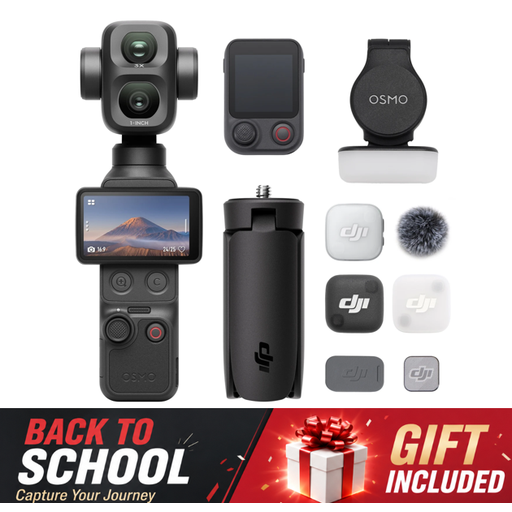
Osmo Pocket 4P Vlog Combo, black

Osmo Pocket 4P Vlog Combo, black

A compact gimbal camera to consider if you want to film independently and mount the camera too.

The product title lists 3-axis stabilisation and a 1/4-inch thread on the handle.

View at Joybuy

DJI Osmo Pocket 4 Standard Combo

DJI Osmo Pocket 4 Standard Combo

A compact camera for standalone video recording; for jewellery close-ups, check that the framing suits your working distance.

The product title lists 4K/240fps video, 2× lossless zoom, 107GB of built-in storage and a 2-inch rotatable screen.

View at Joybuy

Osmo Pocket 4 Creator Combo

Osmo Pocket 4 Creator Combo

A compact standalone video camera to consider if you also film away from your usual desk setup.

The product title lists 4K/240fps video, 3-axis stabilisation, 2× lossless zoom, 14-stop dynamic range, 107GB of built-in storage and a 1/4-inch thread on the handle.

View at Joybuy

Songdian Pocket Camera 4K 44MP, black

Songdian Pocket Camera 4K 44MP, black

A pocket camera for photos and video; check that the smallest component appears in focus and large enough in the frame.

The product title lists 4K video, 44MP and 16× zoom. The product description mentions autofocus.

View at Joybuy

DJI Osmo Pocket 3

DJI Osmo Pocket 3

A compact standalone camera for anyone who also films on the move as well as at their desk.

The product title lists 4K/120fps video, a 1-inch CMOS sensor, 3-axis stabilisation and a 2-inch rotatable touchscreen. DJI lists a focusing distance from 0.2 m; check whether a small piece of jewellery appears large enough in the frame from that distance.

View at Joybuy

Frequently asked questions

Is 4K enough to capture a small clasp in focus?

No. Resolution alone isn’t enough: the component also needs to appear large enough in the frame and be within the focusing range. Compare the framing at your working distance with the lens specifications. For the Canon RF-S 18-45mm, Canon lists a maximum magnification of 0.25× at 15 cm in MF mode.

Can I use a USB document camera without a computer?

The IPEVO V4K reviewed here is designed as a UVC camera for computer programmes, including OBS. If you want to record without a computer, choose a camera whose manufacturer lists that function, such as the Canon EOS R50.

How can I reduce reflections while filming?

Start by adjusting the position and diffusion of the light, then check the image with your own shiny components. Nikon explains how diffused light can help control reflections and hotspots when photographing jewellery; these examples relate to photography and aren’t a test of the video cameras mentioned here.

What warranty and cooling-off period apply to an online consumer purchase in the Netherlands?

According to ACM ConsuWijzer, if a product is faulty, you have statutory warranty rights against the seller; a manufacturer’s warranty doesn’t replace them. For online consumer purchases, you generally have up to 14 days after delivery to change your mind, subject to exceptions that you should check before buying.

Can I publish footage of other people at my workbench?

If other people are recognisable and you want to publish their personal data online, privacy rules apply. The Dutch Data Protection Authority says that consent is required in most cases, and distinguishes this from personal or household use. A recording showing only your own hands and workpiece doesn’t raise the same question about other people’s personal data.
