
Photographers capturing the whole harbour panorama
You want to fit the quayside, buildings and sky into one composition, so start by working out the angle of view you need. Canon Europe describes a wide-angle lens as a way to capture a broad scene.


Start by deciding whether you want a wide view of the harbour or close-ups of distant details: your preferred angle of view and lens will help determine the right camera setup. A mirrorless camera lets you change lenses, while a compact camera with a fixed zoom lens means you can shoot without swapping lenses. With either option, check how you can expose for both the bright sky and dark quayside, and what protection the complete camera-and-lens combination offers in wet weather.
You want to fit the quayside, buildings and sky into one composition, so start by working out the angle of view you need. Canon Europe describes a wide-angle lens as a way to capture a broad scene.
You want to frame ships or cranes individually without assuming that the greatest zoom range is always the best choice. The Consumers’ Association also lists zoom range as a factor to consider when choosing a camera.
You want to adjust the exposure as the cloud cover changes and take your camera outdoors. Canon Europe describes exposure bracketing as an option when it is difficult to capture the bright sky and dark foreground together. There are also site access requirements for industrial areas in the Port of Rotterdam, set by the Port of Rotterdam Authority.
Choose this option if: you want to select a suitable wide-angle lens for your panorama, then use a different lens to frame distant details.
Bear in mind: the mount and the complete kit; extra lenses and possibly an additional battery will make your equipment more extensive.
Choose this option if: you want to frame both the overall view and individual harbour details without changing lenses.
Bear in mind: the wide-angle setting and how easy the camera is to handle when zoomed in. A long zoom range alone does not tell you whether the camera suits you in low light.
The Consumers’ Association and Canon Europe highlight factors such as angle of view, zoom range and exposure. First decide what you want to capture from your vantage point, then check the lens, camera features and complete kit.
| Factor | What should you check? | Who should consider this? |
|---|---|---|
| Angle of view for the panorama | Compare sample compositions from your vantage point and check the focal length, sensor size and lens mount. | If I want to capture the whole quayside and the buildings together, I start with the angle of view I need. Around 31% of consumers prioritise wide framing. |
| Reach for distant details | Decide whether you usually take wide shots or close-ups, then compare the optical zoom range and how easy the camera is to handle. | If you mainly want to frame distant ships or cranes, look at the zoom range without assuming you will always need maximum zoom. Around 25% of consumers say this is their top priority. |
| Bright sky and dark quayside | Check whether the exact model supports RAW capture and exposure bracketing; assess the contrast in the scene when you’re there. | If the sky is bright beside dark harbour structures, I want to be able to judge whether a single exposure will be enough. Around 25% of consumers prioritise exposure control. |
| Portability and wet weather | Compare the combined weight of the camera body and lens, and read the moisture-protection guidance for both parts. | If you’re taking your camera along the quayside and want to take photos in potentially wet weather, consider portability and careful use. Around 19% of consumers prioritise this combination. |
The angle of view and the combination of lens and sensor also matter when composing your harbour shot.
Before comparing models, decide where you’ll be taking photos from and what angle of view you need.
You need a suitable lens to take photos with a mirrorless camera; a body on its own won’t automatically include the lens you’re looking for.
Check what’s included in the kit and whether the lens mount is compatible with the lens you want.
Moisture protection varies by model and does not guarantee protection in all weather conditions or for the complete camera-and-lens combination.
Read the guidance for both the body and lens, and protect your equipment in wet weather.
The EOS R50 is an entry-level APS-C model in the RF/RF-S lens system, for anyone who wants to choose between different lenses.
The Z50II is a mirrorless camera, while the COOLPIX P1100 is a separate compact camera with a fixed zoom lens.
The ILCE-6700 is an E-mount mirrorless camera to consider if you want to shoot in RAW and use interchangeable lenses.
The X-T5 is a mirrorless camera for anyone considering resolution and handling when capturing skyline details.
This Joybuy selection includes cameras with different zoom and lens setups. Check whether each model’s zoom is optical or digital, and whether the listed lens gives you the angle of view you need from the quayside.
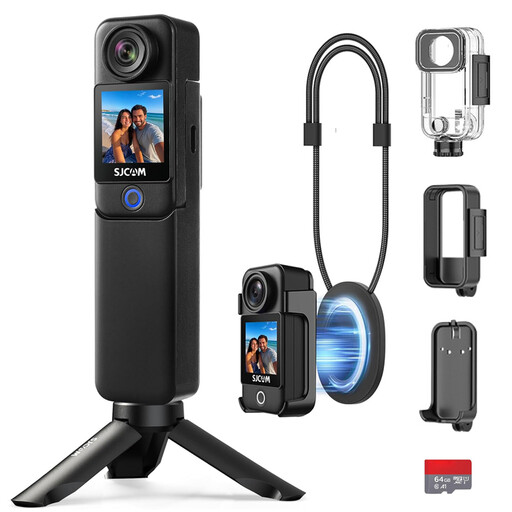 Image unavailable
The listed 154° ultra-wide-angle lens suits a broad composition. This is an action camera, not a mirrorless camera with interchangeable lenses.
The product name lists up to 7 hours of battery life, 6-axis stabilisation, two screens and a supplied accessory kit. The camera body itself is not waterproof; using it in water requires the supplied waterproof housing.
 Image unavailable
The fixed optical zoom lets you frame shots in different ways without changing lenses. Compare the wide-angle setting with the panorama you want to photograph.
The product name lists 12× optical zoom, 4K, Wi-Fi and 64 MP.
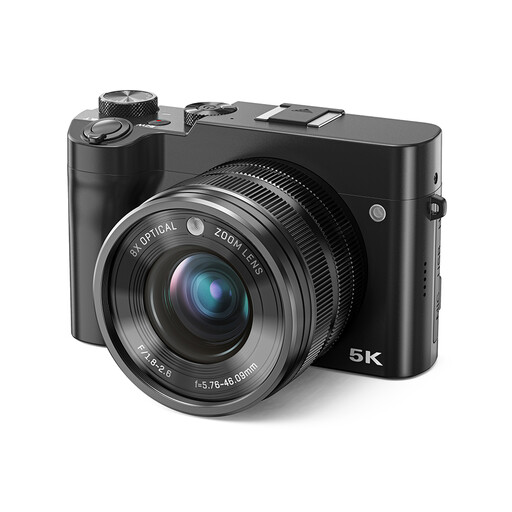 Image unavailable
The listed optical zoom may suit you if you want to frame different shots without changing lenses. Check whether the wide-angle setting captures the whole harbour panorama.
The product name lists 8× optical zoom, 5K, 64 MP and a dual lens.
 Image unavailable
This pocket camera is an option if you’re looking for a compact model for photos and video. Check in advance whether digital zoom suits the framing you need.
The product name lists 4K and 44 MP; the listed 16× zoom is digital.
 Image unavailable
The kit includes a zoom lens for different types of framing without having to swap lenses straight away. Check whether the range suits your vantage point and composition.
The product name lists a 16–50mm zoom lens. The product information warns against exposing the camera to moisture.
No. First check whether a single shot captures enough detail in both the bright sky and the dark quayside. Canon Europe describes HDR as combining several exposures. Check whether your camera supports exposure bracketing, and use it when the scene calls for it.
No. The lens mount on the camera body must match the lens, or you’ll need to use a suitable adapter. Also check which lens is actually included with a camera kit.
Check the shutter speed and stabilise the camera if you need a longer exposure. Nikon recommends using a tripod and remote control for landscape photography to reduce camera shake. Moving ships may still look blurred with a long exposure.
According to the Dutch government, you are entitled to a product that works properly, and the retailer is your point of contact if there is a fault. The legal guarantee does not automatically mean a fixed two-year guarantee period in the Netherlands; what you can expect depends on factors including the product and the sales information. For distance purchases, you will also usually have a 14-day cooling-off period.
It depends on the location and how you use the photos. For the Port of Rotterdam, the Port of Rotterdam Authority says that industrial areas are not accessible without permission and sets specific conditions for taking photos on and of these sites. The Dutch Data Protection Authority distinguishes between images of identifiable people that remain private and wider distribution or commercial use.