Who is this advice for?

Online shop owner with lots of bags

You regularly photograph several bags and want control over framing, background and colour reproduction across your shots. Practical product photography tips from Shopify Netherlands and Canon Netherlands are useful when working with a consistent setup.

Bag seller with fine details to show

You want to show materials and stitching clearly, and may need to crop your images. Canon Netherlands specifies 24.2 effective megapixels for the EOS R50, but that figure alone doesn’t determine what your finished photo will look like.

Beginner with a smartphone they already own

You want to start by testing whether your current phone, enough light and a fixed camera position can produce photos that work for your product page. Shopify Netherlands describes smartphone product photography as one possible place to start.

What should you look for when choosing?

Your current smartphone

Choose this if: you’re taking a limited number of product shots and want to test whether your phone is up to the job first.

Trade-off: manual settings, RAW storage and lens choice depend on your phone.

APS-C mirrorless camera

Choose this if: you want to choose an interchangeable lens or need more options for editing your images.

Trade-off: a camera body isn’t automatically a complete kit, so check the lens mount and what’s included.

Full-frame camera

Choose this if: you have a specific need for extra resolution for cropping, or for other demanding photography or video work.

Trade-off: consider whether you need that extra resolution for your final image size, and remember to factor in a suitable lens.

What to consider What to look for when buying Who is this important for?
Colour against a white background Check the white balance settings and whether the camera supports RAW shooting. Test it with the lighting you’ll actually use. If I want the colour of every bag to look true to life, I pay attention to lighting and white balance. Around 36% of consumers prioritise colour accuracy.
Detail and cropping Compare effective megapixels, the lens mount and the lens included. Assess test shots at the size you’ll publish them. If I want to show stitching and materials, and sometimes crop the image, I look at both the full shot and a crop. Around 29% of consumers prioritise detail and cropping.
A repeatable setup Allow space for a white background, lighting and a tripod. Check that you can use the camera in the same position each time. When photographing a range of bags, I want to be able to repeat the framing and shooting conditions. Around 21% of consumers prioritise this kind of consistent workflow.
Complete kit and getting started Check whether you’re buying a camera body or a kit, and which lens and accessories are included. Compare complete setups, not just individual cameras. If I first want to find out whether my phone is good enough, I test it before choosing a camera body and lens. Around 14% of consumers prioritise the initial cost.

Common pitfalls

  • Comparing a camera body with a complete kit

    A camera body on its own doesn’t automatically include a lens you can use straight away.

    Check the exact kit contents and lens mount before comparing cameras.

  • Assuming more megapixels will fix colour problems

    Resolution alone won’t correct a colour cast or distracting shadows. White balance and lighting affect how the bag and background look.

    Test your lighting and white balance with your current camera first; only then choose a camera body.

    A fixed lighting setup and post-processing can take extra preparation time.

  • Applying consumer rules to a business order without checking

    Business.gov.nl explains that different rules on cancellation periods and guarantees may apply to sales to businesses than to consumer purchases.

    Before ordering, check whether you’re buying as a private individual or a business, and which terms and conditions apply to your order.

Camera brands to compare

Canon

The EOS R50 is a compact APS-C camera with an RF mount, suited to anyone who wants to choose a lens for each shoot.

  • Canon specifies 24.2 effective megapixels and support for RF and RF-S lenses for the R50.
  • Canon doesn’t list in-body image stabilisation for this camera. Check which lens and accessories are included in the kit you choose.

Sony

The α6400 is an APS-C camera with an E mount; the α7 IV is a separate full-frame option.

  • Sony specifies 24.2 effective megapixels for the α6400 and 33.0 for the α7 IV.
  • RTINGS considers the α7 IV likely to be overkill for most hobbyists and retailers. That assessment relates to this model and doesn’t determine whether the α6400 suits your workflow.

Fujifilm

The X-S20 is an APS-C option for anyone who wants to use the same camera for other photography and video work as well as product shots.

  • Fujifilm specifies 26.1 effective megapixels, an X mount and RAW support for the X-S20.
  • Fujifilm describes the camera as having built-in image stabilisation. For a consistent product photography setup, this doesn’t automatically replace a tripod.

Nikon

The Z50II is a mirrorless camera worth comparing if its controls and a suitable Z system kit match your preferences.

  • Nikon shows the Z50II as a camera body and with separate lens kit options.
  • Kit contents vary. Nikon’s Product Review mode is designed for video where the focus shifts from a face to an object being shown. This isn’t a proven advantage for still product shots.

Cameras on Joybuy

This selection includes compact cameras and an APS-C mirrorless camera for anyone comparing cameras for photography. Check the listed specifications and what’s included with each kit.

KINSI Mini Vlog Camera 4K with 64 MP and a rotating lens

KINSI Mini Vlog Camera 4K, 64 MP

A compact camera option for anyone looking for one model for both photography and vlogging.

The product description lists 64 MP for photos, a 330° rotating lens, a 150° wide-angle lens and a mini tripod. According to the product name, the model also has Wi-Fi and a 1.72-inch touchscreen.

Joybuy

Komery W6 camera with 64 MP and 12× optical zoom

Komery W6 Camera, 64 MP, 12× Optical Zoom

A digital camera option for anyone comparing the zoom and resolution features listed.

The product name lists 64 MP, 12× optical zoom, Wi-Fi and 4K.

Joybuy

DJI Osmo Pocket 3 with 1-inch CMOS sensor and rotating touchscreen

DJI Osmo Pocket 3

A compact camera option for anyone who wants to shoot video as well as take photos.

The product name lists a 1-inch CMOS sensor, 4K/120fps video, 3-axis stabilisation and a rotating 2-inch touchscreen. The product description mentions focusing on still subjects.

Joybuy
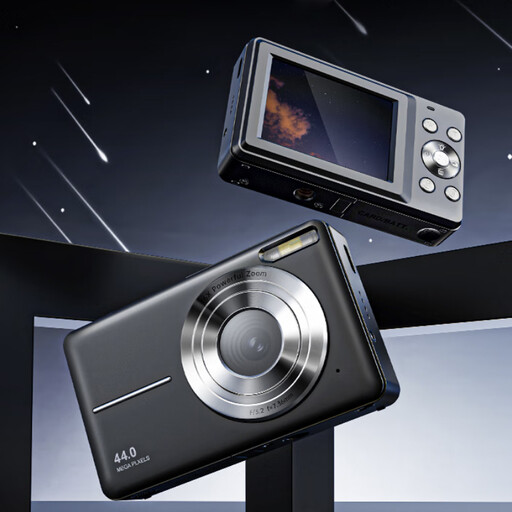
Songdian pocket camera with 44 MP and 16× zoom

Songdian Pocket Camera, 44 MP, 16× Zoom

A pocket camera option for anyone looking for a compact model for photography and video.

The product name lists 44 MP, 4K and 16× zoom; the product description mentions autofocus.

Joybuy

Sony ZV-E10 with 16–50mm zoom lens

Sony ZV-E10 + 16–50mm Zoom, Black

An APS-C mirrorless camera with a lens included, for anyone comparing interchangeable-lens cameras with this kit.

The product description lists a 24.2 MP APS-C sensor, a Sony E mount and a 16–50mm lens.

Joybuy

Frequently asked questions

Can I start with my smartphone?

Yes. First, test your current phone with a white background, soft lighting and a fixed camera position. Assess the photos for the size and colour reproduction you need for your product page. Shopify Netherlands describes smartphone product photography as one possible approach.

How can I keep the colours in handbag photos consistent?

Keep the lighting as consistent as possible and check the white balance whenever the light source changes. RAW shots can give you more scope to assess colour during editing, but they don’t replace a suitable lighting setup.

What do I need besides a camera body?

First, check whether a suitable lens is included. For a fixed white-background setup, you’ll also need to consider a background, stable support and a suitable light source or window light.

As a private online shopper in the Netherlands, am I always entitled to exactly two years of legal guarantee?

No. The Dutch government states that there is no fixed legal guarantee period in the Netherlands. You’re entitled to a product that works properly for as long as you could reasonably expect it to. If there’s a fault, contact the seller; any additional manufacturer’s guarantee doesn’t replace this right.

Does the cooling-off period for an online purchase also apply if I order as a business?

The cooling-off period for online purchases applies to qualifying consumer purchases; don’t assume it also applies to a business order. Dutch government guidance distinguishes between consumer purchases and sales to businesses, so check your purchasing status and the terms and conditions that apply.
