What should you look for when choosing?
Start with a consistent setup, then decide whether you need colour correction, detailed crops or a different lens. For occasional photos, you can try your current camera first.
| What to consider |
What should you check? |
Who is this important for? |
| Repeatable composition |
Check whether you can operate the camera from its position on the tripod, and make sure your setup is stable. |
If you photograph a range of bags, you’ll want to repeat the framing and background as the window light changes. Around 40% of consumers say repeatability is their main buying concern. |
| Colour in changing daylight |
Check the white balance settings and whether the exact model supports RAW shooting. Also decide whether you want to edit your photos. |
If you want to assess colours as accurately as possible across different bags, keep an eye on changes in the window light and whether you can correct them. Around 30% of consumers put colour control first. |
| Details and crops |
Check the minimum focusing distance of the included lens and whether the smallest detail you want to show will still be visible in the final crop. |
If you want to show stitching or material texture, a lens suited to your preferred working distance can help. Around 20% of consumers make detail shots their top priority. |
| Complete camera kit |
Check whether the version includes a lens and what accessories you’ll need for your setup. |
If you want to know in advance what you need for a usable setup, compare the complete kit rather than just the camera body. Around 10% of consumers say the complete kit is their first consideration. |
Cameras at Joybuy
This selection includes digital cameras and mirrorless cameras with zoom lenses, suitable for a range of handbag compositions. Check the listed specifications and included items for each version.
 No image available
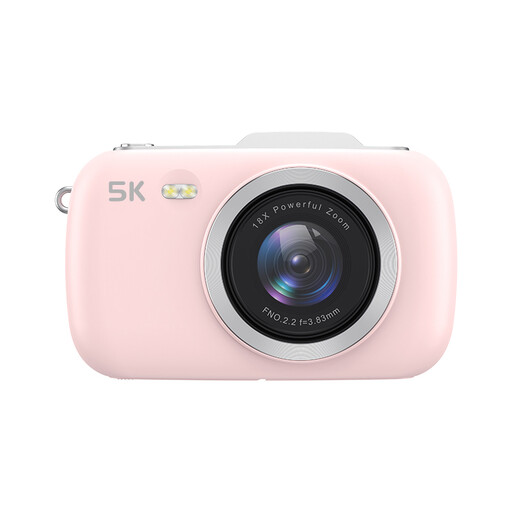
KOMERY G7 digital camera, pink, without SD card
The listed zoom may be useful if you want to try different crops of a bag. Check whether the angle of view suits your working distance.
The product name lists 18X zoom, 5K and 80MP UHD. The product title says an SD card isn’t included.
View at Joybuy
 No image available
Sony ZV-E10 with 16-50mm zoom lens, black
This zoom kit is worth considering if you want to try different framings of a handbag. Check whether the lens suits your preferred working distance.
The product name lists a 16-50mm zoom lens. According to the product description, an SD card and adapter/charger aren’t included.
View at Joybuy
 No image available
Sony Alpha A6100 with 16-50mm f/3.5-5.6 OSS II
A kit lens could suit you if you want to try different framings of a handbag. Check the minimum focusing distance for small details.
The product name lists a 16-50mm f/3.5-5.6 OSS II lens.
View at Joybuy
 No image available
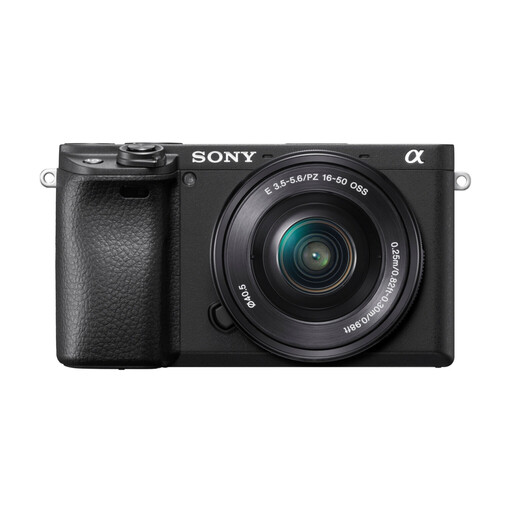
Sony Alpha A6400 with E PZ 16-50mm f/3.5-5.6 OSS II
The product name says the kit includes a zoom lens for trying different framings. Consider separately whether the lens is suitable for your detail shots.
The product name lists an E PZ 16-50mm f/3.5-5.6 OSS II lens.
View at Joybuy
 No image available
Sony ZV-E10 mirrorless camera, body only
This version could be a good option if you already have a suitable lens or want to choose one yourself. Check compatibility before putting your kit together.
This is a body-only version: the product title says a lens isn’t included.
View at Joybuy
Frequently asked questions
Do I need to buy a new camera straight away to photograph handbags in window light?
Not necessarily. First, try your current camera with window light, a plain background and a tripod. Then consider whether you need better colour correction or more detailed crops. This is a practical approach based on advice from Canon Netherlands, not a comparison test of cameras.
How can I keep colours consistent as the window light changes?
Check the white balance in the light you’re shooting in. If you shoot in RAW and edit your photos, you can adjust the white balance afterwards. Check whether the exact camera model supports this feature.
Which lens do I need for handbag details?
Choose based on the smallest details you want to show and the distance you can shoot from. Check the minimum focusing distance of the lens actually included in the kit; a resolution figure alone won’t tell you whether the lens can focus close enough.
Which items should I check besides the camera body?
Check whether a lens is included and whether you’ll need a tripod or storage for your setup. Manufacturers sell body-only versions as well as kits, so what’s included in the specific version determines what else you’ll need.
What returns and warranty rules apply in the Netherlands?
For many distance purchases made by a private individual, the Dutch government says there is a 14-day cooling-off period. Check whether your purchase meets the conditions. Under the statutory guarantee, the seller must offer a solution if a product is faulty. If you’re buying on behalf of a business, don’t assume the same consumer rights automatically apply.


