
Photographing framed prints
If you photograph prints behind glass, you’ll want to minimise distracting reflections from lamps, windows or people. Nikon explains that a polarising filter can reduce reflections.


Start by choosing a setup that works for the print, camera and lighting; a camera with more megapixels won’t prevent reflections in glass. For accurate reproductions, the lens, a consistent white balance and, where available, RAW are all important considerations. A simpler camera may be enough for quick overview shots.
If you photograph prints behind glass, you’ll want to minimise distracting reflections from lamps, windows or people. Nikon explains that a polarising filter can reduce reflections.
If you photograph prints repeatedly, consider colour and detail in relation to how the images will be used. Adobe explains how different lighting conditions affect colour temperature, while Fujifilm lists RAW support for the X-T50.
If you share a camera with others, it helps to have a setup that fits the available space and can be set up again easily.
| What to consider | What should you check? | Who is this most important for? |
|---|---|---|
| Reflections in glass | Take a test shot with the workshop lights on and try moving the light sources. Nikon says that a suitable polarising filter can reduce reflections. | If I can see distracting reflections, I want to be able to adjust the lighting first and try a filter if needed; around 33% of consumers prioritise controlling reflections when buying. |
| Consistent colour | Check the white balance settings and available file formats. Take comparison shots under the lighting you actually use; Adobe explains that different lighting conditions have different colour temperatures. | If I photograph the same print under changing workshop lighting, I want to be able to check and adjust the colour if needed; around 27% of consumers prioritise colour consistency. |
| Detail and framing | Decide what the final image needs to look like and test the camera from the available distance. Then compare both the effective resolution and the lens in the exact setup. | If I want to retain detail in the final reproduction, I’ll consider both the resolution and the lens; around 27% of consumers prioritise detail when buying. |
| Shared use | Measure the available space and check the required shooting distance, what’s included in the kit and how any accessories will be stored. | If several people use the camera, I want a setup that fits the workspace and is easy to set up again; around 13% of consumers prioritise practical shared use. |
Resolution and reflection control are two separate considerations. Even a sharp shot may be unusable if reflections make the print hard to see.
Test the print under your intended lighting first and assess the reflections before comparing resolutions.
With an interchangeable-lens camera, the angle of view depends partly on the lens you choose and the available shooting distance.
Check the exact body, lens and kit contents for each offer.
You may need to buy a lens or setup components separately; what you need depends on the kit you choose.
Your statutory rights if a product is faulty are separate from any warranty offered by the manufacturer or seller. ACM ConsuWijzer distinguishes between a seller’s warranty and your statutory guarantee.
Keep your proof of purchase and report any faulty product to the seller.
The EOS R50 is an example of an APS-C camera with an RF mount and interchangeable RF or RF-S lenses.
The X-T50 is worth considering if effective resolution and a RAW workflow are important to you.
The ILCE-6700 is an APS-C camera with an E mount for anyone who wants to choose a suitable lens separately.
These cameras range from compact models to interchangeable-lens cameras. Check that the lens, shooting distance and included accessories suit your prints and workspace for each kit.
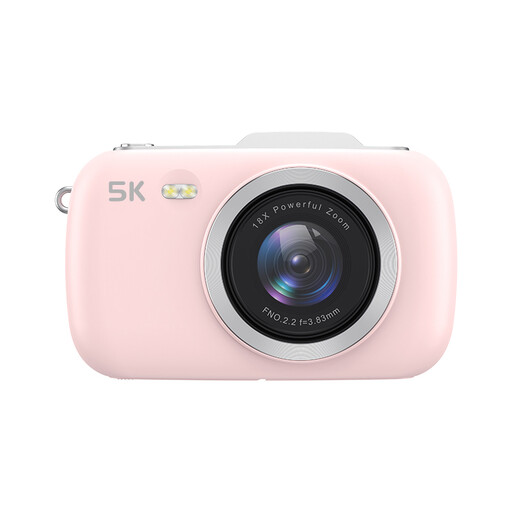 Image unavailable
The title describes the camera as portable; check whether you can frame the whole print properly from the available distance.
The product title lists 80 MP and 5K; these are product claims, not proof of reproduction quality. An SD card is not included.
 Image unavailable
Its compact size may be useful if you want to store the camera in a shared workshop; try a test setup to check that the angle of view works for your prints.
The title lists 44 MP and 4K; these are product claims, not an independent assessment of detail. A TF card is not included.
 Image unavailable
The included zoom lens lets you adjust the framing for different print sizes or shooting distances; also check your setup for reflections in the glass.
Specifications: 24.2 MP APS-C sensor, 16–50 mm kit lens, 40.5 mm filter size and a body weight of 343 g.
 Image unavailable
The included zoom lens gives you scope to adjust the framing for different prints and shooting distances.
Specifications: 24.2 MP sensor, 16–50 mm f/3.5–5.6 OSS II kit lens, 40 mm filter size and a body weight of 396 g.
 Image unavailable
RAW shots may be useful if you want to adjust the colour later; also check that the listed lens suits your shooting distance and print size.
Listed features: 20 Mpx, 24–70 mm lens, RAW shooting and a weight of 267 g.
No, it depends on the situation. Nikon explains that a polarising filter can reduce unwanted reflections. Test it with the actual print and lighting, and see if you can move the light sources too.
Use the same lighting for comparison shots and check the white balance. If you want to adjust the colour later, check that the exact camera model supports RAW shooting; Fujifilm lists RAW support for the X-T50.
Check which lens is included in the offer and what else you need for your chosen setup. A body with an interchangeable lens isn’t automatically a complete photography kit; what you need depends on the exact kit and your workflow.
For online consumer purchases, you generally have a statutory cooling-off period of up to 14 days after delivery, with some exceptions. ACM ConsuWijzer also explains that your statutory guarantee is separate from any manufacturer’s warranty; if a product is faulty, you can contact the seller.
Don’t assume you can freely share or publish a photo of a copyright-protected work. According to the Dutch Government, a copy for personal use cannot simply be shared or made public; before publishing, check the rights and permissions required for the work in question.