What should you look for when choosing?
Start by taking a test shot of the whole card from the available table height. Then adjust the camera, lens and lighting to suit the details you want to capture.
| What to consider |
What should you check? |
Who is this important for? |
| Full-card shot |
Take a test shot from the available height and check that all the edges are clearly in frame. Also make sure there’s room for the mount and lighting beside the card. |
I want a straight-on photo of the whole card for a listing or collection, with no edges cut off. Around 33% of consumers prioritise an overall shot when making this choice. |
| Reflections and colour |
Try moving the light or diffusing it, and assess foil cards from the same camera angle. Check that the light falls evenly across the card. |
With glossy cards, I want to show the text and surface without reflections hiding details. Around 27% of consumers prioritise controlling reflections. |
| Small details |
Compare the lens magnification and the working space between the lens and the card. Check that there’s still room to light the card properly. |
If tiny print or surface details need to be shown separately, I compare the magnification with the space available on my table. Around 20% of consumers prioritise detail magnification. Canon Netherlands lists a maximum of 0.5× for the separate RF 35mm macro lens; Nikon Netherlands lists a maximum of 0.67× for the separate Z DX MC 35mm. These are manufacturer specifications, not a comparative test of card photography. |
| Simple set-up |
First try your existing phone with a stable mount. If you’re using a camera, check which lens is included and test the framing you want. |
I want as few parts and steps as possible, while still getting a usable card photo. Around 20% of consumers prioritise keeping their equipment simple. |
Cameras at Joybuy
Joybuy camera options to suit photography on a small table.
 No image available
KOMERY G7 5K camera
The stated zoom may be useful if you want to adjust the framing from a fixed table-top set-up.
The product title lists 18X zoom.
View at Joybuy
 No image available
Komery W6 camera
The stated zoom may help you adjust the framing; take a test shot to check whether the whole card fits.
The product title lists 12X optical zoom and 4K video.
View at Joybuy
 No image available
DJI Osmo Pocket 3
The product description mentions capturing still subjects; take a test shot to see whether you can achieve the card framing you want.
The product title lists a 1-inch CMOS sensor and 3-axis stabilisation.
View at Joybuy
 No image available
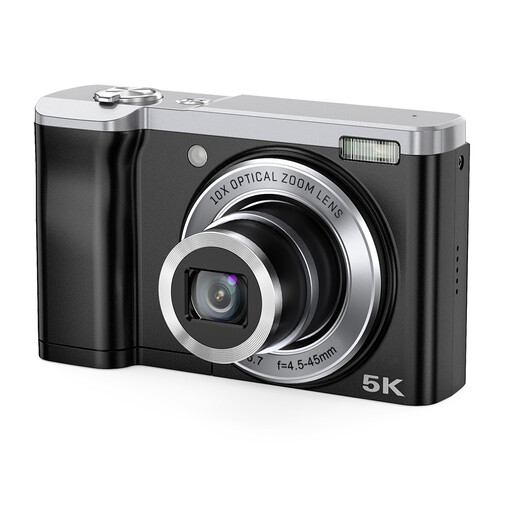
Songdian 5K digital camera
The product title lists optical zoom, which may be useful if you want to adjust the framing from a fixed position.
The product title lists 10X optical zoom and front and rear cameras.
View at Joybuy
 No image available
Sony ZV-E10 + 16–50mm Zoom, black
The zoom lens may be useful if you want to adjust the framing from a fixed table-top set-up; take a test shot to check whether the whole card fits.
The product description lists an APS-C camera with an E PZ 16–50mm lens.
View at Joybuy
Frequently asked questions
Do I need to buy a macro lens straight away to photograph a whole trading card?
No. First take a test shot of the whole card with the camera, mounting height and lighting you already have. A separate macro lens is worth considering if small details don’t appear large enough in the frame. If so, check both the magnification and the working space.
How should I set up the camera and keep the shot tidy?
Secure the camera steadily above the card, check that the edges are in frame and move the light if you can see reflections. Keep the lens and background clean, handle valuable cards with care and check the photo for dust before taking a series of shots.
What extra equipment should I check before buying a camera?
Check whether the version you’ve chosen includes the lens you need and whether you already have a suitable mount and lighting. With a mirrorless camera, a macro lens may be sold separately, so check exactly what’s included in the kit.
What warranty rights apply when buying in the Netherlands?
According to the Dutch government, statutory warranty applies in the Netherlands, with no fixed statutory warranty period. If a product is faulty, contact the seller; any manufacturer’s warranty is in addition to your statutory rights.
Can I return a camera bought online after trying it out?
According to the Dutch government, consumers who buy at a distance are often entitled to a 14-day cooling-off period. There are exceptions to the right to cancel, so handle the camera with care and check the terms that apply to your specific purchase.


