For overview shots of an entire tool, a useful working distance is important. For small engravings or cutting edges, the magnification offered by the chosen close-up mode or lens matters most. A compact camera such as the OM SYSTEM TG-7 keeps your setup simple, while a mirrorless camera with a suitable macro lens gives you more choice of lenses to consider. With either setup, a fixed composition and controlled lighting help keep the tool visible without accidentally lighting the dark background, as Canon Netherlands and Adobe explain.
Who is this choice relevant to?
Detail photographer
You want to fill the frame with engravings, cutting edges or small joints. Compare the maximum magnification of the exact lens or close-up mode, and check that there is enough room in front of the camera for lighting. OM SYSTEM, Canon, Nikon and Sony publish model-specific information about close-up capabilities and lenses.
Seller with a permanent photo table
You photograph several tools against the same dark background and want consistent framing, recognisable colours and control over the lighting. Canon Netherlands explains how a tripod can help keep the composition consistent; Adobe highlights the importance of a controlled environment and good lighting.
Maker who wants to shoot quickly
You want to switch between an overview shot and a close-up without lots of separate components. Check whether the built-in lens can capture both views from the distance available at your photo table.
What should you look for when choosing?
Compact camera with close-up mode
Best for: anyone who wants to capture small details without changing lenses. The OM SYSTEM TG-7 manual describes a close-up mode for shooting from as close as 1 cm.
Keep in mind: the lens is built in and cannot be changed. OM SYSTEM specifies a 12-megapixel resolution for this model; take a test shot if you plan to crop the image heavily.
Mirrorless camera with a suitable macro lens
Best for: anyone who wants to choose a lens that works for both overview shots and small markings. Canon specifies up to 1:2 magnification for the separate RF 35mm F1.8 MACRO IS STM lens; Nikon and Sony specify 1:1 for the macro lenses described here.
Keep in mind: magnification depends on the specific lens, not automatically on the camera body or kit lens. Check the mount, what’s included in the bundle and the working space in front of the lens before buying. Accurate focusing remains important for close-ups.
| What to consider |
What to check before buying |
Who does this matter most to? |
| Capturing small details large enough |
Check the maximum magnification of the exact lens or close-up mode, and test the framing of your smallest detail. |
I want to show an engraving or cutting edge clearly, even when working close to my small photo table. Around 36% of consumers put magnification first. |
| Lighting tools against a dark background |
Take test shots, paying separate attention to the subject and the background; try moving or softening the light. |
I want to show shiny metal without too much light falling on the background. For around 29% of consumers, controlling the distribution of light is the main priority. |
| Creating a consistent series |
Check the tripod mount and keep the framing, lighting and white balance consistent when taking similar shots. |
I photograph tools for a catalogue or portfolio and want the images to look consistent. Around 21% of consumers prioritise being able to create a repeatable series. |
| Keeping the setup simple and compact |
Compare overview and close-up framing from your available working distance; with a mirrorless camera, check which lens is included. |
I want as few separate components as possible and to switch quickly between a whole tool and a detail. Around 14% of consumers put a simple setup first when choosing. |
Common buying mistakes
-
Assuming ‘macro’ means the same magnification on every camera
The 1:2 and 1:1 magnifications mentioned apply to specific lenses; the camera body alone does not guarantee this magnification.
Compare the maximum magnification and lens mount, and check exactly which lens is included in the bundle.
A suitable macro lens may need to be bought separately. Check what’s included in the bundle before choosing a camera body.
-
Expecting a black cloth to produce a black photo automatically
Lighting the background and lighting the tool are separate parts of your setup. Shiny metal can also react to light differently from a matt handle.
Take a test shot and first adjust the direction of the light and the distance between the tool and the background.
Positioning the lighting may take extra preparation. Check that your setup has enough room to move the light source or modifier.
-
Looking only at the minimum focusing distance
A short focusing distance on its own does not tell you how large the detail will appear in the image or how much room there will be in front of the lens for lighting.
Also check the maximum magnification, and test the framing and lighting for the smallest detail you want to photograph.
Brands to consider
OM SYSTEM
The TG-7 is a compact camera with a built-in close-up mode, ideal if you don’t want to choose a separate macro lens.
- OM SYSTEM lists a 12-megapixel resolution and a built-in lens for the TG-7. The manual describes close-up shots from as close as 1 cm and focus bracketing in close-up mode.
- Shooting from 1 cm away does not automatically leave enough room to light the subject well. The built-in lens cannot be changed.
Canon
The EOS R50 is an interchangeable-lens option for anyone who wants to combine overview shots with a separately chosen close-up or macro lens.
- Canon Netherlands specifies up to 1:2 magnification for the separate RF 35mm F1.8 MACRO IS STM lens.
- That magnification is not a feature of every EOS R50 kit lens. Check the exact bundle and make sure the mount is compatible with your chosen lens.
Nikon
The Z50II with a suitable Z lens offers an interchangeable-lens option; the NIKKOR Z MC 50mm f/2.8 is a separate macro lens for small details.
- Nikon specifies a Z mount for the Z50II and 1:1 magnification for the separate NIKKOR Z MC 50mm f/2.8.
- The macro magnification applies to the lens mentioned, not the camera body alone. Check whether the lens is included in the offer.
Sony
The α6400 with an E mount is an interchangeable-lens option; the SEL30M35 is a separate APS-C macro lens.
- Sony specifies a maximum magnification of 1.0× and a minimum focusing distance of 0.095 m for the SEL30M35.
- Check the working space available in front of the lens and whether the SEL30M35 is actually included in your chosen bundle.
Cameras at Joybuy
The Joybuy cameras listed below are designed for photography, including models with interchangeable lenses. For each product, check whether the lens, zoom and controls suit the close-ups and lighting you need at your photo table.
 No image available
Komery W6 4K digital camera, 12× optical zoom
The title mentions photography and 12× optical zoom, which may be useful if you want to adjust the framing from your fixed setup.
The title also mentions Wi-Fi and 64 MP. Take a test shot to check whether your smallest tool detail appears large and sharp enough in a close-up.
View at Joybuy
 No image available
DJI Osmo Pocket 3
The product title presents this model as a small camera for photography and video. Use a test composition to see whether the fixed setup and close-up distance suit your tools.
The title mentions a 1-inch CMOS sensor, 4K/120fps video, 3-axis stabilisation, and face and object tracking. Check that these features suit the way you take photos.
View at Joybuy
 No image available
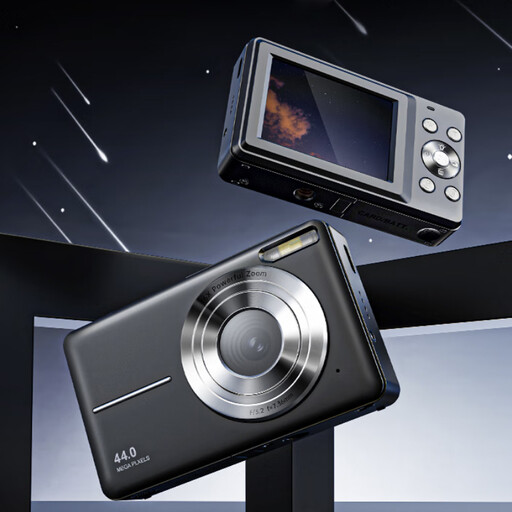
Songdian Pocket Camera 4K 44MP, black
The title describes a pocket camera for photography and video. Test whether you can frame both the whole tool and the detail you want from the distance available.
The title mentions 4K, 44 MP and 16× zoom, but does not specify the type of zoom. Check what magnification you can use in your own setup.
View at Joybuy
 No image available
Sony ZV-E10 with 16–50mm kit lens
According to the product description, this set combines a Sony E mount with a 16–50mm kit lens. Check whether the lens can capture the close-up framing you need for your tools.
The description mentions a 24.2 MP APS-C sensor. An adaptor or charger and an SD memory card are not included, according to the description.
View at Joybuy
 No image available
Sony Alpha A6100 with 16–50mm f/3.5–5.6 OSS II lens
The product title mentions an interchangeable lens and a 16–50mm lens. Check whether the included lens frames your chosen detail large enough from your working distance.
The description mentions a 24.2 MP sensor and an electronic viewfinder.
View at Joybuy
Frequently asked questions
Do you need a macro lens to photograph an entire tool?
Not necessarily. First decide how large the tool needs to appear in the frame from the distance you have available. For small markings, the maximum magnification of the exact lens or close-up mode becomes more important.
How can you avoid a grey background or a blurry close-up?
Set up a test shot so that less light falls on the background than on the tool, and keep the camera steady. Check the focus on the detail you want to show; focusing accurately takes extra care at very short shooting distances.
What additional purchases and rights should you consider when buying a camera in the Netherlands?
Check whether the offer includes the lens and support you need for your setup; a camera body with a standard zoom does not automatically offer the magnification of a separate macro lens. If a product is faulty, the Dutch government says the seller must provide a solution under the legal guarantee; an extended warranty does not replace this right.
Can you publish a photo of a tool if someone is also recognisable in it?
If the photo shows an identifiable person and you publish it for business purposes, the Dutch Data Protection Authority says the exception for personal or household use does not apply. You will need a lawful basis under the GDPR; consent may be one example, but it is not the only possible basis.


