Start by deciding where to position the camera, then check whether the lens can focus at that distance. A high video resolution won’t compensate for a minimum focusing distance that’s too long or an awkward viewing angle. A USB webcam suits demonstrations via a computer, while a compact or gimbal camera can record independently or offer different viewpoints. For example, Sony lists a minimum focusing distance of around 5 cm at the wide-angle end and around 30 cm at the telephoto end for the ZV-1. These are specifications, not test results for soldering footage.
Who is this camera set-up for?
Maker filming fine details
You want the soldering iron tip and small components to remain clearly visible. That makes focusing distance and framing more important than portability. Sony explains that a lens may not focus properly if the subject is closer than the minimum focusing distance.
Maker with limited desk space
You want to keep your work surface clear, so you need to choose the camera alongside a suitable mounting point. A built-in stand or compact size doesn’t automatically mean you can get the overhead angle you want.
Maker demonstrating live
You want to use the footage directly in software on a computer. Check the connection and consider how you’ll record your spoken commentary, too; not every camera has a built-in microphone.
What should you look for when choosing?
USB webcam
A good fit if: you’re recording or demonstrating live via a computer and can set up a fixed camera position.
Keep in mind: Elgato states that the Facecam MK.2 has a fixed focus range of 30–120 cm and no built-in microphone.
Compact camera
A good fit if: you want to record independently and show small components from relatively close up.
Keep in mind: Sony lists a minimum focusing distance of around 5 cm at the wide-angle end and around 30 cm at the telephoto end for the ZV-1, measured from the front of the lens.
Compact gimbal camera
A good fit if: you also want to use the same camera for moving shots or different viewpoints.
Keep in mind: DJI lists a minimum subject distance of 20 cm for the Osmo Pocket 3. A gimbal doesn’t replace a suitable mount for a fixed overhead shot.
| What to consider |
What to look for |
Who is this important for? |
| Clarity of small components |
Compare the minimum focusing distance with your planned camera distance, and check the framing at your chosen zoom setting. |
If I want to show the soldering tip close up, the detail needs to be both sharp and large enough in frame. Around 33% of consumers in this situation make detail visibility their top priority. |
| Clear space and camera position |
Decide where the camera can be mounted and how much room you and your hands need around the work surface. |
I want to handle my soldering iron and components freely, so the camera mount needs to sit outside my work area. Around 27% of consumers prioritise a clear workspace and a practical mounting option. |
| Computer connection and sound |
Check that the camera connects to your computer and whether you’ll need a separate microphone for spoken commentary. |
If I’m demonstrating live via a computer, I want to get both the picture and spoken commentary across clearly. Around 20% of consumers prioritise computer connectivity and sound. |
| Recording time and complete set-up |
Check which mount, power supply and storage suit your recording, and what’s included with the version you’ve chosen. |
I want to record without having to search for missing parts or storage while I’m working. Around 20% of consumers consider a complete, practical set-up the most important thing. |
Common buying mistakes
-
Choosing based only on 4K or maximum zoom
High resolution won’t automatically make your footage sharp if the lens can’t focus at your chosen distance. The minimum focusing distance of the Sony ZV-1 also changes with the zoom setting.
Assess the focusing distance and framing together, from the camera position you plan to use.
-
Buying a webcam without measuring the distance to your work surface
Elgato states that the Facecam MK.2 has a fixed focus range of 30–120 cm. If your work surface is outside that range, you may need to change the camera position or choose another camera.
Measure the distance and check that the mount will fit outside your work area before choosing a webcam.
-
Assuming the camera is a complete video and audio set-up
A computer connection doesn’t automatically mean that the camera itself will record your spoken commentary. Elgato states that the Facecam MK.2 has no built-in microphone; DJI says the Osmo Pocket 3 records to an inserted microSD card.
Before buying, check which microphone, storage and mount you’ll need for your recording.
Camera brands to consider
Sony
The ZV-1 is a compact camera for anyone who wants to fine-tune the distance and framing for close-ups.
- Sony lists a minimum focusing distance of around 5 cm at the wide-angle end for the ZV-1.
- At the telephoto end, the stated minimum distance is around 30 cm, so the shorter distance isn’t available across the full zoom range.
Elgato
The Facecam MK.2 is worth considering for a fixed demonstration via a computer.
- Elgato lists a USB connection and a 1/4-inch threaded mounting point.
- Elgato states that the fixed focus range is 30–120 cm. This model has no built-in microphone, so you’ll need a separate audio solution for spoken commentary.
DJI
The Osmo Pocket 3 is a compact option if you want to use your camera for other viewpoints as well as a fixed desk set-up.
- DJI lists a minimum subject distance of 20 cm, along with features including continuous focusing and Product Showcase mode.
- Having a gimbal doesn’t mean the camera can capture a fixed overhead shot without a suitable mount.
Canon
The PowerShot V10 combines standalone camera use with a webcam function listed by Canon.
- Canon lists a built-in stand, stereo microphones and UVC/UAC webcam use.
- Check that the stand gives you the right angle for filming your soldering work.
Panasonic
The LUMIX G100D is a system camera option for anyone who wants to choose the lens and framing separately.
- For the DC-G100DW, Panasonic lists a bundle with 12–32mm and 45–150mm lenses, plus 4K/30p video.
- Check the minimum focusing distance of the supplied lenses for your planned camera position.
Cameras at Joybuy
This selection includes USB webcams for use with a computer and a compact camera for recording independently.
 No image available
Full HD 1080P webcam with microphone
An option for demonstrating via a computer. Check that the webcam can focus at your intended distance and be mounted in a suitable position.
The product name lists Full HD 1080P, USB Plug & Play and a microphone.
View at Joybuy
 No image available
Philips 4000 Series 4K UHD Webcam SPL6408BT/00
A computer webcam for anyone who also wants to record spoken commentary with the camera. Check the focus and framing at your intended working distance.
The product name lists 4K UHD, autofocus, dual built-in microphones and a privacy cover. Version: EU Version, Black.
View at Joybuy
 No image available
Philips 2K QHD PC Webcam SPL6308S/00
A webcam option for demonstrations via a computer. Before buying, check that the camera can show your soldering work clearly and at a suitable size from your chosen distance.
The product name lists 2K QHD and a noise-cancelling microphone. Version: EU Version, Silver.
View at Joybuy
 No image available
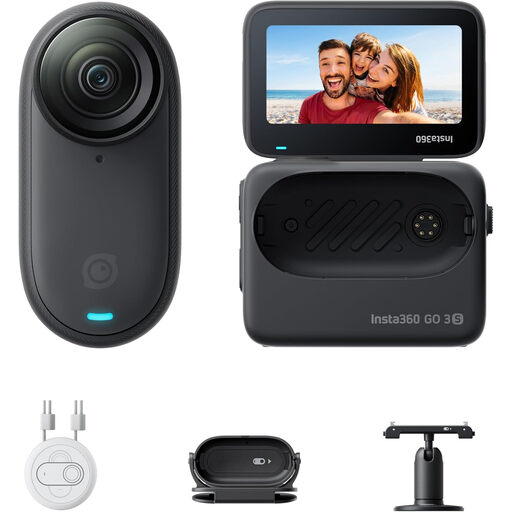
Insta360 GO 3S 128GB
A mini camera for anyone who wants to try a different, hands-free recording position. Check that the supplied mount shows your work surface clearly and safely.
The product name lists 4K video and 128GB. Check how the camera will be mounted for your recording and whether its field of view shows your soldering work.
View at Joybuy
 No image available
Sony ZV-1
A compact camera for anyone who wants to film small components independently. Check the zoom setting and framing from your planned camera position.
Sony lists a minimum focusing distance of around 5 cm at the wide-angle end and around 30 cm at the telephoto end, measured from the front of the lens. The shorter distance isn’t available across the full zoom range.
View at Joybuy
Frequently asked questions
Is 4K enough to film a soldering tip clearly?
No, not on its own. First check that the lens can focus at your planned distance and that the component will appear large enough in frame. Sony explains that a lens may not focus properly if the subject is closer than the minimum focusing distance.
Can I use the Elgato Facecam MK.2 with sound straight away?
According to Elgato, the Elgato Facecam MK.2 uses a USB connection for video, but this model has no built-in microphone. You’ll need a separate audio solution for spoken commentary.
What should I consider when setting up a camera next to my soldering work?
Leave enough room to handle your soldering iron and components safely, and keep the camera out of the fume path. Weller, a soldering equipment manufacturer, warns about soldering fumes and describes source extraction. This doesn’t establish a legal requirement for every home set-up.
What are my rights when buying a camera online in the Netherlands?
According to the ACM, online consumer purchases generally come with a cooling-off period of up to and including 14 days after delivery, subject to legal exceptions. The seller is responsible for the statutory guarantee if a product doesn’t meet the standards you’re entitled to expect; a manufacturer’s guarantee doesn’t replace this right.


