What should you look for when choosing?
Mirrorless camera with interchangeable lens
A good fit if: small joints are your main priority and you can match the lens to the distance from the circuit board.
Trade-off: as well as a camera body, you’ll need to choose a suitable lens and mount. A kit lens isn’t automatically suitable for extreme close-ups.
Webcam connected to a computer
A good fit if: you already record through your computer and can create a stable set-up on or near your desk.
Trade-off: the camera angle and crop need to show your work area. A stand designed for desk work doesn’t guarantee that a small solder joint will appear large and sharp in the frame.
Compact camera with a fixed lens
A good fit if: you want to film in other places as well as at your workbench, and the focusing distance works for your top-down shots.
Trade-off: a fixed lens gives you fewer options for extreme close-ups than a mirrorless camera with an interchangeable lens.
Compare cameras against four practical requirements, then test your chosen set-up at the working distance you’ll actually use.
| What to consider |
What should you check? |
Who is this important for? |
| Capturing small joints clearly |
Check the focusing distance and framing with the exact lens or camera at your planned working distance. |
If small solder joints are your main focus, you’ll want them to look clear and recognisable. Around 36% of consumers prioritise detailed images. |
| Unobstructed top-down view |
Check that the mount leaves your work area clear and keeps the circuit board, your hands and your tools in frame. |
For a tutorial that shows the whole process, your hands and tools need to remain visible without the camera getting in the way. Around 29% of consumers prioritise a full top-down view. |
| Recording through a computer |
Check the connection, recording software and focus of a test image at your actual working distance. |
If you want to monitor or record through your computer while filming, make sure your chosen webcam works with your set-up. Around 21% of consumers prioritise this computer-based workflow. |
| Audio and recording time |
Test your spoken commentary and check the connections, power supply, storage and any recording-time or temperature limits for the exact model. |
If you want to capture your explanation in one take, clear audio and a suitable recording time are important. Around 14% of consumers prioritise this combination. |
Joybuy product picks
This Joybuy selection includes webcams for recording through a computer, a compact camera and a mirrorless camera with a zoom lens. Choose based on your working distance and how you want to record your demonstration.
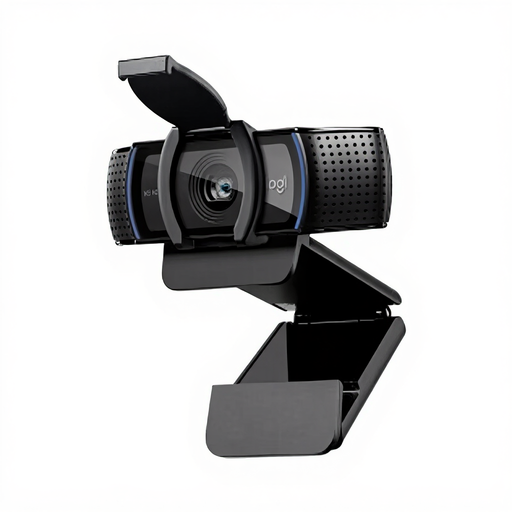 Image unavailable
Logitech HD Pro Webcam C920e
A webcam for recording your soldering demonstration through a computer. Use a test image to check that the working distance and framing suit your workbench.
Autofocus and built-in microphones.
View at Joybuy
 Image unavailable
Philips 4000 Series 4K UHD Webcam, SPL6408BT/00
A webcam for recording through a computer. Set up a test shot to check that the solder joints appear sharp and large enough.
4K UHD, 8MP, autofocus and two built-in microphones.
View at Joybuy
 Image unavailable
Philips 2K QHD PC Webcam, SPL6308S/00
A PC webcam for anyone who wants to manage recording through a computer. Test the focus and framing at your actual working distance.
2K QHD and a noise-cancelling microphone.
View at Joybuy
 Image unavailable
DJI Osmo Pocket 3
A compact camera for anyone who also films away from their usual work area. Check that the fixed lens captures the smallest solder joint clearly at your working distance.
4K/120fps video. DJI gives this model a focusing range starting at 0.2 m.
View at Joybuy
 Image unavailable
Sony ZV-E10 + 16–50mm Zoom, Black
A mirrorless camera with a zoom lens for anyone who wants to build a set-up around an interchangeable lens. Check that this lens can focus at your planned distance and frame your work area appropriately.
Includes a 16–50mm zoom lens.
View at Joybuy
Frequently asked questions
How far should the camera be from the circuit board?
There’s no one-size-fits-all distance. Check that your lens or camera can focus at your preferred working distance and show the solder joint large enough. DJI gives the Osmo Pocket 3 a focusing range starting at 0.2 m; with a mirrorless camera, the minimum focusing distance also depends on the lens you choose.
Can I record a soldering demonstration without a separate microphone?
Yes, but make a test recording of your spoken explanation at your workbench first. If the audio isn’t good enough, an external microphone and a suitable connection are worth considering. The Consumers’ Association lists microphone connections as something to look for in cameras for video-makers.
What should I do about solder fumes in the room?
Keep fumes away from your breathing zone and use suitable extraction. The UK Health and Safety Executive warns about fumes from rosin-based solder flux and recommends extraction at source. This is safety guidance, not a general legal requirement in the Netherlands for every hobby recording.
What are my rights if a camera develops a fault in the Netherlands?
For a consumer purchase, the product must be of satisfactory quality, and the retailer is your point of contact if something goes wrong. According to the Dutch government, there is no fixed statutory guarantee period in the Netherlands; a manufacturer’s guarantee or an additional guarantee comes on top of your statutory rights.
Can I film someone helping me if they’re recognisable, then publish the demonstration?
If you publish the video beyond your personal circle, privacy law may apply if someone is recognisable in it. According to the Dutch Data Protection Authority, commercial or business publication needs a lawful basis under the GDPR. Consent is one possible basis, but it isn’t automatically the only one.


