Who is this buying guide for?

Maker with a small photo table

You want to show the whole scarf without setting up a permanent photography corner. Available shooting height, framing and a set-up that’s easy to put away all matter. Canon Netherlands recommends using a tripod for consistent product photos.

Seller of hand-knitted scarves

You want to take photos that show colour and texture clearly, with consistent framing from one product to the next. Canon Netherlands notes that white balance matters in challenging lighting conditions.

Maker of stitch close-ups

You want to show the yarn and stitches separately. The focusing distance and magnification of the specific lens matter here, not just the camera body. Specifications from Canon, Nikon, Sony and OM SYSTEM give you different starting points.

What should you consider when choosing?

Try your existing camera or phone first

Choose this approach: if your current device can already capture both the whole scarf and sharp stitch details, and what you mainly need is a consistent set-up.

Bear in mind: how well this works depends on your device and the available shooting height; it won’t guarantee that the scarf fits in the frame.

Mirrorless camera with a standard zoom lens

Choose this approach: if you want an interchangeable lens and more control over framing and settings.

Bear in mind: check the angle of view and focusing distance of the lens in the exact kit. A wide-angle setting also needs careful framing to avoid distortion at the edges.

Lens suited to close-ups

Choose this approach: if individual stitches are your priority and your current lens can’t capture them large enough from your working distance.

Bear in mind: a short focusing distance doesn’t tell you how much of a long scarf will fit in a single shot. You may need to shoot from further away or use a different lens for an overall view.

Buying concern What should you check? Who is this important to?
Fitting the whole scarf in the frame Measure the available shooting height and take a test shot of the scarf. Check the angle of view of the exact lens and make sure there’s room for a tripod or other support. If table space is limited, I want to know whether the whole scarf will fit in a single shot. Around 36% of consumers say fitting the full subject in the frame in a small space is their main buying concern.
Stitches and yarn texture Compare the minimum focusing distance at the zoom setting you need with the lens’s maximum magnification. Test a detail from your own working distance. If I want to show individual stitches, the lens needs to focus at my working distance and capture the detail clearly enough. For around 29% of consumers, capturing stitches is their top priority.
Colour and a consistent series Take test shots in the lighting you plan to use and check the white balance. See whether you can keep the camera and support in the same position each time. When photographing several scarves for sale, I want to keep the colour and framing as consistent as possible. Around 21% of consumers give colour reproduction and consistency their highest priority.
Equipment and workspace Check whether the kit includes a lens and compare the set-up with the equipment you already own. Make sure there’s still room on the table to lay out and rearrange the scarf. If I want to keep my table clear and avoid buying lots of extra equipment, the space needed for the set-up matters. For around 14% of consumers, keeping additional equipment to a minimum is their main buying concern.

Common mistakes when choosing

  • Confusing a short focusing distance with room for the whole scarf

    A lens may be able to focus close up, while the whole scarf still won’t fit in the frame from that same position.

    Before choosing, take both an overall test shot and a detail shot from the distance you can actually use at your table.

  • Comparing camera bodies alone

    The lens also affects the angle of view and the distance at which you can focus. A camera body without the lens listed in the product description won’t automatically offer the same capabilities as a kit.

    Check what’s included in the exact kit and the specifications of the lens model.

  • Expecting a new camera to fix inconsistent colours

    Changing or mixed lighting can create a colour cast, even if you use a different camera.

    Take a test shot with your planned lighting set-up first, and check the white balance if needed.

Camera brands and kits worth comparing

Canon

The EOS R50 with RF-S 18-45mm is a kit worth comparing if you’re looking for a standard zoom and a vari-angle screen.

  • Canon lists a vari-angle touchscreen for the EOS R50.
  • Canon lists different focusing distances for the RF-S 18-45mm at different zoom settings. Test whether the lens works for both an overall shot and stitch close-ups.

Nikon

The Z50II with NIKKOR Z DX 16-50mm VR is a standard zoom kit worth considering if you want a compact, retractable lens.

  • Nikon lists a minimum focusing distance of 0.2 m for the lens and a tilting touchscreen monitor for the Z50II.
  • These specifications don’t tell you whether a scarf of any length will fit in the frame from your table. Take a test shot with the kit lens.

Sony

Sony’s APS-C E-mount with the SELP1650 is another standard zoom option to compare.

  • Sony lists a focal length range of 16–50 mm and a maximum magnification of 0.215× for the SELP1650.
  • Sony gives a focusing distance of 0.25–0.30 m for this lens. When buying, check whether this is the lens included with the body you’ve chosen.

OM SYSTEM

The OM-5 Mark II with M.Zuiko 12-45mm F4.0 PRO is a kit worth comparing if you’re also looking at a short focusing distance.

  • OM SYSTEM lists a minimum focusing distance of 0.12 m for the 12-45mm lens.
  • The framing at that distance isn’t the same as the framing of a whole scarf. Test both types of shot from your working distance.

Cameras at Joybuy

This product list features cameras marketed for photography or vlogging in their product names. For each model, check whether the listed zoom, screen features and any included lens kit suit your table space and work for both overall and detail shots.

DJI Osmo Pocket 4 Standard Combo

DJI Osmo Pocket 4 Standard Combo

If you want to check and adjust the framing on a compact camera, the product name lists a rotating screen and 2× lossless zoom.

The product name also lists a 1″ CMOS sensor and 107GB of built-in storage.

View at Joybuy

KOMERY G7-A 4K digital camera, white

KOMERY G7-A 4K digital camera, white

If you don’t want to choose a separate lens, this model is sold as a point-and-shoot camera. Test whether its framing and focusing work for your scarf photos.

The product name lists 18× zoom and 80MP.

View at Joybuy

DJI Osmo Pocket 3

DJI Osmo Pocket 3

If you want to check the framing while taking photos, the product name lists a rotating touchscreen. Take a test shot to see whether the framing works for your scarf.

The product name lists a 1″ CMOS sensor and a 2″ rotating touchscreen.

View at Joybuy
Sony ZV-E10 with 16–50mm zoom lens, black

Sony ZV-E10 + 16-50mm Zoom Black

If you’re considering a camera with an interchangeable lens, this product name lists a 16–50mm zoom lens. Check whether its range gives you the overall framing you want from your shooting position.

The product name lists the Sony ZV-E10 with a 16-50mm zoom lens.

View at Joybuy
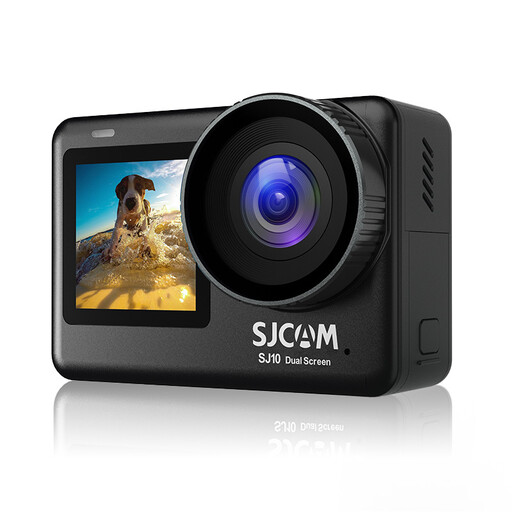
SJCAM SJ10 Pro Dual Screen Action Camera

SJCAM SJ10 Pro Dual Screen Action Camera

If you want to compare cameras with two screens, the product name lists a touchscreen and a second screen. Check whether the controls and framing suit your set-up.

The product name lists a 2.33″ touchscreen and a 1.3″ selfie screen. The description mentions photos up to 20MP and a 154° lens.

View at Joybuy

Frequently asked questions

Should I focus mainly on the minimum focusing distance when photographing the whole scarf?

No. The minimum focusing distance tells you how close a lens can focus. You also need to check whether the whole scarf fits within the angle of view from your shooting height. Test both types of shot with the exact lens.

How can I take a series of scarf photos with consistent framing and less variation in colour?

Set the camera up securely, keep the background and framing the same, and take test shots in the lighting you’ll actually use. Adjust the white balance if needed, as changing light can cause a colour cast.

Can I return a camera bought online in the Netherlands, and what about the warranty?

For online consumer purchases, you generally have a statutory cooling-off period of up to 14 days after delivery. Check which exceptions and returns conditions apply to your purchase. The seller is also responsible for the statutory warranty if, under normal use, a product doesn’t do what you could reasonably expect of it. These consumer rights don’t automatically apply to business purchases. ACM ConsuWijzer explains the cooling-off period and warranty.

Can I publish photos of my scarves if someone is recognisable in them?

Consider each photo separately. According to the Dutch Data Protection Authority, recognisable people count as personal data, and which privacy rules apply depends on who takes the photo and what happens to it. This specific issue doesn’t arise in a photo showing only the scarf.
