
Maker with limited desk space
Wants to film the paper and both hands from above without a wide camera base taking up valuable workspace. Logitech and IPEVO describe setups that can be positioned above your work.


Start with a setup that keeps the whole sheet of paper and both hands in frame without taking up unnecessary space on your small work surface. An adjustable overhead camera or document camera is designed for a top-down view. A webcam needs a suitable overhead mount, while a standalone camera gives you more flexibility for other scenes but won’t solve the mounting problem on its own.
Wants to film the paper and both hands from above without a wide camera base taking up valuable workspace. Logitech and IPEVO describe setups that can be positioned above your work.
Needs a computer connection, an easily adjustable view and clear audio for explanations during the lesson. Logitech, AVer and Elgato describe different camera and connection options.
Wants to record other scenes as well as origami lessons, and weigh up how much extra mounting a standalone camera needs above the desk. Sony describes the ZV-1F as a compact camera; OBS Project also explains how to use a smartphone as a webcam.
First check that the paper and your hands fit in the frame together. Then consider focus, audio for lessons and the type of mount your desk can accommodate.
| What to consider | What should you look for? | Who should pay extra attention to this? |
|---|---|---|
| Top-down view and workspace | Measure the paper and the space needed for your hands; check whether the arm, base or clamp will fit your desk. | I want to keep the whole sheet and my hands in frame without filling up my small work surface; around 36% of consumers give an unobstructed top-down view the highest priority. |
| Focus and framing | Compare the stated focusing distance with the recording area and the height at which you want to mount the camera. | If I want to show small folds, the camera needs to focus at my working distance and frame the whole sheet; around 29% of consumers prioritise seeing fold details. |
| Live lessons and audio | Check the connection and compatibility with your computer and lesson software, as well as which microphone you’ll use. | I want to explain folding steps live and be easy to hear while the camera shows the paper; around 21% of consumers give live video with spoken instructions the highest priority. |
| Use beyond your desk | Decide whether you also want to film other scenes; if so, check that a standalone camera and overhead mount suit your plans. | If I want to film outside my origami lessons too, versatility matters more than a fixed desk setup; around 14% of consumers prioritise using their camera in other situations. |
Choose this if: you want to move the top-down view during your lesson and position the camera above your work.
Bear in mind: mounting options can vary by version. Logitech lists 1080p/60 fps for the Reach and says the table base and desk-edge clamp are available separately.
Choose this if: you mainly want to show paper and your hands live on a computer or, depending on the model, an external screen.
Bear in mind: check that the recording area is large enough for both paper and hands. IPEVO lists a maximum of 30 fps for Full HD live video on the DO-CAM; also check the version and power supply.
Choose this if: you teach via a computer and can arrange a stable mount above the paper yourself.
Bear in mind: Elgato says the Facecam Pro has no built-in microphone, so you’ll also need to plan how to record audio.
Choose this if: you want to film other scenes as well as origami lessons.
Bear in mind: Sony lists the ZV-1F as focusing from around 5 cm from the front of the lens. That alone doesn’t tell you whether the whole sheet will fit in frame at that distance.
A video resolution doesn’t tell you whether the camera can focus from the height you need or keep both the paper and your hands in frame.
Check the focusing distance, recording area and mount together. If possible, test the framing with the paper you’ll be using.
Logitech says the table base and desk-edge clamp for the Reach are available separately.
Check which mount is included with the version on offer and whether it will fit the edge of your desk.
According to Elgato, the Facecam Pro has no built-in microphone.
Check in advance which microphone you can use during your lesson and how it connects to your computer.
The Reach is an adjustable overhead camera for showing teaching materials.
The DO-CAM is a foldable USB document camera for paper and other materials.
The M11-8MV is a document camera with connections for a computer and an external screen.
The Facecam Pro is a webcam for anyone putting together their own overhead mount and computer setup.
The ZV-1F is a standalone compact camera for anyone who wants to film scenes beyond origami.
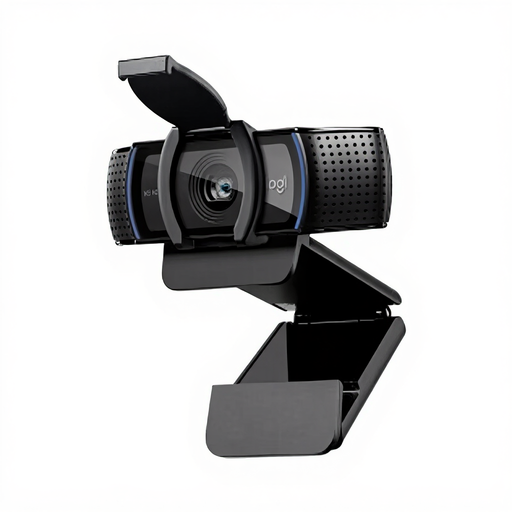
This selection includes webcams for computer use and a standalone camera. For webcams, consider separately what stable overhead mount and framing your desk setup will need.
 No image available
Suitable for a computer-based lesson if you can arrange a suitable overhead mount for the paper yourself.
The product name lists 4K UHD, autofocus, dual microphones and a privacy shutter.
 No image available
An option for computer-based lessons if you also arrange a suitable mount above your work.
The product name lists 2K QHD, a noise-cancelling microphone and a clip for a desktop or laptop.
 No image available
Suitable for anyone who wants to film other scenes as well as origami lessons using a standalone camera setup.
The product name lists a 16–50mm zoom lens. You’ll need to assess the mount and framing separately for a top-down view.
 No image available
A webcam option for a desk demonstration or computer-based lesson; assess the mount needed for a top-down view separately.
The product name lists 4K, auto-framing, HDR, a microphone with AI noise reduction and DeskView mode.
 No image available
Suitable for explaining things via a computer if you also arrange a suitable mount for the paper.
The adjustable clip described is designed for laptops or external monitors; a suitable separate mount is needed for a top-down view.
Add a compatible camera as a video source in OBS and adjust the view so the paper and your hands are visible. Check separately that your camera, computer and lesson platform work together.
Compare the stated focusing distance with the distance at which the whole sheet fits in frame. Test the mounting height and framing with the paper size and hand movements you use; a 4K label alone won’t answer that question.
According to the Dutch government, when you buy as a consumer at a distance, you’ll often have 14 days to change your mind, although there are exceptions. You’re also entitled to a product that works as it should; if there’s a problem, contact the seller to find a solution. Before you buy, check the seller’s information about delivery and returns.
According to the Dutch Data Protection Authority, publishing identifiable people professionally or publicly requires an appropriate legal basis under the GDPR. Consent is one possible basis, but it isn’t automatically the only one. Educational institutions must also consider arrangements for participants appearing on camera, recordings and storage. Assess a recording showing only paper and hands that can’t be used to identify anyone according to its actual content.