What should you look for?
First decide whether you’re taking photos or shooting video, and how small the detail is. Then assess the lighting set-up, lens and how you want gloss and paint texture to appear. A different camera body won’t solve a reflection problem by itself.
| What to consider |
What should you check? |
Who is this important for? |
| Gloss and paint texture |
Take test shots with the lights you plan to use. Printbeat describes using two light sources on the left and right, each at around 45°, for reproduction photography. The Library of Congress treats raking light and polarised light as different documentation methods. |
If I’m capturing a glossy or wet-looking surface, I want to control reflections without losing all the visible paint texture. Around 33% of consumers put controlling gloss first. |
| Colour reproduction |
Limit mixed lighting and, if necessary, take a test shot with a colour reference. Compare the final files under the lighting conditions they’re intended for. |
If I’m photographing a detail for documentation or a print, I want to be able to compare colours under controlled lighting. Around 27% of consumers prioritise colour-accurate reproduction. |
| Magnification and working distance |
Check the magnification, focusing distance and mount of the exact lens. Canon lists 0.5× magnification for the RF 85mm F2 Macro; Sony lists 1:1 magnification for the E 30 mm F3.5 Macro, as does Nikon for the NIKKOR Z MC 50mm f/2.8. These are lens specifications, not a quality comparison of complete set-ups. |
If I want to fill the frame with small brushstrokes, the lens needs to show the detail large enough while leaving room for the lighting. Around 20% of consumers prioritise magnifying small details. |
| Video and flicker |
Film a test clip with your own lights and video settings. Sony Netherlands Support lists 1/50 or 1/100 second as possible shutter speeds for a 50 Hz light source; the result depends on the light and camera model. |
If I’m filming the painting process, I want to avoid visible banding or changes in brightness caused by artificial light. Around 20% of consumers prioritise video recording. |
Cameras at Joybuy
This Joybuy selection includes cameras described in their product titles as vlog, action, or photo and video cameras. For painting details, check separately whether the lens can focus close enough, and test colour reproduction and flicker under your own artificial lighting.
 No image available
Osmo Pocket 4P Vlog Combo, Black
The product title describes this model as a vlog camera; check whether its close-up capabilities suit the details you want to capture.
View at Joybuy
 No image available
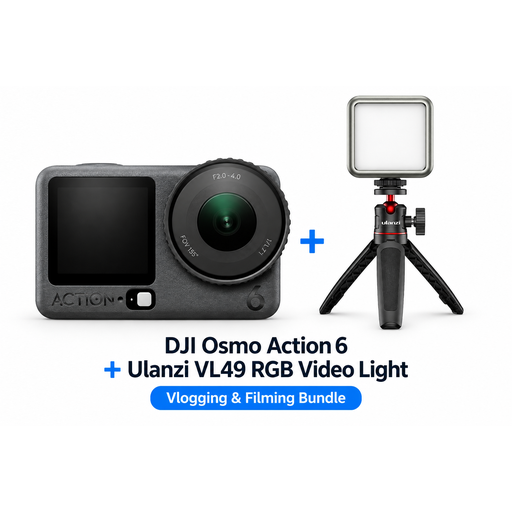
DJI Osmo Action 6 Adventure Combo with Ulanzi VL49 RGB LED light
The product title describes an action camera and a bundle with a Ulanzi VL49 RGB LED light. Check whether the camera and lens suit the distance you want to shoot from.
View at Joybuy
 No image available
DJI Osmo Pocket 3 Creator Combo with Ulanzi VL49 RGB LED light
The product title describes a vlog camera and a bundle with an RGB LED light. Take a test shot to see whether the combination suits your subject, lighting and preferred rendering of paint texture.
View at Joybuy
 No image available
Komery W6 12× Optical Zoom 4K Digital Camera, 64MP
The product title describes a digital camera for photos and video. It lists 12× optical zoom, 4K and 64 MP; these specifications alone don’t tell you about macro magnification or colour reproduction under your lighting.
View at Joybuy
 No image available
Sony ZV-E10 with 16–50mm zoom lens, black
The product title describes a Sony camera with a 16–50mm zoom lens. Check whether the focusing distance and magnification of the exact lens suit the size of the detail you want to film or photograph.
View at Joybuy
Frequently asked questions
Should I buy a different camera straight away for a glossy oil painting?
Not necessarily. First try a test set-up with evenly positioned lights and compare it with a shot that deliberately uses more raking light to show the paint texture. These are different ways of rendering the image; a different camera body won’t remove reflections by itself.
How do I get started with a colour-critical detail photo?
Set up the painting securely, position the camera directly opposite it and avoid mixed lighting. Take a test shot with a colour chart, then check the focus and colour in the files you actually plan to use.
What can I do if my lights cause banding in a painting video?
Start by filming a test clip and adjust the shutter speed if needed. For a 50 Hz light source, Sony Netherlands Support lists 1/50 or 1/100 second as possible settings; the result depends on the light and camera model.
What rights do I have when I buy a camera online?
In the Netherlands, when you buy from a business online, you’ll often have a 14-day cooling-off period, but there are exceptions and it matters who the seller is. If a product is faulty, you have statutory rights in addition to any commercial manufacturer’s warranty. The Dutch government explains these consumer rights; when buying second-hand, also check the camera’s condition and who is selling it.
Can I publish a photo of a painting?
Not automatically. Dutch copyright guidance explains that a painting may be protected by copyright, and you’ll generally need permission from the rights holder to publish or distribute a photo of it. Exceptions depend on the circumstances, so check which rights and permissions apply to your intended use before publishing.


