
Live handwriting demonstrator
You write on paper throughout your session and want viewers to follow your pen and hand. A 2023 account of teacher Mathpaul’s experience shows how this can be used.


If you mainly write on paper during live sessions, start by looking at a document camera that can sit above your work surface. A standard webcam may be enough if you mainly show your face and only occasionally show paper, as long as you arrange a suitable mount. Before buying, check the paper size, focus at your working distance, and whether it connects to your computer and video-conferencing app.
You write on paper throughout your session and want viewers to follow your pen and hand. A 2023 account of teacher Mathpaul’s experience shows how this can be used.
You want to show your pen strokes as well as a whole page or a large part of your notebook. Compare the capture area and paper orientation specified by IPEVO and OKIOLABS for their individual models with how you plan to use the camera.
You switch between showing your face and your desk. In that case, how the camera is aimed and focused, and how it is mounted, matter. HUE, OKIOLABS and Logitech describe these features differently for each model.
First, choose between a camera designed to sit above paper and one that is also easy to use for video calls. Then compare the frame you need with your paper and the space available on your desk.
Choose this if: you write a lot while explaining something and want to keep your pen, hand and paper together in one overhead view.
Bear in mind: a camera designed for paper won’t automatically give you a good view of your face. Also check that the base and capture area suit your notebook.
Choose this if: you want to move the camera head between your paper and your face regularly.
Bear in mind: you may need to re-aim or refocus the camera after moving it. For the S4K, OKIOLABS specifies full A4 coverage in landscape orientation, but not automatically in portrait.
Choose this if: your main use is showing your face and you already have a suitable overhead mount or are happy to arrange one separately.
Bear in mind: check the mounting options and make sure the whole writing area stays in focus and visible. Logitech says the Brio 505 does not have a tripod thread.
| Concern | What to look for | Who is this important for? |
|---|---|---|
| Sharp pen strokes while writing | Check the focus at your working distance and view the image in the video-conferencing app you use. | When I write live, I want to follow small strokes without the camera focusing incorrectly. Around 36% of consumers put clear pen-stroke detail first. |
| The right part of the page in view | Compare the stated capture area and paper orientation with your notebook. Make sure the arm and base won’t get in the way of your writing hand. | I want to show a whole sheet or a large part of my notebook, not just a close-up. Around 29% of consumers prioritise the amount of the page in view. |
| Simple, stable desk setup | Check the USB connection, compatibility with your computer and app, cable length and the space needed for the camera base. | If I want to get started quickly at home and put the camera away afterwards, a practical setup matters a lot. Around 21% of consumers prioritise easy connection and positioning. |
| Switching between your face and paper | Check whether the camera head can turn, how to refocus it and whether any mount you need is compatible with your chosen model. | I want to show my face and my writing during the same session, without discovering that the mount isn’t suitable. Around 14% of consumers prioritise switching between face and paper. |
A stated resolution on its own doesn’t tell you whether the part of the page you need will stay in view or whether pen strokes will be sharp at your working distance.
As well as resolution, compare the capture area, paper orientation and focusing method.
A detachable clip doesn’t automatically mean a webcam is suitable for an overhead view. Logitech says the Brio 505 does not have a tripod thread.
Before buying, check exactly how you’ll mount the camera securely above the entire writing area.
For the S4K, OKIOLABS specifies a full A4 view in landscape orientation and points to another model for full A4 in portrait.
Compare the orientation you actually write in with the specifications for the exact variant you’re considering.
The V4K range includes a USB document camera for an overhead view of paper.
The HD Pro is a USB camera for documents and video calls.
According to OKIOLABS, the OKIOCAM S4K combines a foldable document camera setup with webcam functionality.
The MX-P3 is a document camera for anyone who needs presentation options beyond USB.
The Brio 505 is primarily a video-call webcam for people who mainly show their face.
These Joybuy products are cameras and webcams for video conferencing and desk-based demonstrations. For each model, check that the mounting options and frame suit the paper you want to show.
 No image available
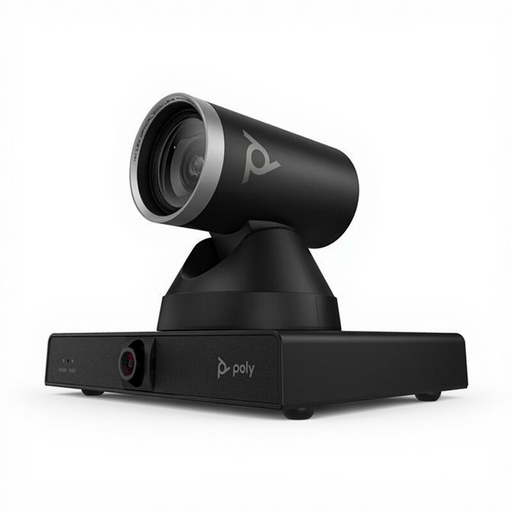
Could suit a fixed video-conferencing setup where you can mount the camera above your desk. Check that the view covers your writing area.
The product description lists mounting on a display, tripod or ceiling mount. Its stated weight is 1,79 kg, so make sure the surface and mount you choose can support it.
 No image available
Worth considering if you’re looking for a fixed video-conferencing camera. Check beforehand that the setup also gives you a good view of your paper.
The product description lists a dual camera, 4K video and 7,3x digital zoom. It can be mounted free-standing or on a wall.
 No image available
Could suit anyone looking for a webcam with a clip for a computer or monitor. A clip alone doesn’t mean the camera can be positioned above your paper.
The product description lists autofocus, a universal clip, dual built-in microphones and a privacy shutter.
 No image available
Could suit a desk setup with a separate tripod mount. Check that this setup frames your writing area properly.
The product description lists a universal clip and tripod mounting.
 No image available
The product description lists DeskView and Whiteboard Mode for desk-based demonstrations. Check that the angle you plan to use shows your handwriting clearly.
The description lists autofocus and says this model is not compatible with ARM-based Windows systems.
Place the paper where you plan to use it, focus the camera at writing distance and check the image in the app you’ll be presenting with. Before buying, compare the paper size you want to show with the stated capture area. A stated sensor resolution doesn’t guarantee that your handwriting will be clear in every app.
It depends on the model and how you plan to use it. IPEVO specifies a USB Video Class interface for the V4K, while HUE describes the HD Pro as compatible with apps that recognise a USB camera. Also check that your computer and video-conferencing app support the model you choose.
For eligible online consumer purchases, you generally have a statutory cooling-off period of up to 14 days after delivery, with some exceptions, according to ACM ConsuWijzer. You’re also entitled to a product that meets what you could reasonably expect. The retailer is your point of contact for your statutory guarantee. A manufacturer’s warranty does not replace this statutory right.
Don’t assume that you can. The Dutch Data Protection Authority advises educational institutions to agree who will appear in recordings and how those recordings will be made and stored. The rules that apply to your recording depend, among other things, on who is recording and who can be seen or heard. Guidance for educational settings does not give general permission for every recording made in a home office.