Start by choosing your filming angle, then check that the embroidery stays in focus and fully in frame from your working distance. A document camera suits overhead views, a webcam works well for computer-based demonstrations, and a mirrorless camera is ideal for edited close-up videos where lens choice matters. A compact gimbal camera is worth considering if you also want to film away from your fixed desk setup.
Who is this camera setup for?
Embroiderer filming from above
You want to keep the embroidery hoop and both hands in shot without holding a camera over your work. Pay particular attention to the arm position, framing and stability. IPEVO and Elgato describe solutions for adjustable camera setups.
Teacher giving a live demonstration
You want to show your work on a computer during a call and switch between speaking to the camera and showing your desk. Logitech describes Show Mode for the MX Brio, while IPEVO lists software support for the V4K.
Maker of close-up videos
You want to film stitches up close and control the composition precisely. Canon describes the EOS R50 and RF-S 18–45mm lens. Check the focusing distance alongside the magnification you need.
What should you look for when choosing?
USB document camera
Best for: showing the embroidery hoop and your hands from above your worktable.
Check: the arm’s reach and whether your computer and recording software recognise the camera for your setup.
Webcam attached to a computer or monitor
Best for: switching between yourself and your desk during a video call.
Check: a camera tilted down from a monitor won’t automatically give you a straight-down view.
Mirrorless camera with a suitable lens
Best for: making edited close-up videos and matching the lens to your recording distance and framing.
Check: the exact lens, magnification, mounting and the space available for your hands.
Compact gimbal camera
Best for: filming moving footage as well as embroidery at your table.
Check: you’ll still need a suitable mount for a fixed overhead setup.
| What to consider |
What to look for |
Who it matters to |
| Focus and detail |
Compare the focusing range and magnification with your working distance, then test the framing. |
When I film stitches up close, I want to focus clearly and see enough detail without cutting off my moving hands. Around 26% of consumers say clearly focused stitches, shown at a useful size, are their top priority. |
| Overhead view and workspace |
Check the arm’s reach, mounting position, framing and any shadows. |
I want to film the hoop and both hands without the camera taking up space on my work surface. Around 26% of consumers prioritise a clear workspace and a usable overhead view. |
| Computer and live view |
Check the USB connection, whether your software recognises the camera and the actual live output. |
When I teach live or make a video call, I want to show my embroidery on the computer and check the framing. Around 21% of consumers prioritise computer use. |
| Long recordings |
Check the power supply, storage and frame rate at your chosen resolution. |
I want to record a longer embroidery session, so I check the power supply and storage for my chosen recording mode in advance. Around 16% of consumers say uninterrupted long recordings are their top priority. |
| Making other videos too |
Weigh lens choice or portability against the mounting options and the need to reframe for a fixed tabletop setup. |
I want to use the same camera for other angles or when I’m out and about, while making sure it still works for my embroidery setup. Around 11% of consumers prioritise versatility. |
Camera-buying pitfalls for embroidery
-
Focusing only on ‘4K’
High resolution alone doesn’t tell you whether a camera will focus at your working distance or capture moving stitches smoothly. IPEVO lists a maximum of 15 fps at the highest stated resolution for the V4K, and up to 30 fps at Full HD.
Compare each model’s resolution with its corresponding frame rate, then test the framing with your embroidery hoop.
-
Assuming a tilting webcam gives you an overhead view
The camera’s position determines the filming angle and how much room your hands have. Logitech describes Show Mode for showing work on your desk, but positioning the camera on your monitor won’t automatically give you the perspective you want.
Measure and test the camera’s position in relation to your monitor, embroidery hoop and hands.
You may need a separate arm or another mount to get a different camera angle.
-
Choosing a camera body or basic bundle without checking the lens
With a mirrorless camera, the focusing distance partly depends on the lens you use. Canon lists a minimum focusing distance of 15 cm for the RF-S 18–45mm lens in manual focus mode.
Check exactly which lens is included, then assess the distance and magnification you need for your embroidery.
You may need another compatible lens to achieve the magnification you want.
-
Assuming local recording is the same as livestream output
DJI lists different output specifications for local video and UVC or livestream use on the Osmo Pocket 3.
Before choosing a camera for live lessons, check its output with the computer connection and app you intend to use.
Brands to consider for different setups
IPEVO
The V4K document camera is an option for filming work on a table with an adjustable USB setup.
- IPEVO lists a hinged stand for the V4K, with up to 30 fps at Full HD and up to 15 fps at the highest stated resolution.
- The frame rate varies by resolution. Choose the mode you want and check the framing with your own embroidery hoop.
Logitech
The MX Brio suits computer-based demonstrations where you tilt the webcam towards your desk.
- Logitech describes Show Mode for sharing work on your desk.
- Check whether your monitor position gives you the angle, focus and space for your hands that you need.
Canon
The EOS R50 with a suitable RF or RF-S lens is an option for edited videos where lens choice matters.
- Canon specifies 4K/30p and USB webcam use for the EOS R50. For the RF-S 18–45mm lens, Canon lists a minimum focusing distance of 15 cm in manual mode.
- The lens distance applies to that lens and focus mode. Check the exact kit and the magnification you need separately.
DJI
The Osmo Pocket 3 is worth considering if you want to alternate embroidery videos with moving footage away from your fixed desk setup.
- DJI specifies a focusing range from 0.2 m and mechanical gimbal stabilisation for the Osmo Pocket 3.
- UVC and livestream output isn’t the same as the maximum local video recording mode. You’ll need a suitable mount for an overhead view.
Elgato
The Facecam 4K and separate Multi Mount system are worth considering for a computer-connected camera on an adjustable arm.
- Elgato lists fixed focus and a range of 30–120 cm at 4K for the Facecam 4K.
- Check that your working distance falls within this range and which parts you’ll need for your chosen mount.
Joybuy products for video recording
These Joybuy products are compact cameras for video recording. Check whether each model can be mounted securely for a stable overhead view and focus at the distance between the camera and your embroidery hoop.
 Image unavailable
Osmo Pocket 4P Vlog Combo Black
This pocket vlog camera could suit anyone who also wants to capture other footage of their creative process. Check that you can mount it securely above your embroidery hoop and focus at your working distance.
View at Joybuy
 Image unavailable
Osmo Pocket 4P Standard Combo Black
This pocket camera could work well for recording your creative process. Check that the included version has the mount you need to record steadily from above your hoop.
View at Joybuy
 Image unavailable
DJI Osmo Pocket 4 Standard Combo
This pocket camera is an option for recording your creative process. Check that it focuses at your working distance and that your chosen mount gives you the overhead view you want.
View at Joybuy
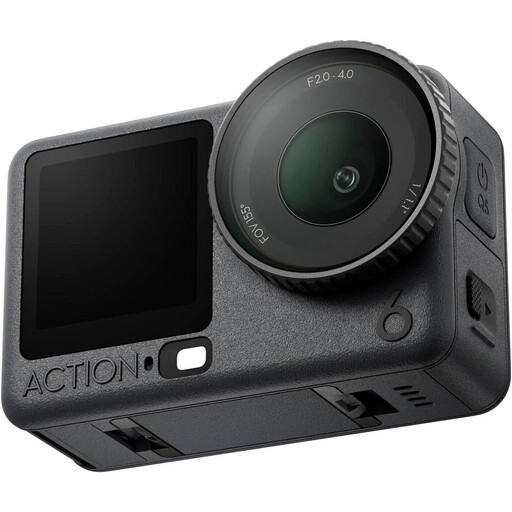 Image unavailable
DJI Osmo Action 6 Adventure Combo
This action camera could suit filming your creative process. Check that you can mount it securely for your embroidery setup and focus at your working distance.
View at Joybuy
Frequently asked questions
Can I record embroidery on my computer without using the camera as a standalone recorder?
Yes, with a compatible USB camera and recording app. IPEVO lists OBS among the software options for the V4K, while Canon describes USB webcam use for the EOS R50. Select the camera in your app, then check the live framing and output.
How can I stop stitches or hands from looking blurry?
First, check the focusing range of the exact model at the distance you’ll be filming from. Elgato lists fixed focus between 30–120 cm at 4K for the Facecam 4K. Canon lists a minimum focusing distance of 15 cm in manual mode for the RF-S 18–45mm lens. Then test the focus and framing while moving your hands.
What should I check before making a long recording?
For your chosen model, check the power supply, available storage and frame rate in the recording mode you plan to use. IPEVO lists different maximum frame rates for the V4K at Full HD and its highest resolution; DJI lists supported microSD cards for the Osmo Pocket 3.
What are my rights when buying a camera online in the Netherlands?
When you buy remotely from a business, you usually have a 14-day cooling-off period, with some exceptions, according to the Dutch government. You’re also entitled to a product that meets legal warranty requirements. If there’s a problem, contact the seller.
Can I publicly share an embroidery video that shows other people clearly?
The exception for personal or household use doesn’t apply if you share footage of identifiable people more widely, for example on a public page, according to the Dutch Data Protection Authority. Check which privacy rules apply to the specific content you plan to share.


