
Creator of close-up crochet tutorials
You want to keep small stitches and the position of the crochet hook clearly in view. So check both the minimum focusing distance and the framing at the planned camera height.


Start with the distance between the camera and your crochet: the camera and lens need to focus at that distance while capturing enough of your hands and stitches. A webcam suits recording or giving live demonstrations via a computer, an interchangeable-lens camera gives you more control over the lens and framing, and a compact gimbal camera is an option if you also want to film from different angles. Test your set-up with your hands moving before you choose.
You want to keep small stitches and the position of the crochet hook clearly in view. So check both the minimum focusing distance and the framing at the planned camera height.
You want to film from a stable position without the camera or lighting getting in the way of your crochet. A suitable mount and enough room for your hands are important.
You want to view or stream the camera feed on a computer and record spoken instructions. Check the computer connection and how the audio will be recorded beforehand.
A good fit if: you record or give live demonstrations via a computer and can mount the camera above your work surface.
Bear in mind: you’ll need a suitable USB connection and mount; check the focus in your own set-up. Elgato states that the Facecam Pro has no built-in microphone.
A good fit if: you want to adjust the overall view and details using the lens and framing, and have room for a sturdy overhead set-up.
Bear in mind: the lens, tripod, storage, power supply and possibly a microphone. A stated minimum focusing distance does not guarantee that the whole work surface will fit in the frame.
A good fit if: you want to film from other angles as well as recording at your worktable.
Bear in mind: the fixed field of view and mounting options; test whether your crochet is clearly in frame from the position you want to use.
| What to consider | What to check before buying | Who is this important to? |
|---|---|---|
| Sharp stitches at working distance | Compare the minimum focusing distance of the exact camera or lens with your planned distance; test the framing with your hands moving. | If small stitches are my top priority, I want the crochet hook and my hands to stay sharp without the frame feeling too tight. Around 36% of consumers prioritise clear stitch detail. |
| Stable overhead view | Measure the table, arm’s reach and camera height; check that the mount leaves enough room for your hands. | If I want to film the same part of my work every time, the camera needs to be stable and my hands must be free to move. Around 29% of consumers prioritise a stable, practical overhead view. |
| Visibility in room lighting | Test with the actual yarn colours, lights and hand positions; look out for shadows and colour changes. | If I’m filming in my room’s lighting, I want to see the stitches and yarn colours clearly as I record. Around 21% of consumers prioritise clear visibility in room lighting. |
| Recording and giving instructions | Decide whether you’ll record via a computer or save files on the camera; check the connections, storage, power supply and audio source. | If I’m explaining as I crochet, I want to record video and audio without unnecessary interruptions. Around 14% of consumers prioritise their recording workflow and spoken instructions. |
A high resolution won’t help if the lens cannot focus at your chosen working distance or your hands cover the crochet.
Check the focusing distance and framing first. Make a test recording with your hands moving.
The camera needs to stay at the right height without blocking your workspace; a portable camera is not automatically a substitute for a suitable overhead mount.
Measure the table and decide in advance where the camera and your hands will go. Also check whether the lighting shows your crochet evenly enough.
Elgato says the Facecam Pro has no built-in microphone. This matters if you want to record spoken instructions.
Check each model to see whether you’ll use its built-in microphone, a computer microphone or a separate microphone.
Model status, support and bundle contents can vary. Elgato classifies the Facecam Pro as legacy/EOL; the Canon offer reviewed is for a specific bundle.
Before buying, compare the full model number, lens and included accessories, and check the current support information.
The MX Brio is designed for a computer set-up and has a downward-facing Show Mode.
The Facecam Pro is a webcam option for recording on a computer, where close focusing is important.
The ZV-E10 II with E-mount may suit creators who want to experiment with lenses and framing.
The EOS R50 with RF-S 18-45mm is an option for a fixed set-up with a vari-angle screen and a choice of lenses.
The Osmo Pocket 3 is a compact gimbal camera for creators who want to film from other angles as well as recording at a table.
This selection includes compact cameras and webcams for recording at a crochet worktable. Check that each model’s focus, mounting options and recording method suit your set-up.
 No image available
A vlog camera to consider if you’re looking for a compact option for recording at your worktable.
Version: Vlog Combo. Colour: Black.
 No image available
A vlog camera to consider if you’re looking for a camera to record at your crochet worktable.
Version: Standard Combo. Colour: Black.
 No image available
A small video camera to consider if you’re looking for a standalone option for recording crochet.
The product name specifies 1080P HD video and an SD card included.
 No image available
A webcam option if you want to record via a PC or laptop and explain your crochet as you go.
The product name specifies USB Plug & Play, Full HD 1080P and a microphone.
 No image available
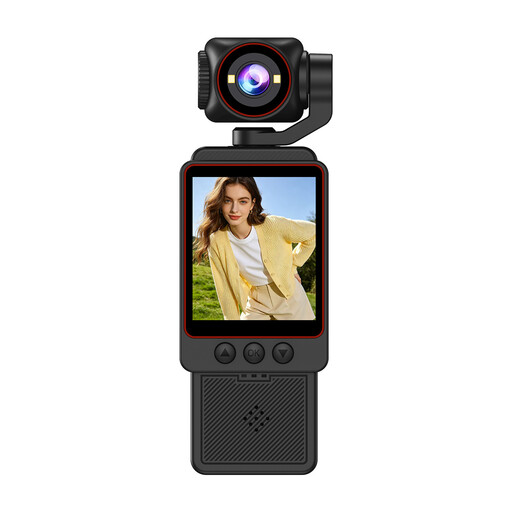
A mini vlog camera to consider if you want to try an adjustable viewing angle when filming crafts.
The product name specifies 4K, 64 MP, a 330° rotatable lens, a 1.72-inch touchscreen and Type-C.
Resolution alone isn’t enough to decide. First check whether the exact camera or lens focuses at your planned distance and whether the stitches appear large enough in the frame. The minimum focusing distance of the lenses reviewed varies by model and zoom setting.
OBS Studio supports video recording and livestreams. Following the OBS guide, add the webcam as a video capture source, then test the framing, focus and audio source before recording a full tutorial.
Check the power supply, storage, recording settings and audio set-up for your chosen camera. Elgato specifies USB 3.0 Type-C for the Facecam Pro. The Canon bundle reviewed includes a memory card; check the contents of the specific bundle you’re considering.
According to ACM ConsuWijzer, online purchases generally come with a statutory cooling-off period of up to 14 days after delivery, with some exceptions. You’re also entitled to a product that performs as you could reasonably expect under normal use. This statutory protection is separate from the cooling-off period, and there is no single fixed warranty period for all cameras.
This depends in part on how you share the footage. The Dutch Data Protection Authority says the exception for personal or household use does not apply to wider public sharing. If other people are recognisable, there must be an applicable GDPR legal basis for processing their personal data; the household exception may apply to footage kept exclusively for private use.