Who is this choice relevant to?

Step-by-step tutorial creator

You want to show stitches and the movement of the crochet hook from a useful overhead angle. The focusing distance also depends on the lens, zoom setting and focus mode. For example, Canon Netherlands lists different distances for the RF-S 18–45mm kit lens.

Online shop owner with a computer-based workspace

You want to record or present lessons from a fixed table without a separate camera workflow. Logitech describes Show Mode on the MX Brio as a way to point the webcam at your desk. Make a test recording to check that your crochet work is clearly visible from your set-up.

Spoken video tutorial creator

You want to explain what you’re doing as you crochet, while balancing the picture, speech and recording time. Compare the microphone options and storage on the camera you choose. DJI, for example, says that the Osmo Pocket 3 saves footage to a microSD card.

What should you look for when buying?

Mirrorless camera with interchangeable lens

A good fit if: you want to film the stitches close up and can choose a lens to suit the distance between the camera and your crochet work.

Bear in mind: you’ll need a suitable support, and may also need a separate lens, extra storage or audio equipment. A suitable macro or close-up lens isn’t automatically included with a kit.

Webcam connected to a computer

A good fit if: you record or present using a computer and can position the webcam securely above your work surface.

Bear in mind: pointing the camera downwards or using Show Mode doesn’t guarantee that small stitches will look large and sharp enough from your working distance.

Compact gimbal camera

A good fit if: you want to capture moving footage as well as recording a fixed lesson, for example around your workspace.

Bear in mind: the lens isn’t interchangeable. Stabilisation is no substitute for a well-positioned support when filming a fixed overhead shot.

Compact mirrorless camera as an alternative kit

A good fit if: you’re looking for a compact camera with interchangeable lenses and can compare the contents of the available kits.

Bear in mind: check which lens comes with each kit and the working distance it suits.

What to consider What should you check? Who is this most important for?
Stitches look sharp and large in the frame Make a test recording from the intended mounting height, with your hands moving. Check the focusing distance of the exact lens and focus mode. If I want to follow the stitches and hook clearly, I need to know what stays in focus while I crochet. Around 36% of consumers prioritise seeing detail.
A useful overhead view Check that the camera can be positioned securely above the table and that your hands, crochet work and lighting all remain in the frame. If I want to film my table without complicated controls, my work surface needs to remain clearly visible. Around 29% of consumers prioritise a practical overhead view.
Clear speech Record a short spoken passage while you crochet, then listen back with the background noise of your workspace. If I explain what I’m doing as I crochet, I want viewers to be able to follow what I’m saying. Around 21% of consumers prioritise clear speech.
Recording a full lesson Check the planned recording time, storage, power supply and file transfer for the video setting you want to use. If I want to record and edit lessons back to back, I need to know in advance whether my storage and workflow are up to the task. Around 14% of consumers prioritise the recording and editing workflow.

Buying pitfalls

  • Focusing only on 4K or a macro label

    How sharply and clearly your stitches appear also depends on the lens, focus mode, distance and framing. Canon Netherlands lists different minimum focusing distances for the RF-S 18–45mm kit lens, depending on the zoom setting and focus mode.

    Assess a test shot from the actual working height and check the specifications of the exact lens included with the kit.

    You may need a different lens or mounting set-up to get the shot you want.

  • Assuming a gimbal will solve the fixed overhead shot

    A gimbal stabilises camera movement, but it won’t determine whether the fixed lens captures enough detail from your mounting position. DJI lists the Osmo Pocket 3’s focusing range as starting at 0.2 m.

    Decide on the camera angle and mounting position first, then consider portability.

    Even with a compact gimbal camera, you may need a separate stable support.

  • Assuming consumer rights automatically apply to a business purchase

    KVK explains that businesses have less consumer protection when entering into contracts. Depending on the circumstances, small businesses may sometimes be able to rely on consumer law through the principle of reflexwerking.

    Make a note of whether you’re buying as a private individual or a business, and check the terms that apply to your purchase in advance.

Camera brands to compare

Canon

Mirrorless cameras with a choice of RF and RF-S lenses, including the EOS R50.

  • Canon lists 4K/30p and a microphone socket for the EOS R50. The RF-S 18–45mm kit lens has different focusing distances depending on the zoom setting and focus mode.
  • The RF 35mm F1.8 MACRO IS STM is a separate lens; the EOS R50 kit with the RF-S 18–45mm isn’t automatically a macro set-up.

Sony

The ZV-E10 combines an APS-C sensor and E-mount with video-focused controls.

  • Sony lists a Product Showcase mode for the ZV-E10.
  • That feature doesn’t tell you whether a specific 16–50mm kit lens will show stitches large enough from your working distance. Check the exact lens and make a test recording.

Logitech

The MX Brio is a webcam for recording or presenting from a computer-based set-up.

  • Logitech lists Show Mode, 4K at 30 frames per second and built-in microphones.
  • These features don’t automatically mean small stitches will be clear enough on your table. Check with a test recording.

DJI

The Osmo Pocket 3 is a compact camera with a fixed lens and gimbal.

  • DJI lists a focusing range starting at 0.2 m and storage on a microSD card.
  • Check whether the fixed lens captures enough stitch detail from a practical mounting position. Stabilisation won’t fix an unsuitable overhead angle.

Panasonic

The LUMIX G100D is a compact mirrorless camera worth comparing for its lens, audio and kit contents.

  • Panasonic lists 4K/30p and five audio modes for the DC-G100DW kit.
  • The Dutch manufacturer’s page marks the listed DC-G100DW kit variants as unavailable; this doesn’t necessarily mean they’re unavailable from other retailers. Check the lens and contents of the exact kit.

Joybuy cameras for video recording

This selection from Joybuy includes a mirrorless camera and compact video cameras. If you’re recording a crochet lesson, make a test recording to check that your work surface, hands and stitches are clearly visible from your mounting position.
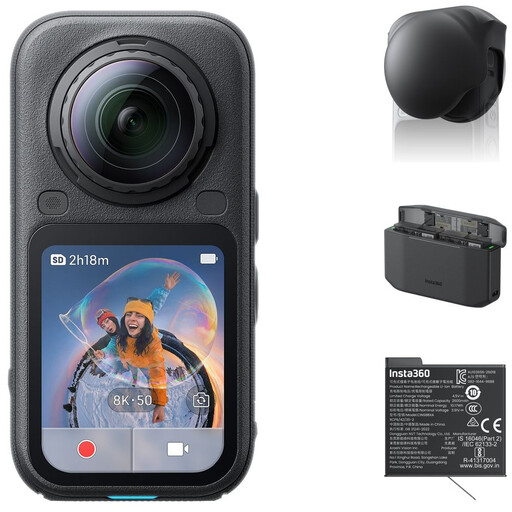
Insta360 X6 All-in-One Bundle with lens cap, Xtreme Battery and Fast Charge Case

Insta360 X6 All-in-One Bundle

Could suit a workflow where you want to choose the framing from 360° footage after recording.

Bundle: Standard Bundle, Lens Cap, Xtreme Battery and Fast Charge Case.

View at Joybuy

DJI Osmo Pocket 4 Standard Combo

DJI Osmo Pocket 4 Standard Combo

Consider this compact gimbal camera if you want to capture moving footage as well as recording a fixed lesson. Test separately whether the camera frames your overhead view well.

The title lists 4K/240fps video, 3-axis stabilisation, 2× lossless zoom, 107GB of built-in storage and a 2-inch rotating screen.

View at Joybuy
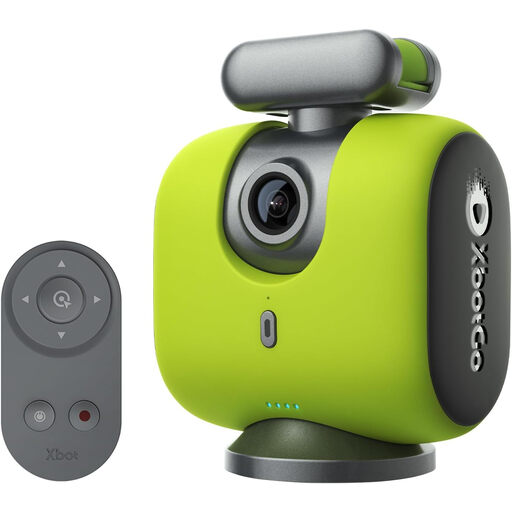
XbotGo Chameleon AI Team Sports Action Cam

XbotGo Chameleon AI Team Sports Action Cam

The product title positions this camera for team and sports recording. If you’re using it for a crochet lesson, check that automatic tracking doesn’t cause your hands and work to move out of frame.

The title lists 4K/60fps video recording and automatic tracking.

View at Joybuy
Sony ZV-E10 with 16–50mm zoom lens, black

Sony ZV-E10 + 16-50mm Zoom Black

Could suit a fixed lesson set-up where you want to adjust the framing using the zoom lens. Make a test recording to check that the stitches look sharp and large enough from your working distance.

The product title lists a 16–50mm zoom lens. The product description says that an adapter/charger and SD card aren’t included.

View at Joybuy
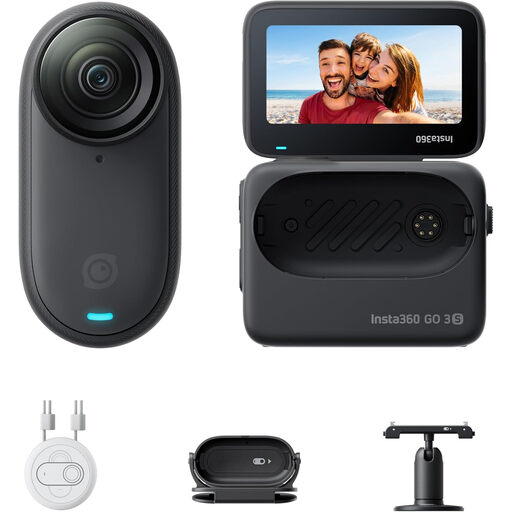
Insta360 GO 3S 128GB, wearable mini camera

Insta360 GO 3S 128GB

Could suit POV recordings of what you’re doing; check that the footage also shows the stitches clearly enough.

The product title lists 4K video and a battery life of 140 minutes. The product description says not to wear the GO 3S on your chest if you have a pacemaker, or to use the magnetic pendant.

View at Joybuy

Frequently asked questions

Is 4K enough to show every crochet stitch?

No. 4K alone doesn’t determine how large and sharp a stitch appears in the frame. Check the framing and focusing distance of the exact lens, too. Canon Netherlands lists different minimum distances for the RF-S 18–45mm, depending on the zoom setting and focus mode.

How do you point a webcam at your crochet work?

Position the webcam securely, pointing it towards your work surface, and make a test recording first. Logitech describes Show Mode on the MX Brio as a way to point the camera at your desk, but the feature doesn’t tell you how large small stitches will appear on your table.

Which extra items should you check for?

Check whether the set you choose includes the lens, memory card, camera support and, if needed, a microphone. DJI says that the Osmo Pocket 3 doesn’t have built-in storage and uses microSD; for a kit such as the Canon EOS R50, the included lens is listed separately.

Can you publish a commercial crochet lesson featuring other identifiable people?

According to the Dutch Data Protection Authority, the GDPR applies to footage featuring identifiable people that is published commercially, and you need a valid legal basis for processing. Bear this in mind before filming other people in a recognisable way or publishing the footage.

Can you add someone else’s music to an online shop tutorial?

Not without the necessary rights. The Dutch government says you may only use copyright-protected music with the creator’s permission. Check this before publishing your lesson.
