Choose a compact camera with a fixed zoom lens if you want to take one complete camera with you without changing lenses. Choose a mirrorless camera if you can fit the lens beforehand and would like more lens options in future. For a bridge silhouette, quick access to exposure compensation and a lens range suited to your viewpoint are just as important as the camera body. Sony explains how exposure compensation can darken an image, while the Consumers’ Association explains that compact cameras have a fixed lens.
Who is this camera guide for?
Photographers short on setup time
You want to be able to pick up your camera and photograph the bridge straight away, without changing lenses on location. A compact camera with a fixed lens or a mirrorless camera with a lens already fitted are both worth considering.
Silhouette photographers who want control over exposure
You want to keep the bridge dark against a bright sky and check the result straight away. Check how quickly you can adjust exposure compensation, and whether the screen or viewfinder makes this easy.
Photographers shooting from a fixed position
You can’t get any closer to the bridge and want to frame both the whole structure and individual details from one spot. The range of the built-in or included lens will help determine which shots you can take.
What should you look for when choosing?
| What to consider |
What should you check? |
Who is this important for? |
| Getting started quickly |
Try turning on the exact camera kit, framing a shot and adjusting exposure compensation. |
If I’m short on time, I want to be able to pick up the camera without changing lenses on location. Around 29% of consumers say getting started quickly is their top priority. |
| Exposing for the silhouette |
Check where the exposure compensation controls are and how to assess the image on the screen or through the viewfinder. Sony explains that a negative adjustment makes the image darker. |
I want to be able to set the bridge against the sky and check the result straight away. Around 29% of consumers say control over the silhouette comes first. |
| Framing your shot from where you are |
Choose your shooting position, then compare it with the range of the built-in or included lens. Nikon lists a 16–50 mm VR lens for the Z50II kit; Sony specifies a 24–200 mm equivalent lens for the RX100 VII, while Panasonic specifies a 24–720 mm equivalent lens for the DC-TZ99. |
If I can’t get any closer, I want to know in advance whether my position will work for a wide shot or a close-up. Around 24% of consumers say framing a shot from a distance is their top priority. |
| A complete, portable kit |
Check exactly what’s included in the kit, including which lens, battery, charging equipment and memory card come with that version. |
I don’t want to find out at the location that something is missing or that I need to bring extra equipment. A complete, portable kit is the top priority for around 18% of consumers. |
Common buying mistakes
-
Comparing only the mirrorless camera body
A mirrorless camera needs a suitable lens before you can take photos. The Nikon Z50II is available, among other options, as a kit with a 16–50 mm VR lens.
Before buying, check the full model and kit name, and make sure the lens suits your shooting position.
-
Assuming the greatest zoom range is automatically the deciding factor
A wider range gives you more options for framing shots from a distance, but zooming in a long way can make framing more difficult. The Consumers’ Association also notes that compact cameras involve a trade-off between a high zoom range and image quality.
First decide whether you want to photograph the whole bridge or a detail, then compare the lens range with how the camera handles.
-
Expecting automatic exposure to create a silhouette on its own
The camera may balance the bright sky and dark bridge differently from the way you want.
Find the exposure compensation controls in advance and check a test shot on location. Sony recommends adjusting the compensation to get the brightness you want.
Camera brands to compare
Canon
The EOS R50 is an APS-C mirrorless camera for anyone who can choose and fit a lens beforehand.
- Canon lists the body weight as approximately 375 g, including the card and battery.
- That weight excludes the lens, so check the weight and contents of the complete kit.
Nikon
The Z50II is available as a mirrorless camera kit with a NIKKOR Z DX 16–50 mm f/3.5–6.3 VR zoom lens.
- The Consumers’ Association describes this kit as easy to use, and Nikon says the kit lens can be retracted.
- If you want a tighter shot of a distant bridge from one spot, check that this lens has enough reach.
Sony
According to Sony, the RX100 VII is a compact camera with a built-in zoom lens equivalent to 24–200 mm.
- The fixed zoom lens gives you different framing options without having to change lenses.
- The lens is attached to the camera and can’t be replaced later, so check in advance that its range suits your viewpoint.
Panasonic
According to Panasonic, the LUMIX DC-TZ99 is a compact camera with a fixed zoom lens equivalent to 24–720 mm.
- Panasonic also lists a tilting screen.
- The lens can’t be changed, so check that you can frame your shot comfortably at the zoom setting you want.
Joybuy products
These Joybuy products are portable cameras described as being for photography in their product titles. Check whether their controls and framing options suit a static bridge silhouette.
 No image available
DJI Osmo Pocket 4 Standard Combo
The product title describes this as a pocket gimbal camera for photography. Check whether its controls and framing options suit a static bridge silhouette.
The product title lists a 1-inch CMOS sensor, 2× lossless zoom and a 2-inch rotating screen.
View at Joybuy
 No image available
DJI Osmo Pocket 3
The product title describes this as a pocket camera for photography. Check in advance whether the screen and controls suit the way you like to frame your shots.
The product title lists a 1-inch CMOS sensor, 4K/120 fps video and a 2-inch rotating touchscreen.
View at Joybuy
 No image available
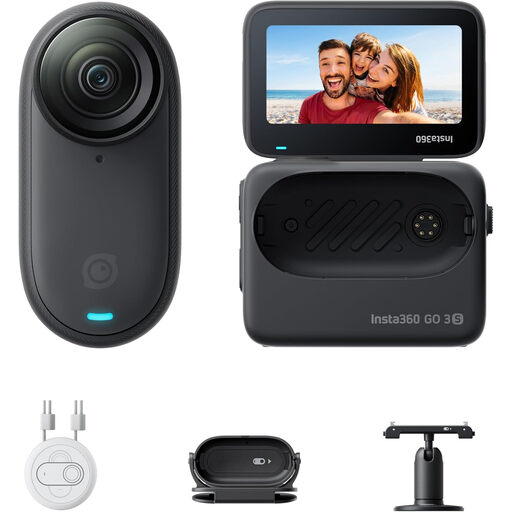
Insta360 GO 3S 128GB
The product title describes this model as a portable camera. Check whether the camera and included accessories are suitable for the composition you want.
The product title lists 128 GB and 4K video.
View at Joybuy
Frequently asked questions
How can you make the bridge look dark against a bright sky?
Take a test shot and check the balance between the sky and the bridge. With automatic exposure, you can adjust exposure compensation towards minus to make the image darker. Sony recommends trying different adjustments, as the brightness you want depends on the scene and your preference.
Do you need to set up a mirrorless camera on location?
Not if you’ve already fitted the right lens. Before you leave, check exactly what’s included in the kit and whether the lens can frame a wide enough or close enough shot from your viewpoint.
What can you do if your camera develops a fault shortly after purchase during normal use?
According to ACM ConsuWijzer, if a product is faulty, the seller must offer an appropriate solution, such as a free repair or replacement, or, in some cases, a refund. Your statutory rights apply alongside any manufacturer’s warranty; there isn’t necessarily one fixed warranty period for every camera.
Can you post a photo of a bridge online if passers-by are recognisable?
First consider the privacy implications. According to the Dutch Data Protection Authority, recognisable people in photos count as personal data, and in most cases you need permission to publish them online. The Authority notes an exception for personal or household use only; this isn’t blanket permission to publish every photo.


