
Explaining a game with a large board
You want to show the whole playing area from above, so you mainly need a useful frame and a stable camera position.


Start with the size of your playing area and where you can position the camera. A document camera with an adjustable arm suits a setup that mainly shows the board from above, while a standard webcam on a suitable arm can be more flexible if you also want to film yourself. Then check that the board and card text are clearly visible from your planned camera distance, and look out for reflections, connections and the space taken up by an arm or base. A 4K label alone does not guarantee a clear view of the whole board.
You want to show the whole playing area from above, so you mainly need a useful frame and a stable camera position.
You regularly show text or fine details. Check how sharp the image is at the distance you’ll actually use the camera, rather than relying on the stated resolution alone.
You want to switch between the board and a conversation, so consider how easy the camera is to reposition, as well as video sources and sound.
Best for: mainly showing the board and what’s happening on it from above, without setting up a separate overhead arm.
Bear in mind: a stated A3 capture area won’t necessarily fit a larger board or make small text readable. Also check the base’s footprint, cable routing and connections.
Best for: recording conversations or other content too, provided you can create a stable camera position above the table.
Bear in mind: a desk-view mode doesn’t guarantee a frame that shows the whole board. An arm or tripod may take up extra space and need to be bought separately.
Best for: a small playing area or a short demonstration, provided a test frame shows all the relevant components.
Bear in mind: the available mounting height and distance both affect whether a larger board can be shown in full and remain readable.
| What to consider | What to look for | Who is this important for? |
|---|---|---|
| The whole playing area | Measure the playing area and test the frame at your planned camera height. Check whether the base or mount takes up table space. | If I want to show the whole board and game components at once, the framing needs to be right; around 36% of consumers prioritise the playing area. |
| Card text and details | Test a typical card at your planned distance, and check what happens when you hold it closer to the lens. | When I explain rules or show small components, I want to know whether the details remain readable at my usual working distance; around 29% of consumers prioritise detail readability. |
| Space and setup | Check the footprint, cable routing and image with the lighting you’ll actually use. Built-in lighting can cause reflections on cards. | If the camera needs to fit in a guest room, table space and practical positioning matter; around 21% of consumers give ease of setup top priority. |
| Conversation and recording | Check which video sources your software supports and make a short test recording of the picture and your voice. | If I want to record a conversation as well as the board, I want to be able to switch easily between camera setups and remain easy to hear; around 14% of consumers prioritise conversation or recording. |
Resolution doesn’t tell you how much of your playing area and small text will be clearly visible in the final frame.
Start by testing a frame with the board, then check a card from your planned viewing distance.
A mode for showing work on a desk doesn’t determine how much of your board will fit in the frame.
Before you choose, check the mounting point, available height, stability and width of the board. You may need to buy a suitable arm or stand separately.
A statement such as ‘EU warranty of at least two years’ doesn’t, on its own, explain your rights if something goes wrong. The Dutch government states that the Netherlands has no fixed statutory warranty period and that the seller must provide a solution if a product develops a fault.
If a product develops a fault, check your rights under Dutch statutory guarantee rules and distinguish them from a manufacturer’s warranty.
The V4K PRO 120 is a USB document camera for anyone who mainly wants to show a playing area from above.
The AVerVision M11-8MV is a document camera with a table base for a fixed overhead setup.
The MX Brio and Brio 500 are standard webcams with a desk-view Show Mode, for anyone who also wants to talk or film themselves.
The Facecam MK.2 is designed for a fixed camera angle on a suitable separate arm.
The Meet 2 is a compact webcam for anyone who also wants to use image framing during conversations.
These Joybuy cameras are mainly intended for video conferencing and webcam use. Before choosing, check that the mounting and camera position will work for a board setup in your room.
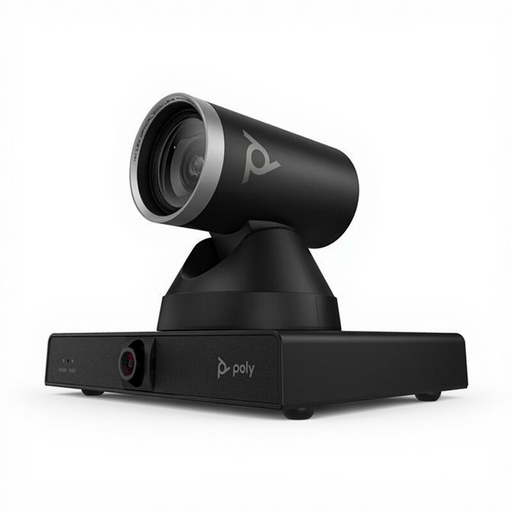 No image available
Could suit anyone who wants to switch between a wide view and close-up details; check that the mount is suitable for your table setup.
The product name lists 12× optical zoom. The mount you use must be able to support the camera’s 1.79 kg weight.
 No image available
Before choosing this camera for a board game demonstration, check that it suits your planned use and mounting setup.
 No image available
Could be worth considering if you’re looking for a webcam for use with a computer; test whether the camera angle and focus suit your playing area.
The product name lists 4K UHD, 8 MP, autofocus, dual built-in microphones and a privacy cover.
 No image available
Could suit PC use or streaming; check whether the mounting position gives you a useful view of the board.
The product name lists 2K QHD and a microphone with noise reduction. It also mentions clip mounting for a laptop or desktop and an EU version.
 No image available
Before choosing this camera for a board setup, check that the mounting and field of view suit the distance to your table.
The product name lists 3840 × 2160 pixels at 30 fps.
No. Don’t judge by resolution alone: test whether a card appears sharp at your camera height and how much space the playing area takes up in the frame. According to its official specifications, the Elgato Facecam MK.2 has fixed focus from 30–120 cm; IPEVO lists focus control for the V4K PRO 120.
According to the OBS guide, add a ‘Video Capture Source’ to your scene and position it in the frame where you want it. First check that your computer recognises the camera as a video source.
Take a test shot with the cards you use, then move the camera or light source if reflections make the text hard to read. According to the specifications, you can switch the built-in LED on or off independently on the IPEVO V4K PRO 120.
If a product bought by a consumer develops a fault, the seller must provide a solution. According to the Dutch government, most eligible online purchases from a business also come with a 14-day cooling-off period; the Netherlands does not have a fixed two-year statutory warranty period for every product.
It depends, among other things, on how and with whom you share the footage. According to the Dutch Data Protection Authority, sharing with a very limited private circle may fall under the exception for personal or household use. That exception doesn’t apply to wider publication featuring identifiable people, or to professional or commercial use. Before publishing, check who can be identified in the picture or audio and which rules apply to your situation.