For a still photo, a stable setup, soft lighting and a plain background matter more than extra video features. Try your existing smartphone first; if you need more control over framing, focus or repeatable shots, consider a mirrorless camera with a suitable lens. Compare the complete setup, not just the camera body.
Who is this setup for?
Creating a series of product shots
You often photograph complete decorated tins and want repeatable framing, a clean background and consistent colours. Adobe and Canon Netherlands emphasise a controlled setup and consistent framing for product photography.
Photographing decorative details
You want to show small lettering, embossing or edges on their own. Compare the minimum focusing distance and magnification of the exact lens you’re considering; Canon Netherlands and Sony Netherlands publish these specifications for each lens.
Occasional home photographer
You want to find out whether your phone and a simple, stable setup will do the job before buying a camera. Adobe suggests a smartphone as a possible starting point; take a test shot with the framing and level of detail you need.
What should you look for?
Your existing smartphone
Choose this if: you occasionally photograph a whole tin and your phone captures it sharply with the framing you want.
Bear in mind: close-up details and manual settings depend on the phone you already own.
Compact camera with a fixed lens
Choose this if: you want a separate camera without interchangeable lenses.
Bear in mind: you can’t add a specialist close-up lens later when you have a fixed lens; check the focusing distance and angle of view for each model.
Mirrorless camera with a standard zoom lens
Choose this if: you regularly want to photograph complete tins from different angles and control the settings yourself.
Bear in mind: a standard zoom isn’t automatically a macro lens; the lens, tripod and lighting can all add to the cost.
Mirrorless camera with a close-up or macro lens
Choose this if: small embossed details, lettering or print are your main subject, and a test shot with the standard zoom doesn’t fill the frame enough.
Bear in mind: an extra lens means a separate purchase and checking that the mount is compatible.
| What to consider |
What to look for |
Who is this most important for? |
| Framing the whole tin evenly and keeping it in focus |
Test the framing and sharpness at the front and around the edge; check that your phone or lens can capture the whole tin from your working distance. |
If I photograph complete tins regularly, I want to be able to repeat the framing easily. Around 36% of consumers prioritise a repeatable overall shot. |
| Reducing reflections on shiny metal |
Take a test photo from the angle you want, then move or soften the lighting until the decoration remains visible. |
With a shiny tin, I want to reduce distracting reflections so the decoration stays clear. Around 29% of consumers prioritise controlling reflections. |
| Capturing small details |
For the exact lens, compare both the minimum focusing distance and maximum magnification; test the smallest detail you want to show. |
If I want to show small lettering or embossing on its own, I want to know whether the lens can capture it as I need. Around 21% of consumers prioritise close-up shots. |
| Keeping extra costs down |
Try your existing phone first; if you buy a camera, factor in the lens and any equipment you need for the setup. |
If I only photograph a tin now and then, I want to make use of the equipment I already have. Around 14% of consumers prioritise keeping extra spending to a minimum. |
Buying pitfalls
-
Comparing only megapixels or a more expensive camera body
For a still product, a tidy background, good lighting and consistent framing matter too. A new camera won’t automatically improve those parts of your setup.
Take a test shot with your current camera or phone first, and check that the whole tin and the details you want are in focus.
Your final setup may also need a tripod or equipment to soften the lighting.
-
Assuming a standard zoom is automatically a macro lens
A lens that can focus on the whole tin might not make a small decoration large enough in the frame. The focusing distance alone won’t tell you that.
For the exact lens, compare both its minimum focusing distance and maximum magnification, and test the smallest detail you want to photograph.
If the standard zoom can’t capture enough detail, you may need a separate close-up or macro lens.
-
Blaming harsh reflections on the camera
In product photography, the lighting setup affects how the shape and decoration appear. A shiny tin can reflect distracting bright patches.
Review a test shot and first adjust the position or softness of the light and the shooting angle.
Softening or repositioning the lighting may require extra equipment for your setup.
Camera brands to compare
Canon
The EOS R50 with RF-S 18-45mm is a mirrorless camera kit for anyone who wants to take full-tin shots and may want to consider a different lens later.
- Canon Netherlands lists the EOS R50 as having an APS-C sensor with 24.2 effective megapixels.
- Canon Netherlands lists a maximum autofocus magnification of 0.16× at 45 mm for the RF-S 18-45mm. This figure applies to that lens at that zoom setting; it doesn’t prove that every small decoration will fill the frame.
Sony
The ZV-E10 with E PZ 16-50mm OSS is an E-mount kit worth looking into if you might also want to shoot product videos as well as photos.
- Sony Netherlands lists the ZV-E10 as having 24.2 effective megapixels and supporting RAW shooting.
- Sony Netherlands lists a maximum magnification of 0.215× for the separate SELP1650 lens. Check the exact lens version included in the bundle; these lens specifications don’t automatically apply to the ZV-E10 II or another 16-50mm variant.
Nikon
The Z50II kit with NIKKOR Z DX 16-50mm f/3.5-6.3 VR is a mirrorless camera with a standard zoom for a variety of overall shots.
- Nikon Netherlands states that this kit includes the NIKKOR Z DX 16-50mm f/3.5-6.3 VR lens and has lens stabilisation.
- Nikon Netherlands lists a minimum focusing distance of 0.2 m for the separate lens. Don’t rely on that alone to decide whether it’s suitable for a small detail shot; test the framing you want.
Joybuy cameras for these product photos
These product picks include compact and mirrorless cameras with zoom lenses for a range of shots of a decorated tin.
 No image available
Komery W6 camera, 12× optical zoom
An option to compare if you want to take different types of photos with a camera.
The product name lists 12× optical zoom.
Joybuy
 No image available
Sony ZV-E10 + 16-50mm zoom, black
A mirrorless camera kit to consider if you want to adjust the framing of a complete tin.
The product name lists a 16-50mm zoom lens. Sony Netherlands lists the ZV-E10 as having 24.2 effective megapixels and supporting RAW shooting.
Joybuy
 No image available
Sony Alpha A6100 + 16-50mm f/3.5-5.6 OSS II
A mirrorless camera kit to compare if you want to vary how the tin is framed.
The product name lists a 16-50mm f/3.5-5.6 OSS II lens.
Joybuy
 No image available
Sony ZV-1 compact camera
A compact camera to compare if you’re looking for a standalone camera without an interchangeable lens system.
Joybuy
 No image available
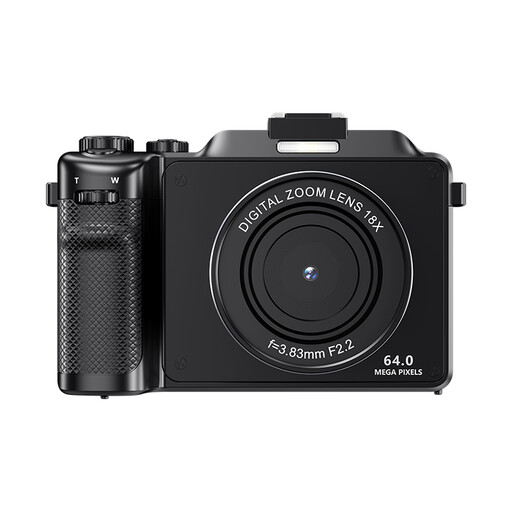
Komery X9 camera, 18× digital zoom
A camera to compare if you want autofocus and are considering different types of framing.
The product name lists 18× digital zoom; the product description warns that digital zoom can reduce image quality.
Joybuy
Frequently asked questions
Do I need to buy a new camera to photograph one biscuit tin?
Not necessarily. First, see whether your phone can capture the whole tin and the details you want in focus, using soft lighting and a stable setup.
How do I keep the background and framing consistent across multiple photos?
Keep the background, tin and camera in fixed positions. Canon Netherlands describes a tripod as a useful way to keep framing consistent.
Is the minimum focusing distance enough to tell me whether a lens can photograph small decorations?
No. Check the maximum magnification too, and take a test shot of the smallest detail. Canon Netherlands lists different focusing distances and magnifications for the RF-S 18-45mm at different zoom settings.
What costs and rights should I consider when buying a camera online in the Netherlands?
Check whether the lens is included with the camera and allow for any equipment you may need for your setup. If you buy online from a business as a consumer, the Netherlands government says that in many cases you have a 14-day cooling-off period. You’re also entitled to a product that is fit for purpose; in the Netherlands, there is no fixed statutory warranty period. These consumer rules don’t necessarily apply to business purchases.


