What should you consider when choosing?
First decide whether your main priority is changing window light, small details, overhead shots or keeping your kit simple. This will help you work out which lens and controls suit the shot you want.
| What to consider |
What to look for |
Who is this important for? |
| Changing window light |
Check the aperture and the maximum aperture of the supplied lens; Canon Netherlands points out that the direction of the window, the time of day and the weather affect the light. |
When daylight changes, I want to be able to adjust the exposure and keep my set-up steady. Around 33% of consumers in this buying context give managing window light their highest priority. |
| Close-up details of dough |
Compare the maximum magnification and minimum focusing distance of the exact lens; also check that it fits your camera body. |
If I mainly want to show the texture of dough or small ingredients, I want to know how close the lens can focus and how large the subject will appear in the frame. Around 25% of consumers in this buying context prioritise close-up details. |
| Framing from above |
Check the lens’s angle of view on your chosen sensor, whether the screen can move and how the camera can be positioned as required. |
For a shot directly above the work surface, I want to frame the whole dish and view the screen from that position. Around 25% of consumers in this buying context give composition their highest priority. |
| Complete kit |
Check whether you’re buying a body or a kit with a lens, which lens is included and whether it fits your camera. |
If I want to keep my kit simple, I want to know whether I can start taking photos with the supplied lens and whether I can replace it later. Around 17% of consumers in this buying context prioritise simplicity. |
Camera brands as a guide
These examples show different camera bodies and lens options. The specifications quoted come from the manufacturers and are not independent performance tests.
Canon
The EOS R50 is a mirrorless camera with interchangeable RF lenses; the PowerShot G7 X Mark III is a separate compact camera with a fixed lens.
- Canon specifies a vari-angle screen for the EOS R50. The RF-S 18-45mm is compatible and offers up to 0.25× magnification.
- The lens on the PowerShot G7 X Mark III can’t be replaced. The RF-S 18-45mm is not a 1:1 macro lens.
Nikon
The Z50II is a DX-format mirrorless camera with a Z mount; the NIKKOR Z MC 50mm f/2.8 is a separate macro lens option.
- Nikon specifies a vari-angle screen for the Z50II and 1:1 magnification for the NIKKOR Z MC 50mm f/2.8.
- The macro capabilities come from that separate lens and aren’t automatically included with every Z50II kit. On a DX camera, Nikon says the lens gives an angle of view equivalent to 75 mm; you may therefore need more distance to capture a whole work surface than you would with a wider lens.
Sony
The ILCE-6400 is an APS-C mirrorless camera with an E mount; the E 30 mm F3.5 Macro offers a separate close-up option.
- Sony specifies 24.2 effective megapixels for the ILCE-6400 and 1:1 magnification for the SEL30M35 macro lens.
- The macro lens is a separate purchase. Don’t assume this combination has stabilisation without checking the specific model.
Fujifilm
The X-S20 is an APS-C mirrorless camera with an X mount, for those who want to pair a body with a compatible lens.
- Fujifilm specifies 26.1 effective megapixels and built-in five-axis sensor stabilisation for the X-S20.
- The quoted 7.0-stop compensation is based on CIPA test conditions using an XF35mmF1.4 R. This isn’t a measured result for every lens or for moving pasta.
Joybuy product picks
This Joybuy selection includes compact pocket and action cameras described in their product titles as being for photography or vlogging. For each model, check whether you can frame your shot and focus on the dish or detail from the position you want.
 No image available
DJI Osmo Pocket 4 Standard Combo
The product title describes this model as a pocket gimbal vlog camera for photography; check whether its design and controls suit your overhead food set-up.
The product title lists a 1-inch CMOS sensor, 2× zoom, 107 GB of built-in storage and a rotating 2-inch screen.
View product at Joybuy
 No image available
KOMERY G7 5K Digital Camera, pink
The product title describes a portable point-and-shoot camera; check whether the lens is suitable for the distance at which you want to photograph details in dough.
The product title lists 80 MP and 18× zoom. No SD card is included.
View product at Joybuy
 No image available
DJI Osmo Pocket 3
The product title describes this model as a small video camera for photography. Check whether its controls and lens set-up suit the crop you want for your pasta shots.
The product title lists a 1-inch CMOS sensor, 3-axis stabilisation and a rotating 2-inch touchscreen.
View product at Joybuy
 No image available
Songdian Pocket Camera 4K, pink
The product title describes this as a pocket camera for photography and video; check whether it’s easy to use from your chosen position by the window and work surface.
The product title lists 44 MP and 16× zoom.
View product at Joybuy
 No image available
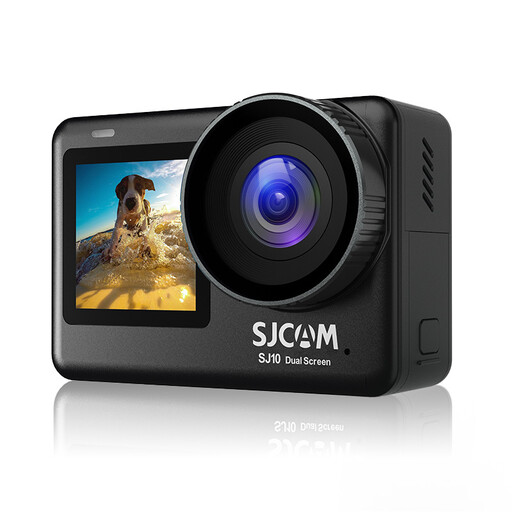
SJCAM SJ10 Pro Dual Screen Action Camera
The product title describes an action camera with two screens. If you’re taking overhead shots, check whether the screens and controls work for your chosen camera position.
The product title lists a 2.33-inch touchscreen, a 1.3-inch selfie screen and a waterproof housing rated to 30 m.
View product at Joybuy
Frequently asked questions
Do I need to buy a macro lens straight away to photograph pasta details?
No. First check whether your current lens can achieve the crop you want while still focusing clearly. Maximum magnification matters for small details: Canon specifies up to 0.25× for the RF-S 18-45mm, while Nikon quotes 1:1 for the separate NIKKOR Z MC 50mm f/2.8.
How should I set up fresh pasta in bright window light?
Move your set-up and see how the direction and time of day affect the light. Canon Netherlands suggests using a thin white curtain to soften bright, direct window light; this is a photography tip, not a requirement when buying a camera.
What should I check about the lens and complete kit?
Check whether you’re buying a body-only deal or a kit with a lens, and whether the supplied lens can deliver the angle of view and focusing distance you want. A mirrorless camera body sold separately isn’t a complete photography kit without a compatible lens.
What warranty applies to a purchase in the Netherlands?
According to the Dutch Government, if a product is faulty, the seller is your point of contact for a solution. A manufacturer’s warranty doesn’t replace your statutory rights against the seller.
Do I always have 14 days to change my mind when buying online in the Netherlands?
No, not always. The Dutch Government states that a 14-day cooling-off period applies in many cases when buying at a distance; for example, an online purchase from a private individual doesn’t count as a distance sale. Check who the seller is and which terms apply to your transaction.


