
Top-down filmmaker
You mainly want to show how you place the stems and what your hands are doing on the work surface. That makes the camera angle and the area in shot especially important.


Start by choosing your filming angle and measuring the distance from the camera to the nearest flower. Then check that the camera can focus at that distance and capture the whole work surface. A document camera or webcam suits a fixed computer setup, while a standalone camera gives you more freedom to change angles. A gimbal camera is most useful if you also want to film around the arrangement.
You mainly want to show how you place the stems and what your hands are doing on the work surface. That makes the camera angle and the area in shot especially important.
You switch between showing the whole bouquet and close-ups. Pay attention to the camera or lens’s focusing distance, and to how far away you’ll be when filming the flowers.
You want to explain your arrangements and sometimes film yourself or capture a side view. Think about the camera angle, sound and how you’ll switch between the work surface and yourself.
First, decide between filming through a computer and using a standalone camera. Then measure the distance you need and check the framing. This helps you assess the camera against your desk and arrangement, rather than focusing on resolution alone.
Choose this option if: you mainly film your hands and work surface from above and can use a computer while recording.
Bear in mind: the IPEVO V4K requires computer software; also check that its capture area can fit your arrangement in shot.
Choose this option if: you already film through a computer and want to switch between yourself and your work on the desk.
Bear in mind: a downward-facing position doesn’t guarantee that the vase, your hands and the flowers will all be in focus and fully in shot.
Choose this option if: you want to film without a computer permanently connected, or regularly change your camera angle.
Bear in mind: you’ll still need a suitable mount for a top-down view. With a mirrorless camera, the lens also needs to suit the distance and framing.
Choose this option if: as well as a fixed shot, you want to capture moving footage around the vase.
Bear in mind: a gimbal isn’t a substitute for a suitable mount for a fixed top-down view; also check what storage you’ll need.
| What to consider | What should you check? | Who should pay particular attention? |
|---|---|---|
| Close-up focusing | Measure the shortest distance to a flower and compare it with the focusing distance of the exact camera or lens. If possible, take a test recording with your hands moving. | If I’m filming flower details and my hands come close to the lens, I want to know whether both will stay in focus. Around 36% of consumers particularly value close-up focusing. |
| Framing and mounting | Measure the work surface and check that the vase, flowers and your hands will fit in shot. Also make sure the mount and cables stay clear of your working area. | If I want to show the whole arrangement and my hand movements on a small desk, the camera needs to capture the area I need. Around 29% of consumers particularly want to frame the work surface. |
| Filming with a computer or standalone | Check whether you’ll have a suitable computer and software while filming, or whether the camera needs storage and power for standalone recording. | If I want to film without a fixed computer setup or move the camera to a different angle, that freedom matters a lot. Around 21% of consumers prioritise standalone filming. |
| Spoken explanations and long recordings | Make a short recording while speaking and arranging flowers. Also check the connections, power and storage required for the model you’ve chosen. | If I’m explaining what I’m doing as I arrange the flowers, I want my voice to be clear and to avoid unexpectedly running out of recording space. Around 14% of consumers particularly value clear explanations and uninterrupted recording. |
Resolution doesn’t change the minimum focusing distance. If a flower is closer to the lens than that distance, the image may be blurred.
Measure from the planned camera position to the nearest flower and check the focusing distance of the exact camera and lens combination. Also test what happens when your hands move.
A tilting stand or built-in support doesn’t prove that the vase, flowers and your hands will all fit in shot, or that the camera can be securely mounted on your desk.
Check the framing you want and the specific mount before choosing your filming setup.
You may need a separate, suitable mount for a top-down view.
Your setup may also depend on having a suitable lens, memory card or computer. The IPEVO V4K requires computer software, and DJI says the Osmo Pocket 3 has no built-in storage.
Check what’s included with each model and what you’ll need for the way you plan to film.
A missing lens, memory card or computer could mean an extra purchase. What you need depends on the camera and model you choose.
The Dutch government explains that the Netherlands has no fixed statutory warranty period, and that the seller must provide a solution if a product has a problem.
Keep your proof of purchase and treat the manufacturer’s warranty as an extra, not a replacement for your legal rights.
The V4K is a document camera for a fixed top-down view using a computer.
The MX Brio is designed for computer-based recording where you want to switch between yourself and your work on the desk.
The ZV-1 II is a standalone compact vlogging camera for creators who film flowers and, if they wish, themselves from different angles.
The PowerShot V10 is a compact standalone camera, while the EOS R50 V offers an interchangeable-lens option.
The Osmo Pocket 3 is particularly suited to moving footage around the arrangement.
This selection includes webcams for computer-based desk filming and standalone cameras for more flexible shooting angles. For each model, check that the filming distance, mount and required accessories suit your workspace.
 No image available
The rotating lens and included mini tripod may suit flexible filming without a fixed computer setup. Check that they’ll let you get the top-down view you want.
The product name lists 4K video, Wi-Fi, a 330° rotating lens, a 1.72-inch touchscreen and a mini tripod.
 No image available
This webcam is a computer-based option for desk filming. Check that the mount and framing suit your vase and arrangement.
The product name lists 4K UHD, 8 MP, autofocus, dual built-in microphones and a privacy shutter. This is the EU version.
 No image available
This standalone camera with a zoom lens may suit you if you want to try a different filming angle. Check beforehand that the lens gives you the framing you need at your filming distance.
The product name lists a 16–50mm zoom lens.
 No image available
This webcam is designed for use with a computer and may suit desk filming. Check that the camera angle captures the whole arrangement and your hands.
The product name lists 4K video and a 1/2-inch sensor.
 No image available
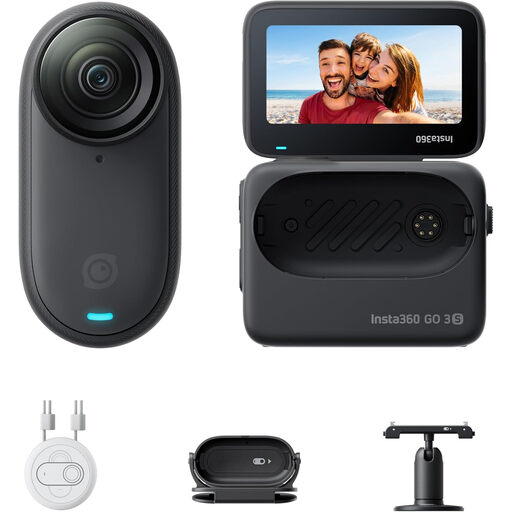
This portable mini camera may suit filming from different positions. Check that the included mount gives you the angle you need for arranging flowers.
The product name lists 128 GB storage and 4K video.
Measure from the planned camera position to the nearest flower and check the minimum focusing distance of the exact camera or lens. Sony explains that a subject closer than this distance may not focus properly. Also take a test recording to see how the camera handles moving hands.
No. Canon lists a built-in stand and tripod socket for the PowerShot V10, but you still need to check that your mount can handle the angle and weight you need, and that the whole arrangement fits in shot.
For a USB document camera, check that you have a suitable computer and software; IPEVO lists these as requirements for the V4K. For a standalone camera, check storage and power: DJI says the Osmo Pocket 3 has no built-in storage.
For a consumer purchase in the Netherlands, statutory rights apply without a fixed statutory warranty period. If a product is faulty, the seller must provide an appropriate solution, as the Dutch government explains. When you buy remotely from a business, you’ll often have a 14-day cooling-off period, although exceptions apply. Check the terms that apply to your purchase.
This depends, among other things, on who can be recognised and how you share the video. The Dutch Data Protection Authority explains that GDPR rules may apply when images of recognisable people are shared beyond a very limited private circle; processing must have a valid legal basis. Don’t assume the exception for personal or household use applies if you publish the video publicly.