
Teacher with a permanent worktable
Wants to keep the vase, hands and steps of the lesson in the frame, while recording clear explanations. The Consumers’ Association recommends a tilting screen for filming from unusual angles.


If you’ll mainly be filming from a single worktable, start by choosing a lens and shooting distance that will fit the vase and your hands, as well as the flower details, in the frame. A mirrorless camera with interchangeable lenses gives you more flexibility to adjust the angle of view, while a compact gimbal camera may be a better choice if you often change position during the class. Test the focus and make sure your explanations are easy to hear in your own set-up.
Wants to keep the vase, hands and steps of the lesson in the frame, while recording clear explanations. The Consumers’ Association recommends a tilting screen for filming from unusual angles.
Wants to show techniques and small details. The minimum focusing distance and lens you choose matter more than the camera body alone; Sony describes the interchangeable lenses available for the ZV-E10 II.
Wants to film the teacher or the finished arrangement during the class, and is weighing up a compact camera with stabilisation against a fixed camera set-up. DJI specifies three-axis stabilisation for the Osmo Pocket 3.
| What to consider | What to look for when buying | Who should give this more weight? |
|---|---|---|
| Keeping the whole process in frame | Check the angle of view of your chosen lens at the actual shooting distance and in the planned mounting position. A wider frame will make small details appear less prominent. | If I want to show the vase, my hands and the work surface at the same time, I first check whether the lens can capture that frame from my worktable. Around 28% of consumers prioritise seeing the entire worktable. |
| Sharp flower details | Check the minimum focusing distance of the exact camera-and-lens combination. DJI specifies a minimum object distance of 20 cm for the Osmo Pocket 3. | When I want to show a small technique close up, I need to know whether the camera can focus at my working distance. Around 22% of consumers make flower details their top priority. |
| Clear explanations | Check the microphone input, its placement and whether you can listen back to the recorded sound. Canon lists a microphone input and headphone output for the EOS R50 V. | If my explanations help clarify the steps, I want to be able to listen back to a test recording and hear my voice clearly. Around 22% of consumers put clear explanations ahead of the other considerations. |
| Recording time | Compare the planned lesson length with the power supply, storage and recording settings. Nikon states that the Z 30 can record continuously for up to 125 minutes; this is a manufacturer’s figure. | For a continuous demonstration, I don’t want to have to stop halfway through a step to restart the recording. Around 17% of consumers make recording time their top priority. |
| Filming while moving | Decide whether you’ll actually be moving around the room with the camera. Stabilisation is no substitute for a suitable mount for a fixed overhead shot; also take the stated focusing distance into account. | If I want to move from the worktable to the finished arrangement during the class, being able to film from different positions matters more to me. Around 11% of consumers prioritise filming while moving. |
The lens partly determines whether both the whole worktable and small flower details will be clearly visible from your camera position. The Sony ZV-E10 II version reviewed comes with the body only.
Compare complete kits and check the angle of view and focusing distance of the lens you’re actually going to use.
With a body-only version, you’ll need a suitable lens before you can start filming.
Stabilisation while moving doesn’t guarantee that the whole worktable will fit in frame from a fixed position. DJI specifies a minimum object distance of 20 cm for the Osmo Pocket 3.
Test the mounting position, framing and focus in the set-up you plan to use during the class.
You may need a suitable mount for a stable overhead shot.
A microphone input or audio mode alone won’t tell you how clearly your voice will be recorded in your set-up.
Make a short test recording with spoken explanations, then check the connections and, if you plan to use it, headphone monitoring on the exact model.
An external microphone and its mount may add another component to your set-up.
The EOS R50 V is a video-focused mirrorless camera for a fixed lesson set-up with your choice of RF lens.
The ZV-E10 II is compatible with interchangeable E-mount lenses, so you can choose a lens to suit different lesson shots.
The Osmo Pocket 3 is a compact gimbal camera for anyone who wants to film handheld as well as capture fixed shots.
The Z 30 with a suitable Z lens is worth considering if you decide on the angle of view and recording time you need in advance.
The LUMIX G100D is a Micro Four Thirds mirrorless camera with an interchangeable lens. The DC-G100DW kit reviewed includes a 12–32mm lens and a 45–150mm lens.
These Joybuy picks are designed for filming flower arranging classes, including compact gimbal cameras and a camera with an interchangeable lens for different shots.
 No image available
A pocket gimbal camera to consider if you change position during a class.
The product name lists a 1-inch CMOS sensor, 4K/240fps, 3-axis stabilisation, 2× lossless zoom, 107 GB of built-in storage and a 1/4″ thread.
 No image available
A compact gimbal camera for classes where you change position while filming.
The product name lists 4K/120fps and 3-axis stabilisation. DJI specifies a minimum object distance of 20 cm for the Osmo Pocket 3, so check that it suits the flower details you want to capture.
 No image available
A compact gimbal camera for shots where you change camera position.
The product name lists 4K/120fps, 3-axis stabilisation and a 2-inch rotating touchscreen. DJI specifies a minimum object distance of 20 cm for this model.
 No image available
A camera with an interchangeable lens to consider if you want to tailor the angle of view to different lesson shots.
The product name lists an included 16–50mm zoom lens. Check that the angle of view and focusing distance suit your worktable.
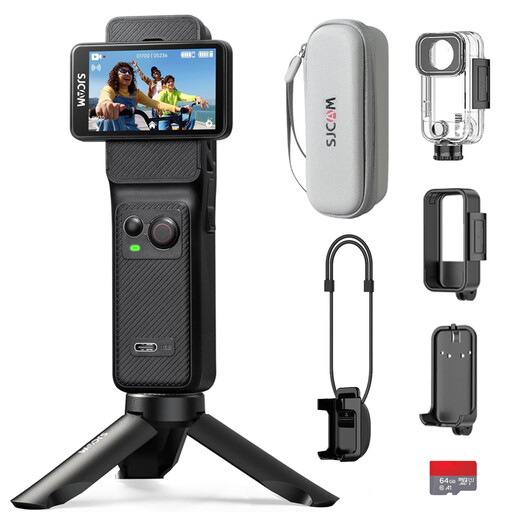 No image available
An action camera to compare if you want to capture a wide view of the worktable or film while moving.
The product name lists 4K, 6-axis stabilisation, two touchscreens and an included 64 GB card. Check that the lens framing suits the shot you want.
No. First, think about how you’ll show the video and how much of the worktable needs to be visible. Several of the models mentioned have 4K modes, but choosing the right angle of view, capturing sharp flower details and recording clear explanations are separate considerations.
Make a short test recording from the planned camera position, with the vase, both hands, a small flower detail and a spoken explanation in shot. Check the framing, focus and sound; the required focusing distance varies between cameras and lenses.
According to ACM ConsuWijzer, the retailer in the Netherlands is responsible for the statutory guarantee if a product doesn’t do what you could reasonably expect. A manufacturer’s guarantee doesn’t replace this right; the appropriate solution depends on the fault and the circumstances.
First, consider which privacy rules apply to your recording and publication. The Dutch Data Protection Authority explains that recognisable people in images count as personal data, and that professional use or sharing outside your personal circle requires a lawful basis under the GDPR. Consent is one possible lawful basis and, according to the regulator, is required in many cases.
According to ACM ConsuWijzer, as a consumer you usually have a statutory cooling-off period of up to 14 days after delivery for an online purchase. There are exceptions; also check how you’re allowed to try out the product during this period.