Choose a camera set-up that captures both the whole puzzle and your hands from the mounting height available to you. Then test the focus and lighting using the lamps you actually use. A mirrorless camera gives you a choice of lenses, a camcorder has a built-in zoom lens, a webcam suits demonstrations based around a computer, and a pocket camera can be useful for moving detail shots. None of these features alone guarantees a good overhead view.
Who is this for?
Puzzle enthusiast who wants to show the details
You want to show small puzzle pieces and what you’re doing, as well as the larger work area. The right lens or focusing distance depends on the mounting height and the size of the puzzle. Canon and DJI outline features and specifications for their own camera models.
Creator filming under artificial light
You use LED or other artificial lighting and want to check whether it causes visible bands, flicker or colour shifts. Sony Support explains that these effects can occur under artificial light.
Online demonstrator
You show the puzzle through a computer, so you need to check whether the camera can point downwards, stays securely in place and works with your audio set-up. Logitech describes a Show Mode for desk-based use; Which? includes sound quality in its tests of video cameras.
What should you look for when choosing?
Mirrorless camera with a suitable lens
A good fit if: you want to combine wide shots and close-ups, and can match the lens, distance and mounting set-up to one another.
Bear in mind: camera specifications won’t tell you whether a particular lens will frame the shot correctly from your mounting height.
Camcorder with built-in zoom
A good fit if: you want a video camera with a fixed lens and adjustable framing, without having to change lenses while filming.
Bear in mind: zoom alone doesn’t tell you how much of the frame will be left for the puzzle and your hands. Check the framing at your intended working distance.
Webcam for use with a computer
A good fit if: you want to show or record your demonstration through a video call or computer software.
Bear in mind: a desk mode doesn’t guarantee that the whole puzzle will fit in the frame from above. Check the connection and mounting too.
Compact gimbal camera
A good fit if: you want to take moving close-ups as well as film a static demonstration.
Bear in mind: a gimbal isn’t a mount for a fixed overhead view. Check that your subject is within the focusing range.
| What to consider |
What to look for |
Who should pay particular attention? |
| Focus and framing |
At your intended mounting height, record a test shot showing the whole puzzle, both hands and the smallest relevant pieces. Check the lens or focusing distance of the exact model. |
I want to show the details and the whole work area without pieces or hands disappearing out of frame. Around 33% of consumers say making the puzzle and actions easy to see is their main purchase concern. |
| Artificial light |
Film with all the lamps you use switched on, then watch the clip back. Check whether you can adjust the shutter speed and white balance. |
I want to know whether my LED or other lamps cause bands, flicker or colour shifts before I make a long recording. Around 27% of consumers prioritise a stable picture under artificial light. |
| Hands-free set-up |
Check there’s room for a mount or tripod, space to move your hands, and enough power and storage for the length of your recording. |
I want to be able to work on the puzzle with both hands while the camera stays pointed at the work surface. Around 20% of consumers put a stable set-up and uninterrupted recording at the top of their list. |
| Online explanations and sound |
Check the computer connection, the framing in the app you plan to use and whether you need an external microphone. |
I want to show the puzzle during a call or recording and make sure my explanations are easy to hear. Around 20% of consumers prioritise computer-based demonstrations with clear speech. |
Common pitfalls
-
Choosing based on 4K alone
A resolution figure won’t tell you whether the smallest relevant puzzle pieces look sharp and large enough in the frame.
At your intended working height, record a test shot that shows both the whole work area and the details.
You may need a different lens or mount to get the framing you want. Check this before choosing a camera set-up.
-
Assuming artificial light will automatically give you an even picture
LED lighting, among other types, can cause visible flicker, bands or colour shifts in video. Sony Support describes these possible effects, but they don’t occur with every camera or lamp.
Record a short clip using the lamps you actually use and watch it back before filming a long demonstration.
-
Assuming a gimbal or desk mode is a complete overhead set-up
A stabiliser or desk mode doesn’t guarantee that your entire work area will stay visible from the position you want.
Test the mount, available height and framing with your hands in shot.
You may need a separate camera mount. Check in advance that your chosen set-up leaves the work area clear.
Camera brands to consider
Canon
The EOS R50 V is a mirrorless camera option for anyone looking to combine a choice of lenses with video features.
- Canon specifies interchangeable RF lenses, Dual Pixel CMOS Autofocus and 4K 60p for the EOS R50 V.
- These specifications don’t prove that a particular lens will frame the puzzle and your hands well at your mounting height. Assess the lens and mount separately.
Sony
The ZV-E10 II is an interchangeable-lens camera for creators who want to choose their field of view using the lens.
- Sony specifies an APS-C sensor and video recording up to 4K 60p for this model.
- Sony Support explains that artificial light can cause visible flicker or bands; this isn’t a confirmed fault with this camera model.
Panasonic
The HC-VX3 represents the camcorder option, with a built-in zoom lens.
- Panasonic specifies 24× optical zoom and 4K recording for the HC-VX3.
- Panasonic listed the HC-VX3 versions shown as unavailable. Check the status of the version you’re considering.
Logitech
The MX Brio is worth considering for a puzzle demonstration using a connected computer.
- Logitech describes 4K at 30 fps, Show Mode and controls for settings including white balance and shutter speed.
- These features don’t confirm that the whole puzzle will fit in the frame from your position. Test the framing and mount.
DJI
The Osmo Pocket 3 is a compact option for creators who also want to shoot moving close-ups.
- DJI specifies a focusing range from 0.2 m, microSD storage and a gimbal for the Osmo Pocket 3.
- Check that the focusing distance and field of view suit your puzzle. A gimbal isn’t a mount for a fixed overhead view.
Joybuy product picks
This selection mainly features webcams for computer-based puzzle demonstrations, plus a Sony camera with a zoom lens for anyone considering a mirrorless camera set-up.
 No image available
Philips 4000 Series SPL6408BT/00 4K webcam
A webcam for recording with a computer; the product description mentions white balance and shutter speed controls.
The product name specifies 4K UHD, an 8MP camera, autofocus, two built-in microphones and a privacy cover.
Joybuy
 No image available
Philips SPL6308S/00 2K QHD PC webcam
A PC webcam for computer-based demonstrations; the product description mentions mounting on a monitor, laptop or tripod.
The product name specifies 2K QHD video and a noise-cancelling microphone. Check that your chosen mount leaves the whole puzzle clearly in view.
Joybuy
 No image available
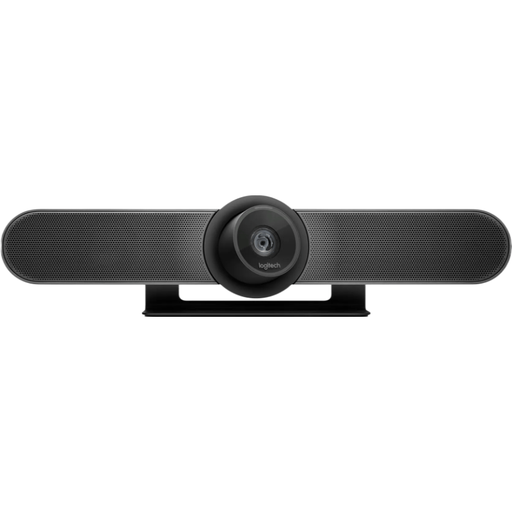
Logitech MeetUp 4K conference camera
A camera designed for use with a computer during a demonstration; check that the available mount and field of view suit your work area.
The product name specifies 3840 × 2160 pixels at 30 fps. The product description mentions a USB connection and built-in microphones.
Joybuy
 No image available
Sony ZV-E10 + 16–50mm zoom lens, black
A mirrorless camera set-up for anyone who wants to try different framings with the included zoom lens. Test the framing at your mounting height.
The product description specifies 4K video, autofocus and a product showcase setting. According to the description, a mains adapter/charger and SD card are not included.
Joybuy
 No image available
Insta360 Link 2C Standard Bundle, Graphite Black
A PC or Mac webcam for computer-based recordings; use a test clip to check that the puzzle and your hands fit in the frame together.
The product name specifies 4K video, a 1/2-inch sensor, HDR, automatic framing and a microphone with AI noise cancellation. The product description mentions white balance and shutter speed settings.
Joybuy
Frequently asked questions
Should I go straight for 4K for a puzzle demonstration?
No, don’t look at resolution alone. Use a test recording to check that the smallest relevant pieces are sharp and large enough, while the action remains in shot. Which? includes picture quality in different lighting conditions and sound in its tests of video cameras.
How can I check whether my lamps cause flicker?
Record and watch back a test clip under the lamps you’ll actually be using. Sony Support explains that LED and fluorescent lighting, among other types, can cause visible flicker, bands or colour shifts in video. Don’t assume that one setting will work perfectly with every lamp.
What should I check is included before buying?
For the exact model, check whether you need a lens, mount, memory card, power supply or external audio equipment, and whether these are included. According to the Dutch Government, online purchases are generally covered by a 14-day cooling-off period. If an item is faulty, consumers may have rights against the seller.
Can I publish a puzzle video that shows identifiable people?
This depends, among other things, on how you use and share the video. The Dutch Data Protection Authority describes an exception for personal or household use; this doesn’t apply when you share footage more widely, for example publicly. For business footage showing identifiable people, you need a lawful basis under the GDPR, such as consent.


