Cameras and webcams on Joybuy
This selection includes webcams and standalone cameras to compare for recording drawing videos. For each model, check that the frame and included mount suit your table and paper.
 No image available
KINSI Mini Vlog Camera 4K, 64 MP, Wi-Fi, 330° rotating lens, 1.72-inch touchscreen
The title mentions a rotating lens and tripod; check whether the included setup can reach over your table to give you the overhead view you want.
The title lists Wi-Fi, 64 MP and a 1.72-inch touchscreen.
Joybuy
 No image available
Philips 4000 Series 4K UHD Webcam SPL6408BT/00, EU Version
A webcam to consider if you want to record via a computer. Check in advance that the clip and positioning will capture your paper from above.
The title lists autofocus, 4K UHD video, dual microphones and a privacy shutter. The product description mentions a USB-A connection and a clip for laptops, desktops and monitors.
Joybuy
 No image available
Sony ZV-E10 + 16–50mm Zoom Black
This kit is worth considering if you want to adjust the framing from your recording position; test whether the lens frames your paper as you’d like.
The product description lists a 16–50mm kit lens, 4K video at 30 fps and a vari-angle touchscreen. A compatible SD card and adapter/charger aren’t included, according to the product description.
Joybuy
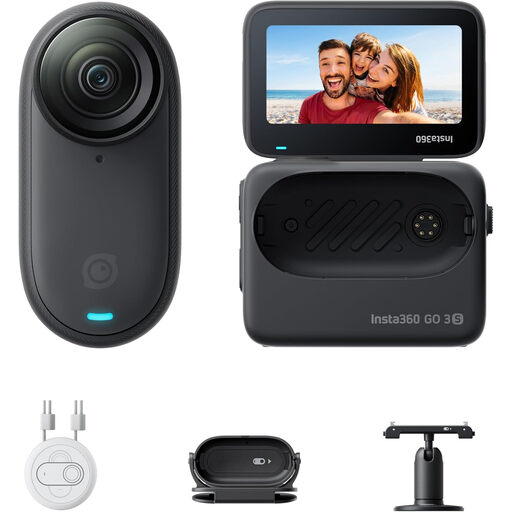 No image available
Insta360 GO 3S 128GB, mini camera with 4K video
The product description mentions a rotating mount and easy clip; check whether the mount is suitable for stable recording above your table.
The product information lists a weight of 39 g and an action pod with screen, live preview and charging while recording. Don’t use the magnetic pendant if you wear a pacemaker.
Joybuy
 No image available
Sony ZV-1 Compact Camera
A compact camera to compare if you want to record independently; try framing a shot from the position where you can mount the camera.
The product specifications list 2.7× optical zoom and a tilting screen. The product description mentions 4K video and image stabilisation.
Joybuy
Frequently asked questions
Do I need to buy a 4K camera straight away to film pastel drawings?
No. Start with a test clip and check that your paper fits in the frame and that the colours and fine strokes are clear. Logitech and Nikon list 4K options, but that alone doesn’t tell you how your footage will look under your drawing light.
How do I position a camera above a small table?
Measure the thickness of the table edge, the available height and the weight of everything attached to the mount. Elgato lists a clamp opening of up to 6 cm and a maximum load of 2 kg for the Master Mount L; you may need a separate arm to extend its reach. Check the specifications of the mount you choose.
How can I prevent colours from shifting while I draw?
Record a short test clip under your usual work light and compare it with the paper. Then check the white balance and exposure. Canon UK explains that white balance may be needed to correct a colour cast in challenging lighting conditions. The settings available vary by camera and app.
Who should I contact about a faulty camera I bought as a consumer in the Netherlands?
According to the Government of the Netherlands, the seller must provide a solution if a product is faulty. There’s no fixed statutory guarantee period for all products in the Netherlands; a manufacturer’s guarantee is in addition to your statutory rights.
Can I publish a video if other identifiable people appear in it?
Not necessarily: the exception for personal or household use doesn’t apply to wider publication. The Dutch Data Protection Authority explains that identifiable people are personal data and that publication requires an applicable legal basis under the GDPR; according to the authority, this is consent in many cases.


