Start with a setup that keeps your entire drawing surface steady in frame. Then compare the white balance, the recording time you need and what’s included with the exact camera version. A mirrorless camera gives you a choice of lenses and settings, while a pocket camera is more compact. Neither will automatically give you a true-to-life pastel recording: lighting and a suitable mount matter too.
Who is this choice relevant to?
Pastel artists who care about colour
You want the paper and pastel shades in your portfolio to look true to life. Consider the white balance and keep your lighting setup as consistent as possible before making extra video resolution your deciding factor.
Artists filming their process at the drawing table
You want to keep the whole sheet of paper in view from a fixed overhead position. Check the field of view from the height available, make sure the camera is securely mounted out of the way of your work surface, and consider how long you need to record continuously.
Creators of short portfolio clips
You’d rather film selected stages than an entire session, and want a camera that’s easy to position and operate. Even with a compact camera, check that its field of view suits your setup.
What should you consider when choosing?
When choosing a camera to film a pastel drawing, your decision will mainly depend on what matters most to you: colour, a full overhead view, a long recording time or the ease of making short clips.
| What to consider |
What should you check? |
Who is this important to? |
| Colour of the paper and pastels |
Check the white balance, make a test clip with your intended lighting and keep the light as consistent as possible throughout the session. |
I want the recording to show pastel shades faithfully, not just look sharp. Around 36% of consumers give colour reproduction their top priority. |
| A complete, stable overhead view |
Try out the field of view at the height available and check that the mount remains stable without getting in the way of your workspace. |
I want to keep the whole sheet of paper in view while drawing, without the camera getting in the way. Around 29% of consumers give keeping the entire drawing surface in frame their top priority. |
| Recording an entire drawing session |
Check the maximum continuous recording time for your chosen video setting, the power supply and a compatible memory card. Test it with a session of your usual length. |
I want to record my creative process without a planned interruption. Around 21% of consumers give capturing an entire session their top priority. |
| Making short clips easily |
Compare the exact version, the included lens and the mount and storage you’ll need before deciding what your setup requires. |
I want to film a few stages without much preparation. Around 14% of consumers give ease of making short clips their top priority. |
Common pitfalls when choosing
-
Choosing based on 4K alone
Resolution doesn’t tell you whether the whole sheet of paper will stay steady in frame or whether the white balance will suit your lighting.
First, try a test setup at your intended working height and with your lighting. Then compare the video modes.
A suitable mount or additional lighting may be part of your setup; check what your workspace requires.
-
Treating a camera body, lens kit and pocket camera as the same package
A mirrorless camera with an interchangeable lens and a pocket camera with a fixed lens don’t offer the same options for adjusting the field of view. Lens kits can also vary between versions.
Check the exact version and what’s included in the package before deciding whether it suits your working distance and paper size.
Depending on the version and your setup, you may need to buy a lens, mount or memory card separately.
-
Assuming the maximum recording time guarantees a full session
The maximum recording time doesn’t necessarily apply to every setting and use case.
Test your planned recording time with your chosen video setting, memory card and power supply.
For a longer recording, your setup may need extra storage or power.
Camera brands to consider
Canon
The EOS R50 is a mirrorless camera worth comparing if you want to combine process videos with individual portfolio photos.
- Canon lists a 24.2-megapixel APS-C sensor and UHD 4K 30p for the EOS R50.
- Check which RF or RF-S lens comes with the exact version and whether its field of view suits your overhead setup. These specifications alone don’t prove that it will reproduce pastel colours accurately.
Nikon
The Z 30 is a mirrorless camera to consider if you want to make a longer process recording.
- Nikon lists 4K UHD 30p and up to 125 minutes of continuous recording for the Z 30.
- That maximum time is a manufacturer’s figure under certain conditions, not a guaranteed duration for every session. Test your own recording settings and power supply.
Sony
The ZV-E10 II is a mirrorless camera worth comparing if you want a choice of E-mount lenses and video settings.
- Sony lists an APS-C sensor and 4K 60p for the ZV-E10 II. The lens kit described includes an E PZ 16-50 mm F3.5-5.6 OSS II lens.
- Check that this is the kit on offer; another version won’t necessarily include the same lens.
DJI
The Osmo Pocket 3 is a compact option for selected process clips alongside a fixed drawing setup.
- DJI specifies a 1-inch sensor, a fixed lens with a 20 mm equivalent focal length and a three-axis gimbal.
- The gimbal doesn’t replace a secure mount above the paper. Check in advance that the fixed field of view suits your working position.
Cameras at Joybuy
This selection includes compact cameras for short process clips and a mirrorless camera with a zoom lens. For each version, check that the field of view, mount and kit contents suit your drawing setup.
 No image available
Osmo Pocket 4P Standard Combo, Black
This pocket camera may suit you if you’re looking for a compact camera for short process clips.
The product description lists a 1-inch CMOS sensor and a 20 mm f/2.0 wide-angle lens.
View at Joybuy
 No image available
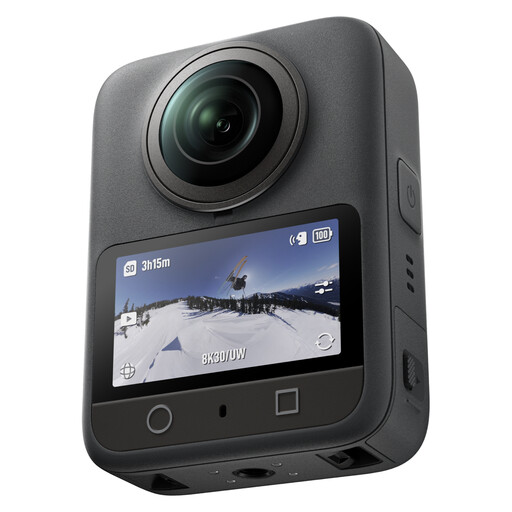
DJI Osmo 360 Standard Combo
This camera may suit process videos where you want to adjust the composition afterwards.
The product description lists 360° video in 8K/30fps, 105 GB of built-in storage and up to 190 minutes of continuous recording. The stated maximum time isn’t guaranteed for every setting or session.
View at Joybuy
 No image available
DJI Osmo Pocket 4 Standard Combo
This compact pocket camera may suit you for short clips where portability or adjusting the framing is important.
The product title lists a 1-inch CMOS sensor, 4K/240fps video, 2× lossless zoom and 107 GB of built-in storage.
View at Joybuy
 No image available
DJI Osmo Pocket 3
This compact camera may suit you for short process clips; check its fixed field of view in advance if you’re planning a fixed overhead setup.
The product title lists 4K/120fps video and a 1-inch CMOS sensor. DJI specifies a fixed lens with a 20 mm equivalent focal length for the Osmo Pocket 3, so you can’t change the lens to adjust the field of view.
View at Joybuy
 No image available
Sony ZV-E10 + 16-50mm Zoom, Black
This mirrorless camera with a zoom lens may suit you if you want to adjust the field of view to your working distance and take individual portfolio photos too.
The product description lists a 16–50 mm kit lens with a Sony E mount, 4K video and a 24.2 MP sensor. According to the description, an adapter/charger and SD card aren’t included.
View at Joybuy
Frequently asked questions
How can you keep pastel and paper colours consistent while recording?
Keep the lighting as even as possible and set the white balance before you start; adjust it again if the lighting changes. Nikon Netherlands recommends keeping lighting conditions consistent. Make a test clip and compare it with your work: this won’t guarantee that every camera reproduces pastel colours exactly.
Do you need a tripod to film from above if your camera has stabilisation?
For a fixed composition above a drawing surface, a sturdy, suitable mount is a good idea. Canon Netherlands explains that a tripod keeps overhead shots steady. Also check that the camera and lens show the whole sheet of paper from your working height.
What can you do if a camera you bought in the Netherlands develops a fault during normal use?
For a consumer purchase, the seller must provide a solution if the product doesn’t meet expectations. The Dutch government states that the Netherlands has no fixed statutory guarantee period for all products; check separately what any manufacturer’s warranty covers.
Can you include recognisable people in your online portfolio video?
First, consider whether you have a valid legal basis for showing recognisable people in an online or professional portfolio. The Dutch Data Protection Authority notes that images of recognisable people can be personal data; a recording kept strictly for private use is covered by a different exception from wider publication.


