
Maker filming detailed demonstrations
Wants small rings, clasps and tools to remain clearly visible. Your lens choice and shooting distance are key.


For small clasps and textures, a mirrorless camera with a suitable close-up lens is a good option if you have space for a fixed mount. A webcam is a better fit for recording via a computer, while a compact gimbal camera suits anyone who also wants to capture moving footage. None of these options guarantees the right framing or sharpness at your worktable, so take a test shot of the smallest component you want to film.
Wants small rings, clasps and tools to remain clearly visible. Your lens choice and shooting distance are key.
Needs a repeatable overhead view and control over the lighting, without turning the spare room into a permanent studio.
Switches between worktable footage and spoken commentary, so also considers computer compatibility, sound and portability.
Choose this option if: you want to show very small connections or textures and have room for a separate lens and a fixed camera mount.
Bear in mind: a camera body or standard kit lens isn’t automatically suitable for macro photography.
Choose this option if: you already record through a computer or give live demonstrations and want to show your worktable quickly.
Bear in mind: a feature for showing your desk doesn’t guarantee that small pieces of jewellery will appear in focus and large enough in the frame.
Choose this option if: you want to capture moving footage as well as fixed shots of your worktable, and a compact camera matters to you.
Bear in mind: stabilisation doesn’t tell you how much magnification you’ll get, and it isn’t a substitute for a suitable overhead mount.
| What to consider | What to look for when buying | Who is this important for? |
|---|---|---|
| Sharpness and magnification | Check the lens’s maximum magnification, focusing distance and the framing in a test shot. | If I want to film small clasps clearly, I look at how large they appear in the frame; around 36% of consumers put detail first. |
| Lighting and material texture | Test with the room’s actual lighting and check for reflections, shadows and colour in the footage. | If you film in changing light, you’ll want your materials to remain clearly visible; around 29% of consumers prioritise lighting control. |
| Overhead view and workspace | Measure the available height and check that the camera and mount stay clear of your hands and tools. | If I need a repeatable overhead view, I want to show the whole table without obstructing my work; around 21% of consumers start with their table setup. |
| Recording workflow and sound | Check whether you’ll record through a computer or independently, and which lens, mount, storage or microphone you’ll need. | If you want to record without cumbersome file transfers or add a spoken explanation, consider the complete workflow; around 14% of consumers prioritise workflow. |
A high resolution doesn’t tell you how large a small piece of jewellery will appear in the frame, or whether it will be in focus at your shooting distance.
Compare the lens’s magnification and working distance, and record a test video of the smallest task you want to show.
The Sony ZV-E10 II version reviewed is body only. The Canon EOS R50 kit mentioned includes an RF-S zoom lens, not the RF macro lens discussed separately.
Before buying, check exactly what’s included in the kit and whether the lens mount is compatible with the lens you want to use.
Being able to show your desk or stabilise movement is not the same as filming a small component from above, large and in focus.
Test the intended mounting position with your hands, tools and the part of the work surface you want in shot.
EOS R mirrorless cameras can be paired with separately selected RF lenses. The EOS R50 and RF 35mm F1.8 MACRO IS STM are examples of this combination.
The ZV-E10 II body with E-mount can be paired with a separate close-up lens, such as the SEL30M35.
Webcams are a computer-based option for recording or showing your worktable.
The compact Osmo Pocket 3 is an option if you want to capture moving footage as well as shots of your worktable.
The LUMIX G100D is a mirrorless camera option with an interchangeable lens; the kit described pairs the body with a 12–32mm lens.
These product picks focus mainly on webcams for computer-based recording and compact cameras for worktable footage or moving shots.
 Image unavailable
An option if you want to record using a PC or laptop.
The product name lists USB Plug & Play and a microphone.
 Image unavailable
For anyone filming via a computer who wants autofocus; record a test shot to check the framing at your worktable.
The product name lists 4K UHD, 8 MP, autofocus, two built-in microphones, a privacy shutter and EU version.
 Image unavailable
A compact camera option if you want to capture moving footage as well as shots of your worktable; test separately to see whether small components appear large enough in the frame.
The product name lists 4K/120 fps, a 1-inch CMOS sensor, three-axis stabilisation and a microphone. DJI gives a minimum focusing distance of 0.2 m for the Osmo Pocket 3; this doesn’t indicate magnification.
 Image unavailable
A webcam option for recording your worktable via a computer; check the mount and framing where you plan to film.
The product name lists 4K, a 1/2-inch sensor, auto-framing, HDR and a microphone with AI noise reduction.
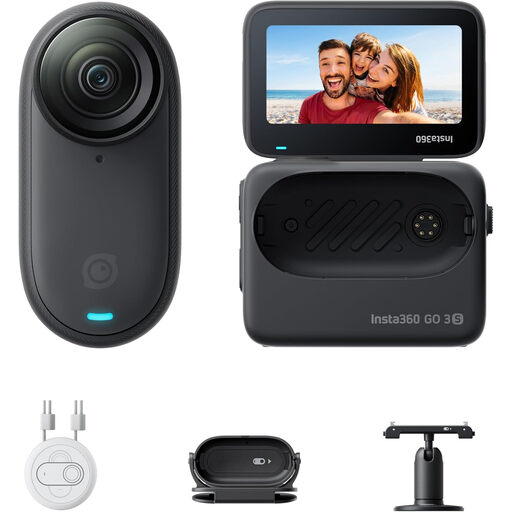 Image unavailable
This compact camera could suit hands-free POV filming; check in advance how you’ll attach it to your workspace.
The product name lists 4K and stabilisation. If you use a pacemaker, don’t wear the camera on your chest or use the magnetic pendant.
Not necessarily. Check how much of the frame the clasp fills and whether the camera and lens can focus at your working distance. Canon Netherlands says accurate focusing is important for macro photography and points out that the depth of field is shallow.
First decide which part of the table you need to show, then take a test shot at the available mounting height with your hands in the frame. Logitech describes Show Mode as a way to show desk work, but this doesn’t guarantee a fully vertical view or enough magnification to show fine details.
That depends on what your test shot shows. Try filming in the room’s actual lighting and, if you’re using a mirrorless camera, check which lens is in the box. The Canon kit discussed includes an RF-S 18–150mm lens; the RF 35mm macro lens is a separate product.
For a consumer purchase in the Netherlands, you’re entitled to a product that does what you can reasonably expect, according to the Government of the Netherlands; there’s no fixed statutory warranty period. The retailer is your point of contact. Whether you’re entitled to a repair, replacement or refund depends, among other things, on the fault and the expected use of the product.
If people are recognisable in the footage, it contains personal data, according to the Dutch Data Protection Authority. An exception may apply if the footage is for personal or household use only; that exception doesn’t apply when sharing publicly or for business purposes, and you’ll need a lawful basis under the GDPR. This information does not say that permission is required simply to film jewellery if no people are recognisable.